
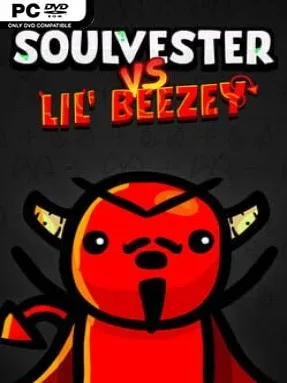
Game Overview
Winkletown faces a cartoon apocalypse as Lil’ Beezey unleashes an army of bouncing, bizarre Horrorballs, leaving Soulvester to blast through the invasion one run at a time. Soulvester VS Lil’ Beezey is a compact side-scrolling shooter with roguelite progression and the bright, exaggerated attitude of an old arcade cabinet. Its hand-animated 2D presentation keeps the action playful rather than grim, while the villain’s constant voice-acted taunts give every confrontation a deliberately silly edge. Built from game-jam roots but expanded into a complete score-chasing experience, it aims for quick restarts, punchy feedback, and steadily escalating chaos.
Runs revolve around moving through enemy-packed stages, firing at incoming Horrorballs, and surviving long enough to confront Lil’ Beezey himself. The control scheme is intentionally stripped down: players can use a two-button mouse setup for immediate accessibility or switch to a controller for a more traditional shooter feel. Levelling up introduces randomized perks and upgrades, but the twist is that opponents grow stronger alongside Soulvester, preventing a lucky build from turning every run into an effortless victory. Upgrades also alter the hero’s appearance, making each attempt feel visually distinct as well as mechanically different, while defeat feeds naturally into the familiar roguelite urge to jump straight back in and try a new combination.
What separates it from more elaborate roguelites is its focus on arcade clarity: readable action, short-form runs, cartoon animation, and a soundtrack designed to keep the momentum high. Fully voiced scenes and in-game banter give the villain more personality than the usual faceless end-of-run boss, and built-in stat tracking supports players who enjoy chasing personal records for runs, defeated enemies, and successful boss clears. The modest scope is part of the appeal; it feels more like a polished, energetic arcade challenge than a sprawling progression grind. Fans of approachable shooters, score attacks, and games with the offbeat humor of a Saturday-morning cartoon will find plenty to enjoy, while roguelite veterans should treat it as a brisk, personality-driven palate cleanser.
Installation
- Click the green button below to be redirected to UploadHaven.
- Wait 15 seconds, then hit “Free Download.” (Free downloads may be slower — upgrade to UploadHaven Pro for faster speeds.)
- Once downloaded, right-click the .zip file and choose “Extract to Soulvester VS Lil' Beezey.” (You’ll need 7-Zip for this.)
- Open the extracted folder and run the game as administrator.
- Enjoy! 🎮 If you see missing DLL errors, check the <strong>_Redist</strong> folder inside and install what’s needed.
System Requirements
- OS: Windows 7+
- Processor: 2ghz
- Memory: 500 MB RAM
- Graphics: Integrated graphics card or better
- Storage: 80 MB available space
- Sound Card: System sound card
Setup Guide & Troubleshooting
How do I fix missing DLL errors for Soulvester VS Lil’ Beezey (v2023.04.16)?
After extracting Soulvester VS Lil’ Beezey (v2023.04.16), navigate to the _Redist or _CommonRedist folder inside the game directory and install DirectX, Vcredist, and any other dependencies included.
What should I do if the downloaded file is corrupted?
The full archive is 114.02 MB — make sure your download completed fully before extracting. Use 7-Zip to extract the files. If you still see a "file corrupted" error, re-download and try again.
Why should I run the game as administrator?
Right-click the game executable and select "Run as Administrator" to avoid save file issues and permission errors. This is especially important on the first launch.
How do I update my GPU drivers for this game?
Soulvester VS Lil’ Beezey (v2023.04.16) requires a Integrated graphics card or better or equivalent. Update your NVIDIA or AMD drivers to the latest version for the best performance.
The game won't launch — what should I try?
Try running in compatibility mode, install the latest DirectX runtime, or install the All-in-One VC Redist Package.
My antivirus is blocking the game — is it safe?
Antivirus false positives are common with pre-installed games. Temporarily pause your antivirus during extraction to prevent it from quarantining game files. You can re-enable it after the extraction completes.