
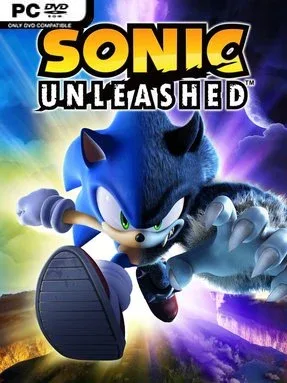
Game Overview
A shattered planet sends Sonic racing across a globe-spanning adventure that alternates between spectacular speed and surprisingly deliberate brawling. By day, the blue blur tears through bright, densely scripted courses in pursuit of the Chaos Emeralds, while nighttime brings out his cursed Werehog form and a darker fight against Dark Gaia’s monsters. The result is an energetic, slightly uneven action-platformer with a grand travelogue feel, moving between recognizable real-world-inspired regions, ancient ruins, busy towns, and hostile wilderness. Its tone stays cartoonishly adventurous even when the stakes involve repairing an entire broken world.
Day stages are built around momentum, reflexes, and spectacle: players boost through enemies, drift around corners, quick-step past hazards, grind rails, and use homing attacks to keep a run alive. These levels reward route memorization and repeated attempts, especially when chasing high ranks, medals, and alternate paths hidden off the main line. At night, the pace changes sharply as the Werehog climbs platforms, swings across gaps with extendable arms, solves light environmental puzzles, and clears arenas of enemies through combo-driven melee combat. Experience gained from both forms feeds upgrades, improving Sonic’s speed and boost capacity or expanding the Werehog’s health, strength, and combat options, while hub areas provide quests and collectibles between major stages.
Few Sonic entries contrast their two halves as boldly as Sonic Unleashed, and its daytime levels remain a major showcase for the series’ cinematic sense of velocity. The Werehog sections can feel long for players who only want pure racing platform action, but they give the adventure a more substantial progression loop than a collection of short speed runs alone. Its stylized Hedgehog Engine visuals, sweeping camera work, and varied international locations still lend the game a distinct identity. Fans of Sonic Colors, Sonic Generations, or arcade-like platformers should find the daylight content especially rewarding, while patient players who can accept a slower combat side campaign get the fullest experience.
Installation
- Click the green button below to be redirected to UploadHaven.
- Wait 15 seconds, then hit “Free Download.” (Free downloads may be slower — upgrade to UploadHaven Pro for faster speeds.)
- Once downloaded, right-click the .zip file and choose “Extract to Sonic Unleashed.” (You’ll need 7-Zip for this.)
- Open the extracted folder and run the game as administrator.
- Enjoy! 🎮 If you see missing DLL errors, check the <strong>_Redist</strong> folder inside and install what’s needed.
System Requirements
- OS *: Windows® XP / 7 / 8 / 10 / 11
- Processor: Intel Pentium 4 3.0 GHz or newer
- Memory: 2 GB RAM
- Graphics: DirectX 9.0c compatible GPU with 256 MB VRAM
- DirectX: Version 9.0c
- Storage: 8 GB available space
Setup Guide & Troubleshooting
How do I fix missing DLL errors for Sonic Unleashed?
After extracting Sonic Unleashed, navigate to the _Redist or _CommonRedist folder inside the game directory and install DirectX, Vcredist, and any other dependencies included.
What should I do if the downloaded file is corrupted?
The full archive is 8.49 GB — make sure your download completed fully before extracting. Use 7-Zip to extract the files. If you still see a "file corrupted" error, re-download and try again.
Why should I run the game as administrator?
Right-click the game executable and select "Run as Administrator" to avoid save file issues and permission errors. This is especially important on the first launch.
How do I update my GPU drivers for this game?
Sonic Unleashed requires a DirectX 9.0c compatible GPU with 256 MB VRAM or equivalent. Update your NVIDIA or AMD drivers to the latest version for the best performance.
The game won't launch — what should I try?
This game requires Version 9.0c. Try running in compatibility mode, install the latest DirectX runtime, or install the All-in-One VC Redist Package.
My antivirus is blocking the game — is it safe?
Antivirus false positives are common with pre-installed games. Temporarily pause your antivirus during extraction to prevent it from quarantining game files. You can re-enable it after the extraction completes.