
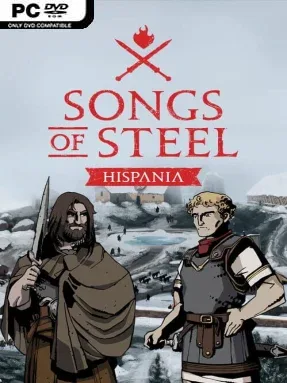
Game Overview
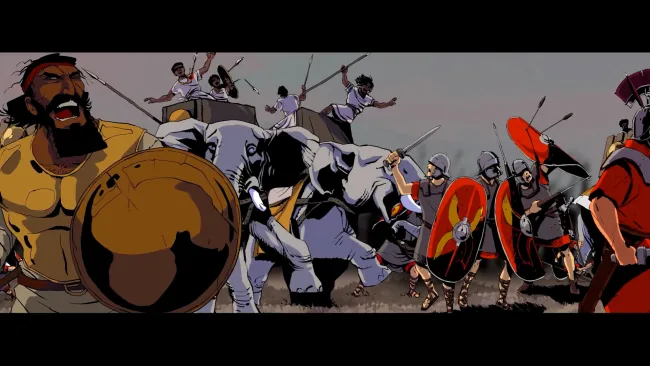
The Numantine War becomes the stage for a grounded tactical campaign where Rome’s military machine clashes with the fiercely independent Celtiberian defenders of Hispania. Songs of Steel: Hispania covers the long conflict between 153 BC and 133 BC, letting players view the struggle through two opposing campaigns rather than treating history as a one-sided conquest. Its tone is serious and human, balancing battlefield pressure with the political and moral cost of commanding a people under siege. Hand-drawn artwork gives the campaign a storybook appearance, but the subject matter remains brutal: survival, loyalty, and hard choices shape every advance.
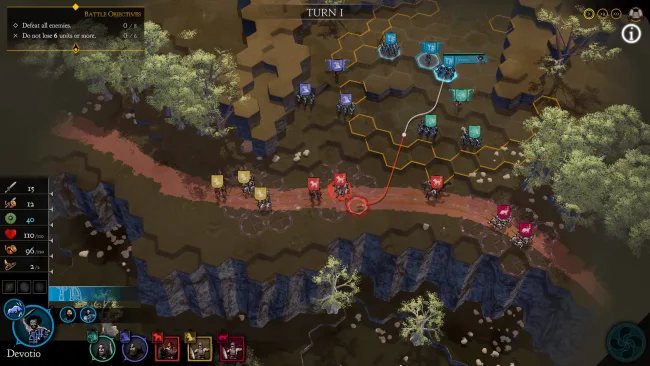
Battles revolve around classic positional tactics, asking commanders to use cover, flanking routes, terrain, and troop placement intelligently. Forests restrict movement, mountains create defensive advantages, and ancient settlements turn engagements into close-range struggles for streets and strongpoints. You manage available resources and mobilize forces that are often outnumbered, so blindly charging stronger armies rarely works; careful formations and opportunistic attacks matter far more. Objectives can shift during combat, forcing quick adaptation when a mission suddenly demands holding ground, reaching a target, or protecting vital units. Between clashes, narrative decisions and political dilemmas influence the direction of the war, connecting strategic success to the fate of the characters involved.
What distinguishes Songs of Steel: Hispania is its focus on a conflict that strategy games rarely visit, supported by campaigns featuring figures such as Scipio, Rhetogenes, Megara, Ambo, and Leuco. Rather than aiming for the huge army scale of Total War, it favors more immediate tactical problems and story-driven consequences, with a format closer to a focused historical command drama. The accessible rules make its battlefield fundamentals approachable for newcomers, while changing objectives and uneven odds give experienced tactics fans meaningful challenges. Players who enjoy tactical positioning, ancient history, and narrative campaigns with weighty decisions should find plenty to engage with here.
Screenshots
Installation
- Select the <strong>Download</strong> button at the top of this page to open UploadHaven.
- On UploadHaven, wait for any countdown, then select <strong>Free Download</strong>. Optional: UploadHaven Pro for faster downloads.
- When complete, extract the archive to a <strong>Songs of Steel: Hispania</strong> folder using 7-Zip.
- Open the extracted folder and start the game normally.
- For errors, check <strong>Setup Guide & Troubleshooting</strong> below. Keep your security software enabled.
System Requirements
- Requires a 64-bit processor and operating system
- OS: Windows 10
- Processor: AMD Ryzen 5 or equivalent
- Memory: 8 GB RAM
- Graphics: Nvidia GeForce RTX 1050 or equivalent
- DirectX: Version 9.0
- Storage: 4 GB available space
Setup Guide & Troubleshooting
How do I fix missing DLL errors for Songs of Steel: Hispania (v1.0.14)?
After extracting Songs of Steel: Hispania (v1.0.14), navigate to the _Redist or _CommonRedist folder inside the game directory and install DirectX, Vcredist, and any other dependencies included.
What should I do if the downloaded file is corrupted?
The full archive is 2.33 GB — make sure your download completed fully before extracting. Use 7-Zip to extract the files. If you still see a "file corrupted" error, re-download and try again.
Why should I run the game as administrator?
Right-click the game executable and select "Run as Administrator" to avoid save file issues and permission errors. This is especially important on the first launch.
How do I update my GPU drivers for this game?
Songs of Steel: Hispania (v1.0.14) requires a Nvidia GeForce RTX 1050 or equivalent or equivalent. Update your NVIDIA or AMD drivers to the latest version for the best performance.
The game won't launch — what should I try?
This game requires Version 9.0. Try running in compatibility mode, install the latest DirectX runtime, or install the All-in-One VC Redist Package.
My antivirus is blocking the game — is it safe?
Antivirus false positives are common with pre-installed games. Temporarily pause your antivirus during extraction to prevent it from quarantining game files. You can re-enable it after the extraction completes.