
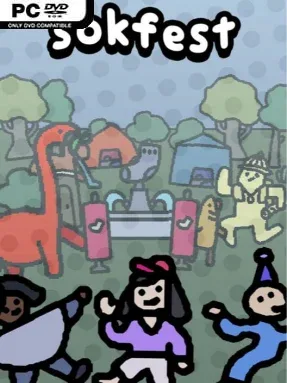
Game Overview
A scrappy digital music festival becomes a cheerful point-and-click adventure packed with the familiar oddballs of Sokpop’s catalog. Sokfest celebrates the studio’s hundredth release by turning its history into a playable party, where more than 120 characters gather across a colorful, slightly ramshackle venue. The goal sounds simple—make friends with everybody—but the event gradually develops an amusing mystery around the absent Ruben and the uncertain state of the anniversary game itself. Its tone stays playful and weird, mixing festival energy with the kind of offbeat humor that defines Sokpop’s smaller experimental projects.
Players arrive by bus, slip past the entrance, find a questionable ticket, and begin roaming the grounds in search of conversations, favors, and newly opened sections. Clicking through each area reveals characters who may immediately join your social circle or ask for help with a small puzzle, personal problem, or silly errand before they warm up to you. Progress comes from talking, noticing environmental details, and following the loose chain of requests that opens more than 15 festival locations. The adventure lasts roughly one to three hours, making it better suited to a relaxed evening than a long RPG campaign, while online play lets friends attend the festivities together rather than merely compare notes afterward.
What makes Sokfest work is its sense of community: it functions as both a compact adventure and a victory lap for a hundred games’ worth of characters, ideas, and in-jokes. Rather than relying on combat, loot, or demanding challenge, it rewards curiosity and a willingness to chat with every strange attendee standing near a stage, food stall, or hidden corner. A real DJ set from DJ Diamond and additional performances from DJ Aron and tommie96 give the festival an extra layer of authenticity, especially in the exclusive club area. Fans of Sokpop, laid-back dialogue adventures, and humorous games in the vein of small-scale point-and-click indies will get the most from it, though newcomers can still enjoy the approachable mystery and compact party atmosphere.
Installation
- Click the green button below to be redirected to UploadHaven.
- Wait 15 seconds, then hit “Free Download.” (Free downloads may be slower — upgrade to UploadHaven Pro for faster speeds.)
- Once downloaded, right-click the .zip file and choose “Extract to Sokfest.” (You’ll need 7-Zip for this.)
- Open the extracted folder and run the game as administrator.
- Enjoy! 🎮 If you see missing DLL errors, check the <strong>_Redist</strong> folder inside and install what’s needed.
System Requirements
- Requires a 64-bit processor and operating system
- OS *: Windows 7
- Processor: Dual Core 2 GHz
- Memory: 4 GB RAM
- Graphics: DirectX 9 compatible with at least 500MB of memory
- DirectX: Version 9.0
- Storage: 200 MB available space
- Sound Card: DirectX 9 compatible sound card or integrated sound chip
Setup Guide & Troubleshooting
How do I fix missing DLL errors for Sokfest (v1.0.5)?
After extracting Sokfest (v1.0.5), navigate to the _Redist or _CommonRedist folder inside the game directory and install DirectX, Vcredist, and any other dependencies included.
What should I do if the downloaded file is corrupted?
The full archive is 242.65 MB — make sure your download completed fully before extracting. Use 7-Zip to extract the files. If you still see a "file corrupted" error, re-download and try again.
Why should I run the game as administrator?
Right-click the game executable and select "Run as Administrator" to avoid save file issues and permission errors. This is especially important on the first launch.
How do I update my GPU drivers for this game?
Sokfest (v1.0.5) requires a DirectX 9 compatible with at least 500MB of memory or equivalent. Update your NVIDIA or AMD drivers to the latest version for the best performance.
The game won't launch — what should I try?
This game requires Version 9.0. Try running in compatibility mode, install the latest DirectX runtime, or install the All-in-One VC Redist Package.
My antivirus is blocking the game — is it safe?
Antivirus false positives are common with pre-installed games. Temporarily pause your antivirus during extraction to prevent it from quarantining game files. You can re-enable it after the extraction completes.