
Game Overview
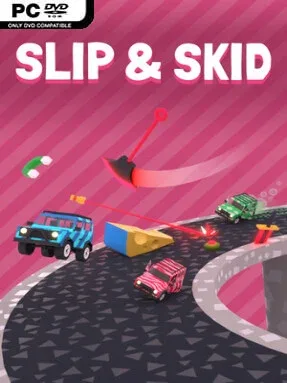
Arcade racing gets wonderfully mean-spirited when every competitor can reshape the road beneath your wheels. Slip & Skid is a physics-driven racer built around four-player chaos, where tight driving matters just as much as sabotaging the next corner. Its courses are not fixed obstacles to memorize; they become evolving playgrounds of ice, mud, magma, ramps, hazards, and ill-advised shortcuts assembled between rounds. The mood is bright, fast, and playful, but a perfectly placed trap can turn a friendly race into a ruthless scramble for the finish.
Races demand more than holding the accelerator and hoping for the best. Cars slide, drift, roll, flip, and even cling to walls, while each surface changes handling enough to make route choice a constant risk-reward decision. After a round, players use simple three-dimensional placement tools to add objects and modifiers to the circuit, creating new lines for themselves or bottlenecks intended to ruin everyone else’s lap. Knocking opponents from the track is fair game, and trailing racers can temporarily cooperate to stop a runaway leader, giving the action a party-game layer of shifting alliances. Solo players get time trials and ghost challenges, while online sessions and local split-screen support make it easy to suit a competitive group.
The strongest idea here is that track editing is part of the match rather than a separate creative mode. Every alteration also affects the presentation, with scenery and music responding to the changing terrain, so courses feel increasingly warped as rival plans collide. Unlockable cars, paint options, accessories, visual designs, and performance tracking add reasons to keep racing beyond a single evening. Slip & Skid lands somewhere between the accessible stunt-racing energy of Trackmania and the spiteful improvisation of a strong couch multiplayer game, though its emphasis on physics makes clean control important. It suits newcomers who want immediate arcade fun, but experienced racers and creative troublemakers get the most from learning how to build a course that is barely survivable—for everyone except them.
Installation
- Click the green button below to be redirected to UploadHaven.
- Wait 15 seconds, then hit “Free Download.” (Free downloads may be slower — upgrade to UploadHaven Pro for faster speeds.)
- Once downloaded, right-click the .zip file and choose “Extract to Slip & Skid.” (You’ll need 7-Zip for this.)
- Open the extracted folder and run the game as administrator.
- Enjoy! 🎮 If you see missing DLL errors, check the <strong>_Redist</strong> folder inside and install what’s needed.
System Requirements
- Requires a 64-bit processor and operating system
- OS: Windows 10/11, 64 Bit
- Processor: Intel Core i5 / AMD Ryzen 5, or equivalent
- Memory: 8 GB RAM
- Graphics: GPU with ~4 GB VRAM (NVIDIA GTX 1050 / AMD RX 550)
- DirectX: Version 11
- Storage: 500 MB available space
Setup Guide & Troubleshooting
How do I fix missing DLL errors for Slip & Skid (v1.0.12)?
After extracting Slip & Skid (v1.0.12), navigate to the _Redist or _CommonRedist folder inside the game directory and install DirectX, Vcredist, and any other dependencies included.
What should I do if the downloaded file is corrupted?
The full archive is 240.93 MB — make sure your download completed fully before extracting. Use 7-Zip to extract the files. If you still see a "file corrupted" error, re-download and try again.
Why should I run the game as administrator?
Right-click the game executable and select "Run as Administrator" to avoid save file issues and permission errors. This is especially important on the first launch.
How do I update my GPU drivers for this game?
Slip & Skid (v1.0.12) requires a GPU with ~4 GB VRAM (NVIDIA GTX 1050 / AMD RX 550) or equivalent. Update your NVIDIA or AMD drivers to the latest version for the best performance.
The game won't launch — what should I try?
This game requires Version 11. Try running in compatibility mode, install the latest DirectX runtime, or install the All-in-One VC Redist Package.
My antivirus is blocking the game — is it safe?
Antivirus false positives are common with pre-installed games. Temporarily pause your antivirus during extraction to prevent it from quarantining game files. You can re-enable it after the extraction completes.