
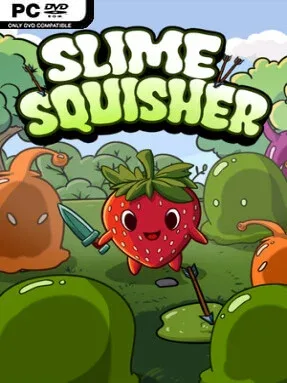
Game Overview
A strawberry sits at the center of a tiny battlefield, and every approaching slime wants to turn it into dessert. Slime Squisher is a frantic cursor-driven survival game built around the simple, satisfying act of crushing enemies before they reach their target. Its colorful presentation keeps the mood playful, but the pressure rises quickly as the screen fills with creatures that move, shoot, split the player’s attention, and punish slow reactions. What begins as a cute arcade distraction steadily becomes a demanding test of speed, positioning, and decision-making.
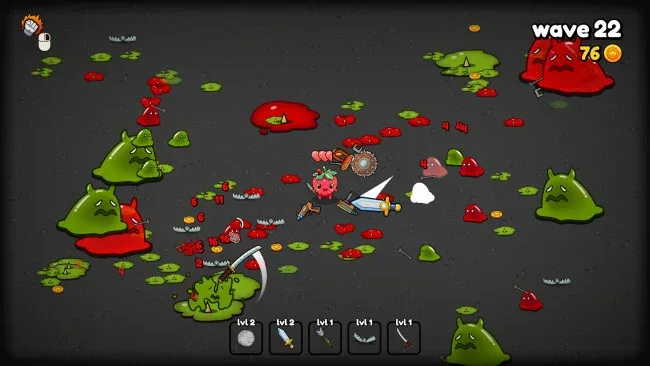
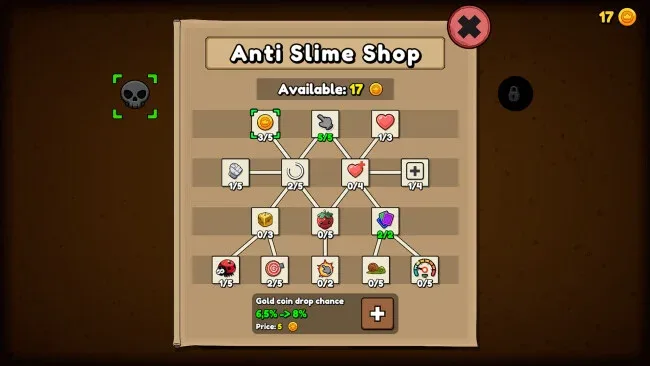
Each run revolves around surviving increasingly dangerous waves by clicking directly on slimes to squash them. Enemies arrive in distinct forms: quick small threats slip through openings, lumbering bruisers absorb more punishment, and ranged variants force players to manage incoming fire rather than merely chase the closest target. Defeated foes occasionally leave coins behind, which feed a permanent progression system and make later attempts more manageable. During a run, upgrades and active abilities let players assemble different builds, whether that means leaning into raw squishing power, survivability, economy, or screen-clearing chaos when a boss arrives.
The strongest feature is how much variety Slime Squisher extracts from a deliberately narrow premise. Choosing upgrades creates meaningful run-to-run differences, while challenge modes offer tougher rulesets for players who have already mastered the standard difficulties. Boss encounters break up the wave routine and demand more than panicked clicking, especially when regular enemies continue to crowd the arena. Fans of compact score-chasing survival games and roguelite progression, particularly players who enjoy the escalating pressure of Vampire Survivors but prefer direct mouse control, should find plenty to like here. It is approachable for newcomers on easy mode, yet hard mode and specialized challenges give experienced arcade players a reason to keep refining their builds and reactions.
Screenshots
Installation
- Click the green button below to be redirected to UploadHaven.
- Wait 15 seconds, then hit “Free Download.” (Free downloads may be slower — upgrade to UploadHaven Pro for faster speeds.)
- Once downloaded, right-click the .zip file and choose “Extract to Slime Squisher.” (You’ll need 7-Zip for this.)
- Open the extracted folder and run the game as administrator.
- Enjoy! 🎮 If you see missing DLL errors, check the <strong>_Redist</strong> folder inside and install what’s needed.
System Requirements
- OS *: Windows 7+
- Processor: 2 Ghz
- Memory: 4 MB RAM
- Graphics: 128MB
- Storage: 350 MB available space
Setup Guide & Troubleshooting
How do I fix missing DLL errors for Slime Squisher?
After extracting Slime Squisher, navigate to the _Redist or _CommonRedist folder inside the game directory and install DirectX, Vcredist, and any other dependencies included.
What should I do if the downloaded file is corrupted?
The full archive is 130.38 MB — make sure your download completed fully before extracting. Use 7-Zip to extract the files. If you still see a "file corrupted" error, re-download and try again.
Why should I run the game as administrator?
Right-click the game executable and select "Run as Administrator" to avoid save file issues and permission errors. This is especially important on the first launch.
How do I update my GPU drivers for this game?
Slime Squisher requires a 128MB or equivalent. Update your NVIDIA or AMD drivers to the latest version for the best performance.
The game won't launch — what should I try?
Try running in compatibility mode, install the latest DirectX runtime, or install the All-in-One VC Redist Package.
My antivirus is blocking the game — is it safe?
Antivirus false positives are common with pre-installed games. Temporarily pause your antivirus during extraction to prevent it from quarantining game files. You can re-enable it after the extraction completes.