
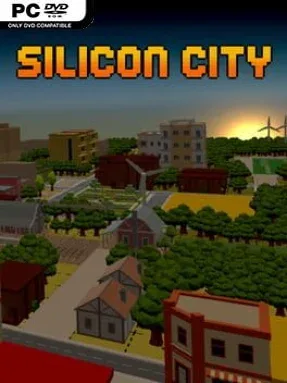
Game Overview
A vacant plot, a mayoral mandate, and the looming threat of commuter gridlock form the foundation of a deliberately old-school city-building challenge. Silicon City channels the approachable, systems-driven spirit of 1990s management classics, asking players to turn bare land into a functioning urban center without losing sight of the people living in it. Its tone is more colorful and accessible than grimly realistic, but the pressures of budgets, services, employment, and election approval give every expansion a practical consequence. Growth is never just about filling the map with towers; it is about creating a city citizens can actually navigate and afford to call home.
Players lay out roads on a grid, zone residential districts, and place the commercial, office, public-service, cultural, and recreational buildings that make a settlement viable. New residents need power, jobs, education, shopping, and places to spend their free time, while their financial health and personal development influence how successfully the city evolves. Traffic management sits at the center of the simulation: poorly planned routes can leave commuters stuck, jeopardize their employment, worsen pollution, and make everyday errands needlessly painful. The central loop is a satisfying cycle of watching a neighborhood develop, identifying shortages or bottlenecks, then rebuilding and rebalancing the layout before unhappy voters punish the administration at the next election.
What separates Silicon City from a purely decorative builder is its focus on the daily routines behind population numbers. Citizens travel between homes, workplaces, schools, shops, and leisure venues, so district placement and road design matter as much as a healthy bank balance. The presentation and grid-based construction favor clarity over overwhelming complexity, making it easier to understand why a city succeeds or fails while still leaving room for efficient, carefully planned layouts. Fans of SimCity-style urban management, especially players who miss compact retro builders with readable systems, should find it appealing; newcomers can learn the essentials quickly, while genre veterans can chase cleaner traffic flow and more productive cities.
Installation
- Click the green button below to be redirected to UploadHaven.
- Wait 15 seconds, then hit “Free Download.” (Free downloads may be slower — upgrade to UploadHaven Pro for faster speeds.)
- Once downloaded, right-click the .zip file and choose “Extract to Silicon City.” (You’ll need 7-Zip for this.)
- Open the extracted folder and run the game as administrator.
- Enjoy! 🎮 If you see missing DLL errors, check the <strong>_Redist</strong> folder inside and install what’s needed.
System Requirements
- Requires a 64-bit processor and operating system
- OS: Windows 7
- Processor: Intel Core i5 @1.60GHz
- Memory: 8 GB RAM
- Graphics: GeForce GTX 1050
- DirectX: Version 10
- Storage: 1 GB available space
Setup Guide & Troubleshooting
How do I fix missing DLL errors for Silicon City (v1.0)?
After extracting Silicon City (v1.0), navigate to the _Redist or _CommonRedist folder inside the game directory and install DirectX, Vcredist, and any other dependencies included.
What should I do if the downloaded file is corrupted?
The full archive is 424.84 MB — make sure your download completed fully before extracting. Use 7-Zip to extract the files. If you still see a "file corrupted" error, re-download and try again.
Why should I run the game as administrator?
Right-click the game executable and select "Run as Administrator" to avoid save file issues and permission errors. This is especially important on the first launch.
How do I update my GPU drivers for this game?
Silicon City (v1.0) requires a GeForce GTX 1050 or equivalent. Update your NVIDIA or AMD drivers to the latest version for the best performance.
The game won't launch — what should I try?
This game requires Version 10. Try running in compatibility mode, install the latest DirectX runtime, or install the All-in-One VC Redist Package.
My antivirus is blocking the game — is it safe?
Antivirus false positives are common with pre-installed games. Temporarily pause your antivirus during extraction to prevent it from quarantining game files. You can re-enable it after the extraction completes.