

Game Overview
A volcanic disaster is only the opening warning in this fast, stylish action RPG, where a reborn god of magma turns a mounting crisis into a personal vendetta. Signy stands between Auger and a world that is rapidly catching fire, joined by Mino, a deceptively adorable companion with a crucial role in every fight. The tone mixes mythic danger with playful character energy, but combat demands real precision rather than button-mashing. Its central appeal is the satisfaction of turning a single opening into an outrageous, screen-clearing chain of attacks.
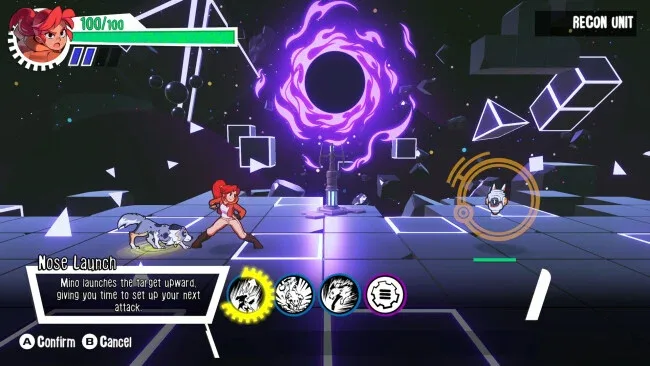
Battles revolve around positioning enemies and linking moves at the right moment, building a combo from grounded strikes, launches, aerial juggles, throws, and heavy finishers. Signy can angle attacks so impacts carry through multiple foes, sacrifice health to keep momentum after a target falls, and unleash powerful attacks that punish everyone caught in the sequence. Mino is not a passive pet: calling him in for launches, retrievals, digs, and aimed throws lets players rescue a failing chain or redirect it toward a fresh group of enemies. Experience grants skill points for an upgrade tree covering Signy’s techniques, Mino’s increasingly useful tricks, defensive options, and extensions that allow even longer strings.
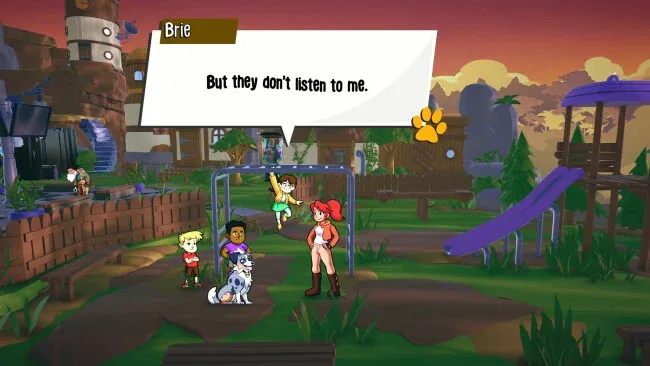
What separates Signy & Mino: Against All Gods from many combo-driven brawlers is its emphasis on spatial planning; a great chain depends as much on where opponents land as on which move comes next. Encounters become small improvisational puzzles, asking players to read enemy placement, preserve a juggle, and decide whether risking their own health is worth one more hit. The story also promises a cast of fallen gods and battle-worn allies, including mentors who broaden Signy’s options as her buried powers emerge. Players who enjoy the expressive combat of character-action games but want a more deliberate, tactical combo system should find plenty to chase here, while newcomers can grow into its depth through the gradual skill progression.
Screenshots
Installation
- Click the green button below to be redirected to UploadHaven.
- Wait 15 seconds, then hit “Free Download.” (Free downloads may be slower — upgrade to UploadHaven Pro for faster speeds.)
- Once downloaded, right-click the .zip file and choose “Extract to Signy & Mino: Against All Gods.” (You’ll need 7-Zip for this.)
- Open the extracted folder and run the game as administrator.
- Enjoy! 🎮 If you see missing DLL errors, check the <strong>_Redist</strong> folder inside and install what’s needed.
System Requirements
- Requires a 64-bit processor and operating system
- OS: Windows 10 64-bit
- Processor: 2.0 GHz
- Memory: 4 GB RAM
- Additional Notes: TBD
Setup Guide & Troubleshooting
How do I fix missing DLL errors for Signy & Mino: Against All Gods (v1.0)?
After extracting Signy & Mino: Against All Gods (v1.0), navigate to the _Redist or _CommonRedist folder inside the game directory and install DirectX, Vcredist, and any other dependencies included.
What should I do if the downloaded file is corrupted?
The full archive is 433.69 MB — make sure your download completed fully before extracting. Use 7-Zip to extract the files. If you still see a "file corrupted" error, re-download and try again.
Why should I run the game as administrator?
Right-click the game executable and select "Run as Administrator" to avoid save file issues and permission errors. This is especially important on the first launch.
How do I update my GPU drivers for this game?
Update your NVIDIA or AMD drivers to the latest version for the best performance and compatibility.
The game won't launch — what should I try?
Try running in compatibility mode, install the latest DirectX runtime, or install the All-in-One VC Redist Package.
My antivirus is blocking the game — is it safe?
Antivirus false positives are common with pre-installed games. Temporarily pause your antivirus during extraction to prevent it from quarantining game files. You can re-enable it after the extraction completes.