

Game Overview
A corrupted forest, a graveyard-like castle, and rumors of a dragon form the hostile route toward a world-threatening rift. Seal the Rift is a single-player roguelike deckbuilder built around desperate runs where defeat sends you back to the beginning. Its dark-fantasy tone favors grim monsters and risky decisions over grand storytelling, with every expedition feeling like an attempt to survive a realm already claimed by catastrophe.
Each run starts with one of two adventurers, whose themed starting decks encourage different tactical approaches. Battles play out through turn-based card combat: you draw a hand, spend resources, assemble attacks and defenses, and adapt when unusual enemies disrupt your plans. The branching map forces meaningful route choices between safer rewards, dangerous encounters, events, and boss fights, while new cards and run-altering relics steadily reshape your strategy. A standout system called Boost lets you amplify a card currently in hand, creating clutch turns when a basic effect needs to become a fight-saving play; limited-use magic adds another powerful layer, with additional spells earned by overcoming bosses.
Replayability comes from the changing mix of cards, relics, enemies, magic, and map layouts, so a reliable deck in one attempt may be useless in the next. Strong builds emerge from finding synergies rather than simply collecting the highest-value cards, and the permanent leveling system unlocks more options for future runs without removing the challenge of permadeath. Account titles tied to high scores give dedicated players an extra reason to chase cleaner, more ambitious runs. Fans of Slay the Spire and other run-based card battlers should find the familiar structure immediately accessible, while Boost and the limited spell arsenal give experienced deckbuilding players fresh tactical decisions to master.
Screenshots
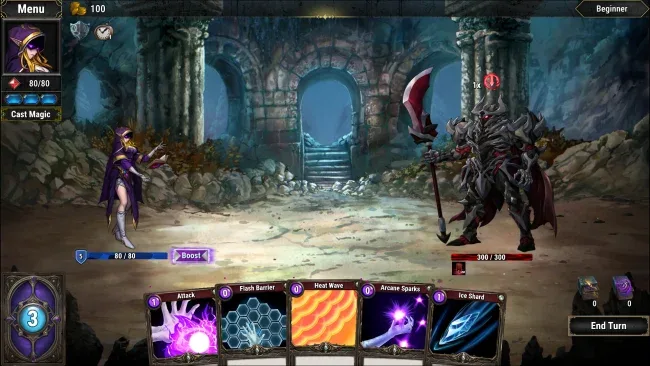
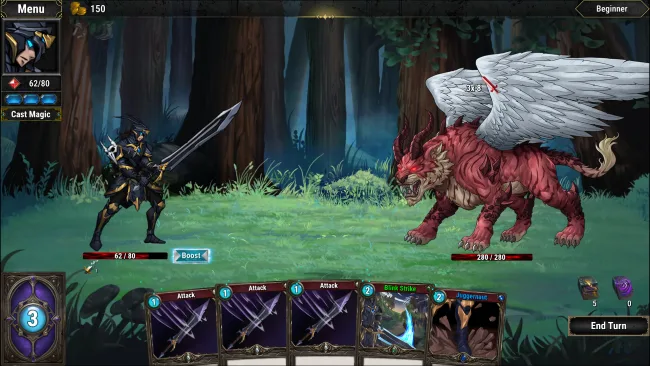
Installation
- Select the <strong>Download</strong> button at the top of this page to open UploadHaven.
- On UploadHaven, wait for any countdown, then select <strong>Free Download</strong>. Optional: UploadHaven Pro for faster downloads.
- When complete, extract the archive to a <strong>Seal the Rift</strong> folder using 7-Zip.
- Open the extracted folder and start the game normally.
- For errors, check <strong>Setup Guide & Troubleshooting</strong> below. Keep your security software enabled.
System Requirements
- Requires a 64-bit processor and operating system
- OS: Windows 10
- Processor: Intel Core i5-650 | AMD Phenom II X4 965
- Memory: 6 GB RAM
- Graphics: Nvidia GeForce GTX 650, 1 GB | AMD Radeon HD HD 6950, 2 GB
- DirectX: Version 11
- Storage: 2 GB available space
Setup Guide & Troubleshooting
How do I fix missing DLL errors for Seal the Rift?
After extracting Seal the Rift, navigate to the _Redist or _CommonRedist folder inside the game directory and install DirectX, Vcredist, and any other dependencies included.
What should I do if the downloaded file is corrupted?
The full archive is 0.95 GB — make sure your download completed fully before extracting. Use 7-Zip to extract the files. If you still see a "file corrupted" error, re-download and try again.
Why should I run the game as administrator?
Right-click the game executable and select "Run as Administrator" to avoid save file issues and permission errors. This is especially important on the first launch.
How do I update my GPU drivers for this game?
Seal the Rift requires a Nvidia GeForce GTX 650, 1 GB | AMD Radeon HD HD 6950, 2 GB or equivalent. Update your NVIDIA or AMD drivers to the latest version for the best performance.
The game won't launch — what should I try?
This game requires Version 11. Try running in compatibility mode, install the latest DirectX runtime, or install the All-in-One VC Redist Package.
My antivirus is blocking the game — is it safe?
Antivirus false positives are common with pre-installed games. Temporarily pause your antivirus during extraction to prevent it from quarantining game files. You can re-enable it after the extraction completes.