
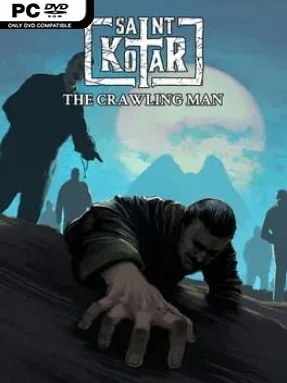
Game Overview
A revered schoolteacher’s descent into physical ruin and spiritual fanaticism drives this short, grim interactive comic set in the cursed Croatian town of Sveti Kotar. Saint Kotar: The Crawling Man trades traditional adventure-game puzzles for an intimate horror story about Rudolf Mojsek, known affectionately as Mojse by the children he teaches. What begins with the image of a gentle, devout community figure gradually curdles into something cruel, tragic, and deeply unsettling. The mood is oppressive rather than action-heavy, rooted in religious guilt, small-town suspicion, and the sense that something malignant has been waiting beneath ordinary life.
Players advance through illustrated scenes, following Mojse’s past and the events that reshape him into the broken figure suggested by the title. Interaction centers on reading, observing, and moving through a motion-comic presentation enhanced by ambient sound, animation, and carefully timed visual details. Rather than testing reflexes or offering branching combat systems, the experience asks you to absorb its revelations and piece together the emotional logic behind a man’s collapse. Its compact format makes it best treated as a focused narrative episode, though familiarity with the larger Saint Kotar setting adds extra weight to its locations, beliefs, and ominous local history.
The standout feature is its willingness to make horror personal: the fear comes not from constant monsters, but from watching faith, duty, and affection become tools of self-destruction. Hand-drawn comic imagery gives the tale a distinctive storybook quality while the sound design keeps its quiet scenes uneasy. As the opening installment in Tales from the Cursed Valley, it works both as a companion piece to the Saint Kotar adventure game and as a standalone origin story with a harsher, more concentrated tone. Fans of dark visual novels, motion comics, and slow-burn psychological horror will find the most to appreciate, while players seeking puzzles, choices with major consequences, or long playtime should approach it as a brief atmospheric narrative rather than a full adventure.
Installation
- Click the green button below to be redirected to UploadHaven.
- Wait 15 seconds, then hit “Free Download.” (Free downloads may be slower — upgrade to UploadHaven Pro for faster speeds.)
- Once downloaded, right-click the .zip file and choose “Extract to Saint Kotar: The Crawling Man.” (You’ll need 7-Zip for this.)
- Open the extracted folder and run the game as administrator.
- Enjoy! 🎮 If you see missing DLL errors, check the <strong>_Redist</strong> folder inside and install what’s needed.
System Requirements
- Requires a 64-bit processor and operating system
- OS: Windows 10
- Processor: 2 GHz
- Memory: 2 GB RAM
- Graphics: 1 GB
- DirectX: Version 10
- Storage: 2.50 GB available space
Setup Guide & Troubleshooting
How do I fix missing DLL errors for Saint Kotar: The Crawling Man?
After extracting Saint Kotar: The Crawling Man, navigate to the _Redist or _CommonRedist folder inside the game directory and install DirectX, Vcredist, and any other dependencies included.
What should I do if the downloaded file is corrupted?
The full archive is 654.57 MB — make sure your download completed fully before extracting. Use 7-Zip to extract the files. If you still see a "file corrupted" error, re-download and try again.
Why should I run the game as administrator?
Right-click the game executable and select "Run as Administrator" to avoid save file issues and permission errors. This is especially important on the first launch.
How do I update my GPU drivers for this game?
Saint Kotar: The Crawling Man requires a 1 GB or equivalent. Update your NVIDIA or AMD drivers to the latest version for the best performance.
The game won't launch — what should I try?
This game requires Version 10. Try running in compatibility mode, install the latest DirectX runtime, or install the All-in-One VC Redist Package.
My antivirus is blocking the game — is it safe?
Antivirus false positives are common with pre-installed games. Temporarily pause your antivirus during extraction to prevent it from quarantining game files. You can re-enable it after the extraction completes.