
Game Overview
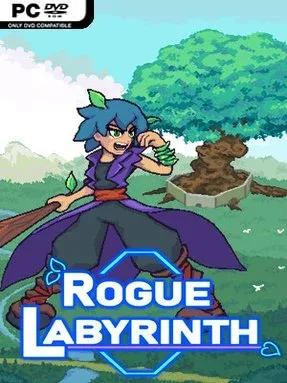
Lantanas turns its political collapse into a chaotic televised blood sport, with a vain billionaire forcing would-be rulers to fight through a colossal arena beneath an ancient Great Tree. Rogue Labyrinth is an indie roguelite built around shifting dungeon runs, colorful rivalries, and the idea that almost anything on the battlefield can become ammunition. Its tone is playful and absurd rather than relentlessly grim: the stakes involve a conquered nation, but the action includes dinner invitations, audience pandering, and monsters hired to stop your climb. Every attempt sends you deeper into a changing colosseum while competing contenders chase the same crown.
Combat runs on quick reactions, positioning, and a wonderfully physical projectile system. A basic attack can send branches, thorny balls, rocks, trees, enemy shots, and even opponents flying across the arena, creating a controlled bullet-hell feel where environmental awareness matters as much as raw damage. Players choose different weapons, forms, upgrades, powers, and artifacts during a run, then combine them into builds that can favor close-range brawling, ranged throws, bouncing attacks, summoned hazards, or abilities borrowed from rivals. Procedural routes span four biome themes and a large pool of rooms, with choices altering the path ahead and ensuring that the labyrinth rarely unfolds the same way twice. Between fights, relationships with rivals, staff, and monsters provide another layer of progression, opening opportunities to improve abilities or learn combat techniques.
The standout idea is how freely the arena lets you weaponize its clutter; instead of merely dodging bullet patterns, you constantly turn the chaos back on whoever created it. Seven distinct rivals give runs personality beyond anonymous bosses, while the fame meter rewards aggressive play by attracting spectators who may provide benefits once sufficiently entertained. Its blend of randomized builds, room-to-room decision-making, and physics-flavored combat lands somewhere between a traditional action roguelite and an arcade arena shooter. Fans of Hades-style repeat runs who want more knockback, ricochets, and emergent projectile nonsense should find plenty to enjoy, while newcomers benefit from its readable premise and playful presentation.
Installation
- Click the green button below to be redirected to UploadHaven.
- Wait 15 seconds, then hit “Free Download.” (Free downloads may be slower — upgrade to UploadHaven Pro for faster speeds.)
- Once downloaded, right-click the .zip file and choose “Extract to Rogue Labyrinth.” (You’ll need 7-Zip for this.)
- Open the extracted folder and run the game as administrator.
- Enjoy! 🎮 If you see missing DLL errors, check the <strong>_Redist</strong> folder inside and install what’s needed.
System Requirements
- Requires a 64-bit processor and operating system
- OS: Windows 10 64bit
- Processor: x64 architecture with SSE2 instruction set support
- Memory: 4 GB RAM
- Graphics: DX11, DX12 capable
- DirectX: Version 11
- Storage: 400 MB available space
Setup Guide & Troubleshooting
How do I fix missing DLL errors for Rogue Labyrinth (v1.0)?
After extracting Rogue Labyrinth (v1.0), navigate to the _Redist or _CommonRedist folder inside the game directory and install DirectX, Vcredist, and any other dependencies included.
What should I do if the downloaded file is corrupted?
The full archive is 237.65 MB — make sure your download completed fully before extracting. Use 7-Zip to extract the files. If you still see a "file corrupted" error, re-download and try again.
Why should I run the game as administrator?
Right-click the game executable and select "Run as Administrator" to avoid save file issues and permission errors. This is especially important on the first launch.
How do I update my GPU drivers for this game?
Rogue Labyrinth (v1.0) requires a DX11, DX12 capable or equivalent. Update your NVIDIA or AMD drivers to the latest version for the best performance.
The game won't launch — what should I try?
This game requires Version 11. Try running in compatibility mode, install the latest DirectX runtime, or install the All-in-One VC Redist Package.
My antivirus is blocking the game — is it safe?
Antivirus false positives are common with pre-installed games. Temporarily pause your antivirus during extraction to prevent it from quarantining game files. You can re-enable it after the extraction completes.