

Game Overview
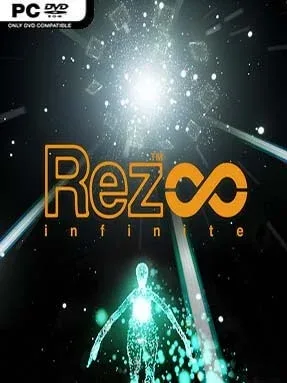
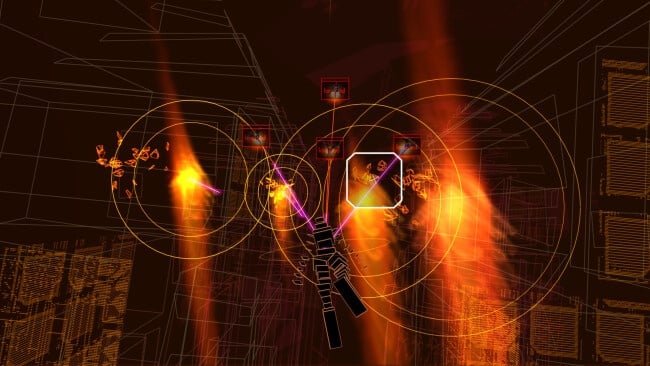
A rail shooter becomes something far more hypnotic when every lock-on, explosion, and enemy movement feeds directly into the music. Set inside a surreal digital network, Rez Infinite sends you gliding through abstract cybernetic landscapes while dismantling hostile programs to a driving electronic soundtrack. Its tone is cool, futuristic, and almost meditative rather than aggressive, even when the screen erupts into a storm of lasers and geometric creatures. The result is a compact arcade experience built as much around sight and sound as score chasing.
Movement follows a fixed forward path in the original stages, leaving you to aim, lock onto clusters of enemies, and release missiles in time with the beat. Holding the lock button lets you tag several targets at once, rewarding awareness and clean timing, while power-ups evolve your avatar through multiple forms and grant an extra layer of protection. Each stage steadily escalates from simple enemy formations to enormous bosses that reshape themselves in rhythm with the soundtrack. The included Area X expansion changes the formula most dramatically: it offers free 360-degree flight, smoother modern visuals, and a more exploratory flow while retaining the same elegant shooting mechanics. Desktop play works well with a controller, but VR is the ideal format, since looking around to aim makes the audiovisual spectacle feel unusually physical.
What separates Rez Infinite from ordinary on-rails shooters is its synesthetic design: actions do not merely accompany the music, they actively build the track’s percussion and effects. The original levels retain an early-2000s wireframe aesthetic that still feels distinctive, while Area X presents a lush, dreamlike evolution of that visual language. It is short, and players seeking deep weapon customization or a long campaign may find its scope limited, but repeat runs, score improvement, alternate modes, and VR immersion give it lasting appeal. Fans of Panzer Dragoon, Tetris Effect, rhythm games, or experimental arcade design should make time for it, and newcomers can enjoy it immediately thanks to its simple controls and adjustable difficulty.
Installation
- Click the green button below to be redirected to UploadHaven.
- Wait 15 seconds, then hit “Free Download.” (Free downloads may be slower — upgrade to UploadHaven Pro for faster speeds.)
- Once downloaded, right-click the .zip file and choose “Extract to Rez Infinite.” (You’ll need 7-Zip for this.)
- Open the extracted folder and run the game as administrator.
- Enjoy! 🎮 If you see missing DLL errors, check the <strong>_Redist</strong> folder inside and install what’s needed.
System Requirements
- Requires a 64-bit processor and operating system
- OS: Windows 7/8/10 (64-bit)
- Processor: Intel i3-3220
- Memory: 4 GB RAM
- Graphics: NVIDIA GeForce GTX 750 equivalent or greater
- DirectX: Version 11
- Storage: 2 GB available space
- Sound Card: DirectX 11 Compatible
- Additional Notes: Minimum specs for non-VR mode
Setup Guide & Troubleshooting
How do I fix missing DLL errors for Rez Infinite (Incl. DLC)?
After extracting Rez Infinite (Incl. DLC), navigate to the _Redist or _CommonRedist folder inside the game directory and install DirectX, Vcredist, and any other dependencies included.
What should I do if the downloaded file is corrupted?
The full archive is 748.08 MB — make sure your download completed fully before extracting. Use 7-Zip to extract the files. If you still see a "file corrupted" error, re-download and try again.
Why should I run the game as administrator?
Right-click the game executable and select "Run as Administrator" to avoid save file issues and permission errors. This is especially important on the first launch.
How do I update my GPU drivers for this game?
Rez Infinite (Incl. DLC) requires a NVIDIA GeForce GTX 750 equivalent or greater or equivalent. Update your NVIDIA or AMD drivers to the latest version for the best performance.
The game won't launch — what should I try?
This game requires Version 11. Try running in compatibility mode, install the latest DirectX runtime, or install the All-in-One VC Redist Package.
My antivirus is blocking the game — is it safe?
Antivirus false positives are common with pre-installed games. Temporarily pause your antivirus during extraction to prevent it from quarantining game files. You can re-enable it after the extraction completes.