
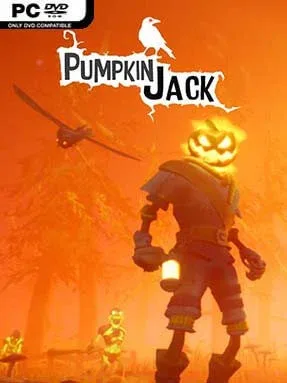
Game Overview
A grinning pumpkin-headed champion fights for the forces of Evil in a Halloween-flavored 3D platformer that stays more playful than grim. Pumpkin Jack casts you as Jack, a supernatural warrior chosen to help darkness conquer a fairy-tale world after humanity’s goodness has become intolerable to the Devil. Its colorful graveyards, crooked villages, haunted forests, and infernal ruins give the adventure a Tim Burton-like cartoon mood, balancing spooky imagery with broad comedy and energetic action. The result is an old-school, level-based platformer built around personality rather than horror scares.
Jack runs, jumps, double-jumps, wall-climbs, hunts down collectibles, and smashes through enemies with a growing collection of melee weapons. Combat is simple but satisfying, with dodges, charged attacks, and environmental hazards keeping encounters from becoming mindless button mashing. Stages also break up the platforming with physics puzzles involving movable objects, reflected beams, gravity tricks, and magical spheres that must be guided into place. Jack’s sarcastic crow companion can scout areas and help with certain challenges, while his skeletal sidekick Snif stars in small diversions that include puzzle-like sequences and a surprisingly involved combat minigame.
What separates Pumpkin Jack from many retro-inspired platformers is its willingness to change pace constantly instead of relying on jumping alone. Individual chapters introduce distinct action set pieces, from traversal challenges to special side activities, and the game’s compact structure means it rarely lingers on one idea too long. The art direction is bright, chunky, and deliberately nostalgic, recalling the approachable 3D platforming of the PlayStation 2 era while using modern controls and presentation. Anyone who enjoys MediEvil, A Hat in Time, or light action adventures with collectible hunting and Halloween charm should find plenty to like, while genre veterans may appreciate its brisk pacing more than its relatively forgiving difficulty.
Installation
- Click the green button below to be redirected to UploadHaven.
- Wait 15 seconds, then hit “Free Download.” (Free downloads may be slower — upgrade to UploadHaven Pro for faster speeds.)
- Once downloaded, right-click the .zip file and choose “Extract to Pumpkin Jack.” (You’ll need 7-Zip for this.)
- Open the extracted folder and run the game as administrator.
- Enjoy! 🎮 If you see missing DLL errors, check the <strong>_Redist</strong> folder inside and install what’s needed.
System Requirements
- OS: Windows 7
- Processor: Intel Core i5-3330 3.0 GHz, AMD FX-8300 3.3 GHz
- Memory: 4 GB RAM
- Graphics: NVIDIA GeForce GTX 760, Radeon R9 270
- DirectX: Version 11
- Storage: 5 GB available space
Setup Guide & Troubleshooting
How do I fix missing DLL errors for Pumpkin Jack (v1.4.6)?
After extracting Pumpkin Jack (v1.4.6), navigate to the _Redist or _CommonRedist folder inside the game directory and install DirectX, Vcredist, and any other dependencies included.
What should I do if the downloaded file is corrupted?
The full archive is 1.83 GB — make sure your download completed fully before extracting. Use 7-Zip to extract the files. If you still see a "file corrupted" error, re-download and try again.
Why should I run the game as administrator?
Right-click the game executable and select "Run as Administrator" to avoid save file issues and permission errors. This is especially important on the first launch.
How do I update my GPU drivers for this game?
Pumpkin Jack (v1.4.6) requires a NVIDIA GeForce GTX 760, Radeon R9 270 or equivalent. Update your NVIDIA or AMD drivers to the latest version for the best performance.
The game won't launch — what should I try?
This game requires Version 11. Try running in compatibility mode, install the latest DirectX runtime, or install the All-in-One VC Redist Package.
My antivirus is blocking the game — is it safe?
Antivirus false positives are common with pre-installed games. Temporarily pause your antivirus during extraction to prevent it from quarantining game files. You can re-enable it after the extraction completes.