
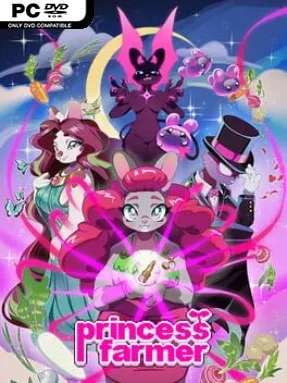
Game Overview
A bright magical forest, a suspiciously strange corruption, and enormous vegetables form the heart of Princess Farmer, a puzzle adventure that blends match-three action with the conversational charm of a visual novel. Its heroine begins as an ordinary grower before Gaia’s power gives her the strength to pull entire rows of crops from the earth, turning a familiar genre into something much more physical and playful. The tone lands somewhere between a cozy magical-girl cartoon and a lightly spooky woodland mystery, with charming animal-like friends, colorful produce, and an unfolding threat beneath the cheerfulness. Story chapters play out like self-contained episodes, making it easy to enjoy in short sessions while still following a larger narrative.
Rather than swapping individual tiles, players grab and shift complete lines of vegetables to create matches, clear barriers, and meet each stage’s changing objectives. Levels ask for more than simply chasing high scores: some require rescuing characters, breaking particular obstacles, or managing the board before a situation gets out of hand. Three selectable play styles let newcomers prioritize a relaxed pace while experienced puzzlers can opt into stricter, more demanding conditions, and every approach still earns useful rewards. Princess Farmer also supports local co-op, letting two players coordinate their crop-pulling chaos, while solo players can bring along an AI partner.
Its strongest feature is how comfortably the puzzle boards and character scenes feed into one another. Dialogue choices shape Princess Farmer’s relationships with figures such as Garlic, Rowan, Mother Gaia, and BunBot, and close friendships can lead to gifts that make those conversations feel more than decorative. The soft hand-drawn art, expressive cast, and flexible difficulty give the game a welcoming personality without making its later board challenges toothless. Fans of Puzzle Quest-style genre hybrids, light visual novels, and cooperative couch puzzlers should find plenty to like, while players wanting ruthless competitive match-three action may prefer something more score-driven.
Installation
- Click the green button below to be redirected to UploadHaven.
- Wait 15 seconds, then hit “Free Download.” (Free downloads may be slower — upgrade to UploadHaven Pro for faster speeds.)
- Once downloaded, right-click the .zip file and choose “Extract to Princess Farmer.” (You’ll need 7-Zip for this.)
- Open the extracted folder and run the game as administrator.
- Enjoy! 🎮 If you see missing DLL errors, check the <strong>_Redist</strong> folder inside and install what’s needed.
System Requirements
- OS: Windows XP, Vista, 7 or later
- Processor: 64bit Intel compatible Dual Core CPU
- Memory: 32 MB RAM
- Graphics: DirectX 9 compliant graphics card
- DirectX: Version 9.0
- Storage: 700 MB available space
- Sound Card: DirectX 9 compatible sound card, or integrated sound chip
Setup Guide & Troubleshooting
How do I fix missing DLL errors for Princess Farmer (v1.0.7)?
After extracting Princess Farmer (v1.0.7), navigate to the _Redist or _CommonRedist folder inside the game directory and install DirectX, Vcredist, and any other dependencies included.
What should I do if the downloaded file is corrupted?
The full archive is 366.73 MB — make sure your download completed fully before extracting. Use 7-Zip to extract the files. If you still see a "file corrupted" error, re-download and try again.
Why should I run the game as administrator?
Right-click the game executable and select "Run as Administrator" to avoid save file issues and permission errors. This is especially important on the first launch.
How do I update my GPU drivers for this game?
Princess Farmer (v1.0.7) requires a DirectX 9 compliant graphics card or equivalent. Update your NVIDIA or AMD drivers to the latest version for the best performance.
The game won't launch — what should I try?
This game requires Version 9.0. Try running in compatibility mode, install the latest DirectX runtime, or install the All-in-One VC Redist Package.
My antivirus is blocking the game — is it safe?
Antivirus false positives are common with pre-installed games. Temporarily pause your antivirus during extraction to prevent it from quarantining game files. You can re-enable it after the extraction completes.