
Game Overview
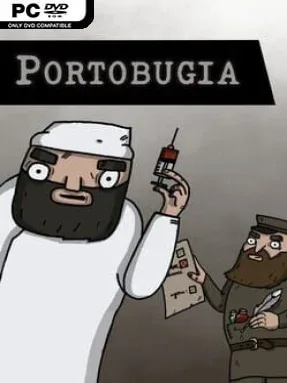
A fragile Eastern European port becomes the last lifeline for a starving city in this tense indie management survival game. Set amid the disorder following the First World War, Portobugia trades grand empire-building for a more immediate struggle: keep food, goods, and hope moving while disease, crop-devouring insects, and lawlessness close in. Every arriving vessel represents a possible delivery, but also a potential disaster waiting to be waved through the docks. The atmosphere is bleak without becoming action-focused, placing pressure on careful planning rather than combat reflexes.
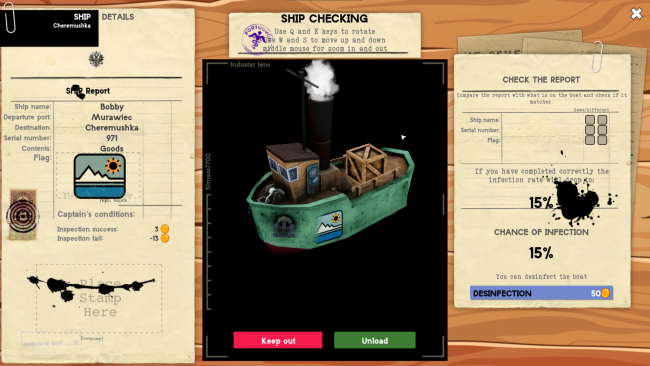
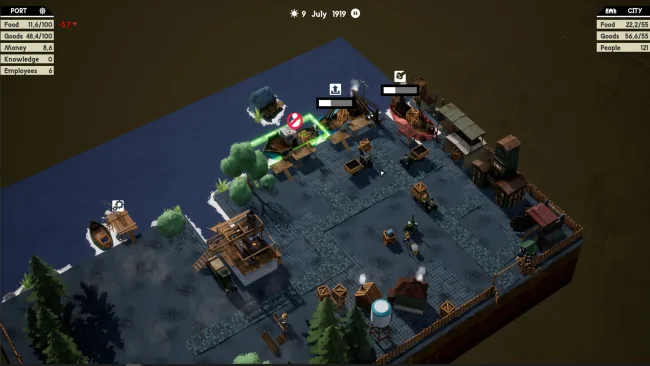
Most of the work revolves around examining incoming boats before deciding whether their cargo is safe to unload. You compare visual details on each vessel against its paperwork, earning rewards for accurate inspections and risking infestations that consume stored resources when contaminated ships slip past your checks. Supplies then need to be processed, stored, and sent onward to the city every day, since shortages directly threaten the population’s survival. Expansion is essential: construct additional facilities, improve existing structures, unlock technologies, and balance the benefits of hired workers against their recurring wages. Random events add another layer of uncertainty, forcing difficult decisions when an already strained operation faces new trouble.
Portobugia’s strongest idea is its mix of paperwork-style inspection and survival-city logistics. Rather than merely optimizing production chains as in many builders, players must make judgment calls with incomplete information and live with the consequences of a bad call at the harbor. The small-scale port setting gives its systems a focused, claustrophobic feel, while research, staffing, upgrades, and resource shipments provide enough moving parts for management fans to dig into. It suits players who enjoy the pressure of Frostpunk’s hard choices or Papers, Please-style checking, but want a calmer, systems-driven experience instead of a narrative-heavy one. Veterans of survival strategy games should appreciate its constant demand for efficiency, while newcomers can find a straightforward core loop built around inspecting, building, and keeping the city alive.
Screenshots
Installation
- Select the <strong>Download</strong> button at the top of this page to open UploadHaven.
- On UploadHaven, wait for any countdown, then select <strong>Free Download</strong>. Optional: UploadHaven Pro for faster downloads.
- When complete, extract the archive to a <strong>Portobugia</strong> folder using 7-Zip.
- Open the extracted folder and start the game normally.
- For errors, check <strong>Setup Guide & Troubleshooting</strong> below. Keep your security software enabled.
System Requirements
- Requires a 64-bit processor and operating system
- OS: Windows 10
- Processor: i5-8250u
- Memory: 1 GB RAM
- Graphics: MX150; GTX660
- Storage: 500 MB available space
Setup Guide & Troubleshooting
How do I fix missing DLL errors for Portobugia (v1.0.4)?
After extracting Portobugia (v1.0.4), navigate to the _Redist or _CommonRedist folder inside the game directory and install DirectX, Vcredist, and any other dependencies included.
What should I do if the downloaded file is corrupted?
The full archive is 659.25 MB — make sure your download completed fully before extracting. Use 7-Zip to extract the files. If you still see a "file corrupted" error, re-download and try again.
Why should I run the game as administrator?
Right-click the game executable and select "Run as Administrator" to avoid save file issues and permission errors. This is especially important on the first launch.
How do I update my GPU drivers for this game?
Portobugia (v1.0.4) requires a MX150; GTX660 or equivalent. Update your NVIDIA or AMD drivers to the latest version for the best performance.
The game won't launch — what should I try?
Try running in compatibility mode, install the latest DirectX runtime, or install the All-in-One VC Redist Package.
My antivirus is blocking the game — is it safe?
Antivirus false positives are common with pre-installed games. Temporarily pause your antivirus during extraction to prevent it from quarantining game files. You can re-enable it after the extraction completes.