
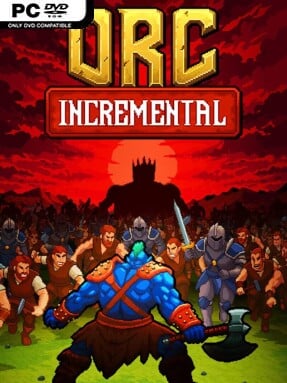
Game Overview
A ragtag greenskin force grows from a handful of grunts into a self-sustaining engine of destruction in this idle auto battler. Orc Incremental combines the satisfying number climb of an incremental game with enough army-building decisions to keep progress from feeling entirely hands-off. Battles play out automatically as your warband advances through increasingly punishing waves and boss encounters, creating a relaxed but strategically minded rhythm. Its tone is simple, grimly comic fantasy: brutal little troops march forward, get crushed when a build fails, and return stronger after a rethink.
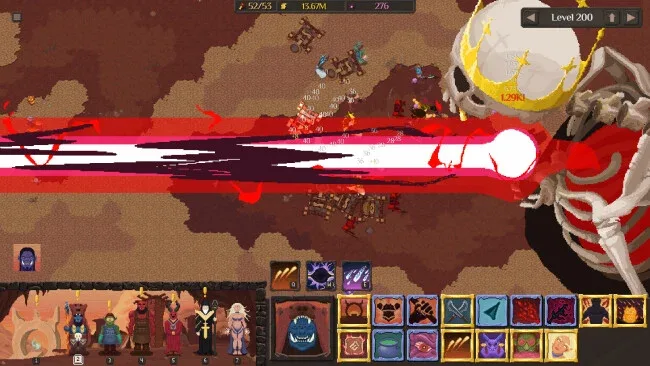
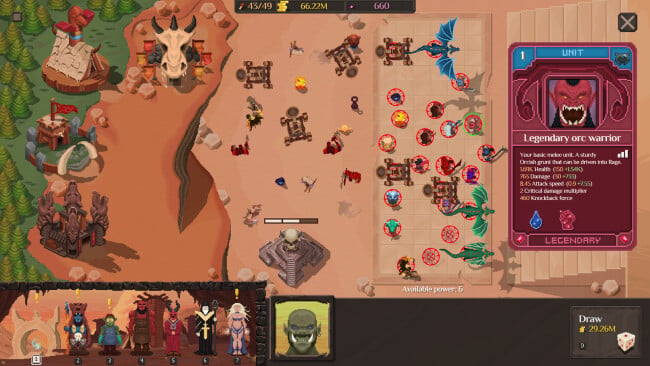
Card drafting drives each run, letting you recruit units of differing quality and battlefield purpose while adding totems that reshape the entire army’s stats or behavior. Formation placement matters because your frontline needs to absorb pressure while damage dealers and specialists survive long enough to contribute, so hitting a difficult stage often means revisiting the lineup rather than merely waiting for bigger numbers. Spells give you active intervention during otherwise automated fights, allowing well-timed attacks or crowd control to rescue a struggling push against an elite enemy. Gold continues accumulating while away, but the game still asks players to make meaningful calls about composition, timing, and which upgrades deserve attention.
Dark Rebirth acts as the main prestige system, resetting short-term progress in exchange for permanent improvements, fresh units, tougher objectives, and chieftain choices that give subsequent attempts a different focus. That loop makes failure productive: a stalled army is not a dead end, but a signal to alter your draft, rearrange troops, or restart with stronger long-term bonuses. Handcrafted visual assets and a clear, readable presentation suit the game’s straightforward design, while the escalating bosses provide concrete targets beyond watching counters rise. Fans of games such as Loop Hero, Vampire Survivors’ meta-progression, or traditional idle RPGs should find plenty to enjoy, especially if they want automation tempered by light tactical planning rather than demanding real-time micromanagement.
Screenshots
Installation
- Click the green button below to be redirected to UploadHaven.
- Wait 15 seconds, then hit “Free Download.” (Free downloads may be slower — upgrade to UploadHaven Pro for faster speeds.)
- Once downloaded, right-click the .zip file and choose “Extract to Orc Incremental.” (You’ll need 7-Zip for this.)
- Open the extracted folder and run the game as administrator.
- Enjoy! 🎮 If you see missing DLL errors, check the <strong>_Redist</strong> folder inside and install what’s needed.
System Requirements
- Requires a 64-bit processor and operating system
- OS: Windows 10 or later
- Processor: 2.0 GHz dual-core processor
- Memory: 2 GB RAM
- Graphics: Integrated Graphics
- DirectX: Version 12
- Storage: 200 MB available space
Setup Guide & Troubleshooting
How do I fix missing DLL errors for Orc Incremental (v1.0.1)?
After extracting Orc Incremental (v1.0.1), navigate to the _Redist or _CommonRedist folder inside the game directory and install DirectX, Vcredist, and any other dependencies included.
What should I do if the downloaded file is corrupted?
The full archive is 127.94 MB — make sure your download completed fully before extracting. Use 7-Zip to extract the files. If you still see a "file corrupted" error, re-download and try again.
Why should I run the game as administrator?
Right-click the game executable and select "Run as Administrator" to avoid save file issues and permission errors. This is especially important on the first launch.
How do I update my GPU drivers for this game?
Orc Incremental (v1.0.1) requires a Integrated Graphics or equivalent. Update your NVIDIA or AMD drivers to the latest version for the best performance.
The game won't launch — what should I try?
This game requires Version 12. Try running in compatibility mode, install the latest DirectX runtime, or install the All-in-One VC Redist Package.
My antivirus is blocking the game — is it safe?
Antivirus false positives are common with pre-installed games. Temporarily pause your antivirus during extraction to prevent it from quarantining game files. You can re-enable it after the extraction completes.