
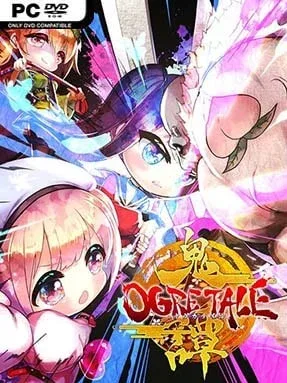
Ogre Tale Cover Art

Ogre Tale

INDIE 1.96 GB v1.03

Game Overview

A colorful Japanese folktale gets turned inside out in this compact side-scrolling brawler, where the supposed heroes become the problem and a trio of ogre girls has to clean up the mess. Ogre Tale trades grim mythology for broad comedy, anime-styled charm, and plenty of supernatural chaos as Momotaro’s descendant unleashes yokai across the countryside for no better reason than personal boredom. The result is a light, deliberately silly adventure built around familiar legends, eccentric enemies, and a revenge story that never takes itself too seriously.

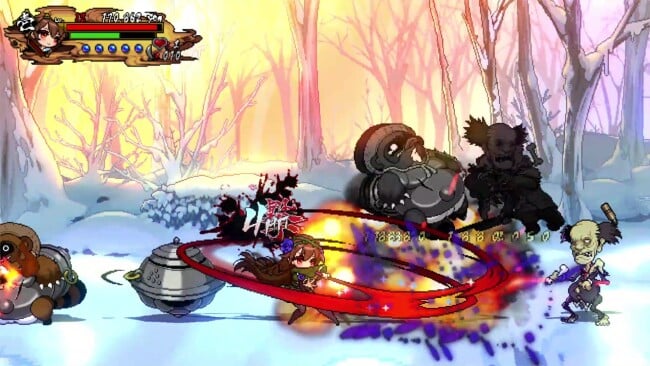
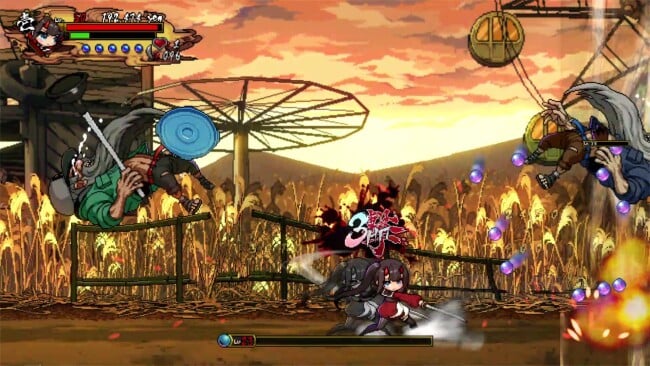
Players choose between three distinct ogre heroines and punch, kick, throw, and special-move their way through linear stages packed with monsters and Momotaro’s followers. Combat follows an old-school beat-’em-up rhythm: clear groups of enemies, keep pressure on bosses, grab useful pickups, and learn when to use each character’s stronger attacks instead of mashing through every encounter. The controls are approachable, but positioning and crowd management matter once enemies start attacking from both sides of the screen. Local co-op supports up to three players, making the simple arcade action far more entertaining when friends can join the brawl and combine their attacks against a crowded screen.

Its biggest strength is the setting. Japanese folklore is not merely decorative here; the game uses ogres, yokai, and twisted storybook expectations to give its cartoonish stages a personality many budget brawlers lack. Bright sprites, exaggerated animations, and comic dialogue keep the mood breezy even when the action becomes busy, although the campaign is relatively short and the combat does not offer the depth of genre heavyweights. Players who enjoy the straightforward co-op energy of Streets of Rage or the playful attitude of River City Girls should find plenty to like, especially if they want an accessible, folklore-flavored brawler rather than a demanding technical fighter.

Installation

  1. Click the green button below to be redirected to UploadHaven.
  2. Wait 15 seconds, then hit “Free Download.” (Free downloads may be slower — upgrade to UploadHaven Pro for faster speeds.)
  3. Once downloaded, right-click the .zip file and choose “Extract to Ogre Tale.” (You’ll need 7-Zip for this.)
  4. Open the extracted folder and run the game as administrator.
  5. Enjoy! 🎮 If you see missing DLL errors, check the <strong>_Redist</strong> folder inside and install what’s needed.

System Requirements

  • OS: Windows
  • Storage: 1.96 GB available space
  • License: Free

Setup Guide & Troubleshooting

How do I fix missing DLL errors for Ogre Tale (v1.03)?

After extracting Ogre Tale (v1.03), navigate to the _Redist or _CommonRedist folder inside the game directory and install DirectX, Vcredist, and any other dependencies included.

What should I do if the downloaded file is corrupted?

The full archive is 1.96 GB — make sure your download completed fully before extracting. Use 7-Zip to extract the files. If you still see a "file corrupted" error, re-download and try again.

Why should I run the game as administrator?

Right-click the game executable and select "Run as Administrator" to avoid save file issues and permission errors. This is especially important on the first launch.

How do I update my GPU drivers for this game?

Update your NVIDIA or AMD drivers to the latest version for the best performance and compatibility.

The game won't launch — what should I try?

Try running in compatibility mode, install the latest DirectX runtime, or install the All-in-One VC Redist Package.

My antivirus is blocking the game — is it safe?

Antivirus false positives are common with pre-installed games. Temporarily pause your antivirus during extraction to prevent it from quarantining game files. You can re-enable it after the extraction completes.

Need more help? Browse our FAQ & Troubleshooting Guide for solutions to common issues.
Looking for something else? Explore all games on Steam Unlocked