
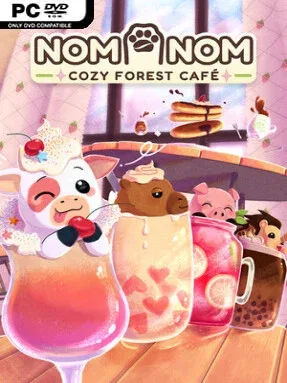
Game Overview
A woodland café becomes a small, personal refuge from city pressure, built around warm lighting, friendly animal regulars, and the pleasure of making a place feel like home. Nom Nom: Cozy Forest Café is a low-stakes indie management game with no combat or punishing failure loops; its focus stays on decorating, cooking, and getting to know a community of charming customers. The mood is deliberately gentle, colorful, and cheerful, closer to arranging a miniature diorama than running a frantic restaurant. It is designed for players who want a creative routine with a little rhythm-game energy rather than another demanding business sim.
Running the café means arranging furniture, wallpapers, flooring, lamps, and small decorative touches to create inviting corners for visitors. Food and drink preparation uses timing-based rhythm sequences, turning waffles, sodas, and other treats into quick musical challenges with animated feedback instead of complicated kitchen management. Customer friendships reveal preferred recipes and visual styles, giving you useful direction without forcing a single “correct” layout. New ingredient combinations can be tested freely, then sold through a vending machine for rewards, while the game also lets you paint custom signs, posters, and even shirts to extend the café’s identity beyond its menu.
Its strongest appeal comes from how many forms of self-expression it packs into a compact, noncompetitive premise. Photography adds another relaxed goal, encouraging you to frame decorated spaces, finished dishes, and adorable patrons for the café’s in-game website. The blend of interior design, light relationship building, recipe experimentation, and approachable rhythm cooking gives it more interaction than a pure decorating sandbox while keeping the pressure low. Fans of the cozy customization found in Animal Crossing and the casual serving rhythms of cooking games should find a natural fit here, especially if they value atmosphere over challenge.
Installation
- Click the green button below to be redirected to UploadHaven.
- Wait 15 seconds, then hit “Free Download.” (Free downloads may be slower — upgrade to UploadHaven Pro for faster speeds.)
- Once downloaded, right-click the .zip file and choose “Extract to Nom Nom: Cozy Forest Café.” (You’ll need 7-Zip for this.)
- Open the extracted folder and run the game as administrator.
- Enjoy! 🎮 If you see missing DLL errors, check the <strong>_Redist</strong> folder inside and install what’s needed.
System Requirements
- Requires a 64-bit processor and operating system
- OS: Windows 10
- Processor: Intel Core i3
- Memory: 4 GB RAM
- Graphics: 1GB
- Storage: 1 GB available space
Setup Guide & Troubleshooting
How do I fix missing DLL errors for Nom Nom: Cozy Forest Café (v1.0.1)?
After extracting Nom Nom: Cozy Forest Café (v1.0.1), navigate to the _Redist or _CommonRedist folder inside the game directory and install DirectX, Vcredist, and any other dependencies included.
What should I do if the downloaded file is corrupted?
The full archive is 298.32 MB — make sure your download completed fully before extracting. Use 7-Zip to extract the files. If you still see a "file corrupted" error, re-download and try again.
Why should I run the game as administrator?
Right-click the game executable and select "Run as Administrator" to avoid save file issues and permission errors. This is especially important on the first launch.
How do I update my GPU drivers for this game?
Nom Nom: Cozy Forest Café (v1.0.1) requires a 1GB or equivalent. Update your NVIDIA or AMD drivers to the latest version for the best performance.
The game won't launch — what should I try?
Try running in compatibility mode, install the latest DirectX runtime, or install the All-in-One VC Redist Package.
My antivirus is blocking the game — is it safe?
Antivirus false positives are common with pre-installed games. Temporarily pause your antivirus during extraction to prevent it from quarantining game files. You can re-enable it after the extraction completes.