
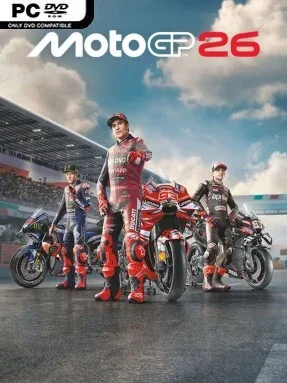
Game Overview
Modern grand prix motorcycle racing takes center stage in MotoGP™26, a polished circuit racer built around the official 2026 season. Every licensed team, rider, machine, and venue aims to recreate the weekend-to-weekend pressure of MotoGP competition, from packed grids to tiny margins at the chequered flag. The tone can shift dramatically depending on your settings: Arcade Experience keeps the action immediate and approachable, while Pro Experience demands patience, precision, and an understanding of how a rider moves with the bike. Dynamic real-world rider ratings also give the championship a living quality, changing competitors’ in-game strengths as the season develops.
Races revolve around braking control, corner entry, throttle discipline, tire management, and the new rider-focused handling model. Body position matters more prominently, so hanging off the bike, shifting weight, and managing lean angles become essential to carrying speed without losing the rear wheel. Tutorials, adaptive challenge settings, and Neural Aids help less experienced riders build confidence, while simulation-minded players can strip away assistance for a more demanding ride. Career mode lets you create a newcomer or guide an existing star, then work through team talks, press interactions, negotiations, and rider-market changes that influence your contracts, development opportunities, and long-term path from rookie to champion.
What separates MotoGP™26 from a straightforward licensed racer is its breadth beyond the premier class. Motard, Flat Track, Minibike, production machinery, and single-make events offer distinct bike behavior and useful breaks from conventional asphalt racing. Collectible Cards add a visual record of your accomplishments, while detailed graphic editors support personal liveries and gear designs. Online races accommodate up to 22 competitors with cross-play, making it a strong fit for league racers and casual groups alike. Fans of Milestone’s modern MotoGP series, or players who enjoy the adjustable realism of F1 games, find plenty here; newcomers get meaningful support, but veterans benefit most from the deeper physics and career systems.
Installation
- Click the green button below to be redirected to UploadHaven.
- Wait 15 seconds, then hit “Free Download.” (Free downloads may be slower — upgrade to UploadHaven Pro for faster speeds.)
- Once downloaded, right-click the .zip file and choose “Extract to MotoGP26.” (You’ll need 7-Zip for this.)
- Open the extracted folder and run the game as administrator.
- Enjoy! 🎮 If you see missing DLL errors, check the <strong>_Redist</strong> folder inside and install what’s needed.
System Requirements
- Requires a 64-bit processor and operating system
- OS: Windows 11
- Processor: Core i5-9600K / Ryzen 5 2600X
- Memory: 16 GB RAM
- Graphics: GeForce GTX 1660 / Radeon RX 580
- DirectX: Version 12
- Storage: 30 GB available space
Setup Guide & Troubleshooting
How do I fix missing DLL errors for MotoGP26 (v2026.08.06 & ALL DLC)?
After extracting MotoGP26 (v2026.08.06 & ALL DLC), navigate to the _Redist or _CommonRedist folder inside the game directory and install DirectX, Vcredist, and any other dependencies included.
What should I do if the downloaded file is corrupted?
The full archive is 28.24 GB — make sure your download completed fully before extracting. Use 7-Zip to extract the files. If you still see a "file corrupted" error, re-download and try again.
Why should I run the game as administrator?
Right-click the game executable and select "Run as Administrator" to avoid save file issues and permission errors. This is especially important on the first launch.
How do I update my GPU drivers for this game?
MotoGP26 (v2026.08.06 & ALL DLC) requires a GeForce GTX 1660 / Radeon RX 580 or equivalent. Update your NVIDIA or AMD drivers to the latest version for the best performance.
The game won't launch — what should I try?
This game requires Version 12. Try running in compatibility mode, install the latest DirectX runtime, or install the All-in-One VC Redist Package.
My antivirus is blocking the game — is it safe?
Antivirus false positives are common with pre-installed games. Temporarily pause your antivirus during extraction to prevent it from quarantining game files. You can re-enable it after the extraction completes.