

Game Overview
A blocky wilderness becomes whatever you make of it: a harsh survival challenge, a peaceful building project, or a shared playground for friends. Minecraft: Bedrock Edition drops players into randomly generated landscapes of forests, deserts, oceans, deep caverns, and strange dimensions, with no prescribed route beyond staying alive and following their curiosity. Its simple visuals hide a world full of systems, from farming and animal breeding to enchanting, trading, and automated machinery. The tone can shift from cozy and meditative to unexpectedly tense when night falls and monsters begin closing in.
Survival starts with punching trees, turning raw materials into tools, and gradually establishing a safe base with better equipment and food supplies. Players mine downward for rare ores, raid structures, barter with villagers, battle creatures, and eventually pursue major boss encounters in the Nether and the End. Creative mode removes resource limits and danger, making it ideal for enormous castles, working redstone contraptions, pixel art, adventure maps, or experimental architecture. Bedrock’s biggest practical advantage is cross-platform play, allowing Windows players to join compatible worlds with friends on consoles and mobile devices, while optional difficulty settings make the experience approachable for younger players and newcomers.
Its lasting appeal comes from the freedom to decide what a “successful” session looks like. One evening can be spent digging a mine, another designing an automated crop farm, and the next simply roaming until a spectacular mountain range or buried ruin appears on the horizon. Redstone offers a surprisingly deep logic system for players who enjoy engineering, while the Marketplace and community-made content provide extra worlds, cosmetics, and themed adventures. Anyone who enjoys Terraria’s gathering loop, LEGO’s open-ended construction, or survival games with less pressure finds plenty to enjoy here, but Bedrock especially suits groups looking for an easy, stable way to build and adventure together across different devices.
Screenshots
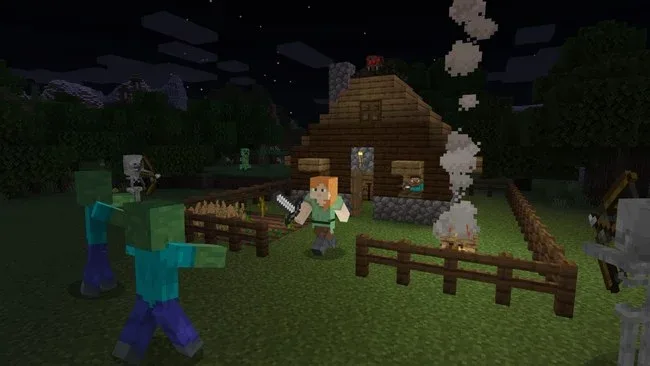
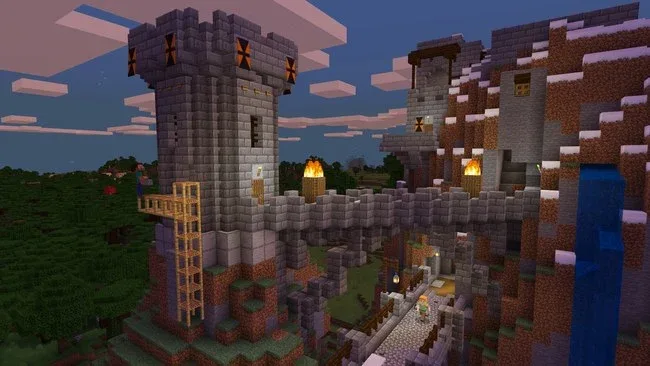
Installation
- Select the <strong>Download</strong> button at the top of this page to open UploadHaven.
- On UploadHaven, wait for any countdown, then select <strong>Free Download</strong>. Optional: UploadHaven Pro for faster downloads.
- When complete, extract the archive to a <strong>Minecraft: Bedrock Edition</strong> folder using 7-Zip.
- Open the extracted folder and start the game normally.
- For errors, check <strong>Setup Guide & Troubleshooting</strong> below. Keep your security software enabled.
System Requirements
- Requires a 64-bit processor and operating system
- OS: Windows 7 / 10 / 11 (64-bit)
- Processor: Intel Core i3-3210 / AMD A8-7600 or equivalent
- Memory: 4 GB RAM
- Graphics: Intel HD Graphics 4000 / AMD Radeon R5 Series (OpenGL 4.4 support)
- Storage: 1 GB available space
Setup Guide & Troubleshooting
How do I fix missing DLL errors for Minecraft: Bedrock Edition (v1.21.130)?
After extracting Minecraft: Bedrock Edition (v1.21.130), navigate to the _Redist or _CommonRedist folder inside the game directory and install DirectX, Vcredist, and any other dependencies included.
What should I do if the downloaded file is corrupted?
The full archive is 947.36 MB — make sure your download completed fully before extracting. Use 7-Zip to extract the files. If you still see a "file corrupted" error, re-download and try again.
Why should I run the game as administrator?
Right-click the game executable and select "Run as Administrator" to avoid save file issues and permission errors. This is especially important on the first launch.
How do I update my GPU drivers for this game?
Minecraft: Bedrock Edition (v1.21.130) requires a Intel HD Graphics 4000 / AMD Radeon R5 Series (OpenGL 4.4 support) or equivalent. Update your NVIDIA or AMD drivers to the latest version for the best performance.
The game won't launch — what should I try?
Try running in compatibility mode, install the latest DirectX runtime, or install the All-in-One VC Redist Package.
My antivirus is blocking the game — is it safe?
Antivirus false positives are common with pre-installed games. Temporarily pause your antivirus during extraction to prevent it from quarantining game files. You can re-enable it after the extraction completes.