
Game Overview
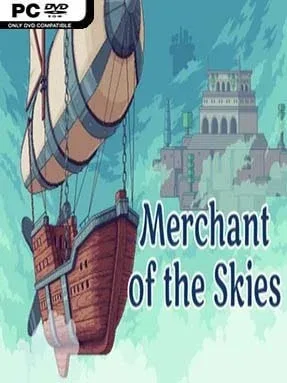
A battered airship, a thin purse, and a sky full of floating islands form the quietly addictive foundation of Merchant of the Skies. Rather than chasing combat or survival pressure, it turns the fantasy of captaining a cloudship into a relaxed economic adventure about spotting opportunities, hauling cargo, and gradually becoming a major name in the skies. The mood is warm, colorful, and lightly whimsical, though the constant need to balance fuel, storage space, and profitable goods gives every trip a satisfying edge. Its world feels built for players who enjoy watching a modest operation grow into something impressive.
Most of your time goes into buying low in one settlement, selling high in another, and using the profits to improve your ship and business reach. Islands offer resources to harvest, story characters to assist, contracts to complete, and new products that expand the market, while upgrades make longer and more ambitious voyages possible. Light base-management systems let you invest in properties and develop a personal estate, adding another layer beyond simple route optimization. The main campaign lasts roughly six to eight hours and guides progression with clear objectives, while Sandbox mode removes the narrative urgency and lets you experiment with trade networks at your own pace.
Merchant of the Skies stands out because it treats trading as an adventure rather than a spreadsheet-only exercise: every voyage has a sense of distance, discovery, and gradually earned freedom. Its hand-drawn presentation and compact island map make it accessible, but there is enough room in its markets and route planning to reward efficiency-minded players. Fans of the peaceful accumulation in games such as Sid Meier’s Pirates!, Stardew Valley’s business side, or casual tycoon sims should find plenty to enjoy here. It suits newcomers looking for an approachable management game, while veteran merchants can use Sandbox mode to chase cleaner, richer supply chains without story restrictions.
Installation
- Click the green button below to be redirected to UploadHaven.
- Wait 15 seconds, then hit “Free Download.” (Free downloads may be slower — upgrade to UploadHaven Pro for faster speeds.)
- Once downloaded, right-click the .zip file and choose “Extract to Merchant of the Skies.” (You’ll need 7-Zip for this.)
- Open the extracted folder and run the game as administrator.
- Enjoy! 🎮 If you see missing DLL errors, check the <strong>_Redist</strong> folder inside and install what’s needed.
System Requirements
- OS: Windows 7 SP1+
- Processor: Intel Core 2 Duo
- Memory: 1024 MB RAM
- Graphics: shader 3.0 supporting card (i.e. Intel HD Graphics 4000)
- DirectX: Version 9.0a
- Storage: 512 MB available space
- Additional Notes: DX9 (shader model 3.0) support
Setup Guide & Troubleshooting
How do I fix missing DLL errors for Merchant of the Skies (v1.6.7)?
After extracting Merchant of the Skies (v1.6.7), navigate to the _Redist or _CommonRedist folder inside the game directory and install DirectX, Vcredist, and any other dependencies included.
What should I do if the downloaded file is corrupted?
The full archive is 118.60 MB — make sure your download completed fully before extracting. Use 7-Zip to extract the files. If you still see a "file corrupted" error, re-download and try again.
Why should I run the game as administrator?
Right-click the game executable and select "Run as Administrator" to avoid save file issues and permission errors. This is especially important on the first launch.
How do I update my GPU drivers for this game?
Merchant of the Skies (v1.6.7) requires a shader 3.0 supporting card (i.e. Intel HD Graphics 4000) or equivalent. Update your NVIDIA or AMD drivers to the latest version for the best performance.
The game won't launch — what should I try?
This game requires Version 9.0a. Try running in compatibility mode, install the latest DirectX runtime, or install the All-in-One VC Redist Package.
My antivirus is blocking the game — is it safe?
Antivirus false positives are common with pre-installed games. Temporarily pause your antivirus during extraction to prevent it from quarantining game files. You can re-enable it after the extraction completes.