

Game Overview
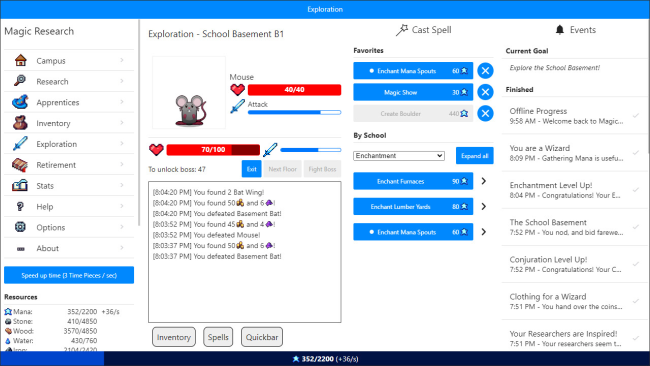
Running a fledgling academy of sorcery turns into a deceptively deep incremental strategy challenge, where every experiment, spell, and new hire pushes your institution closer to magical prestige. Magic Research casts you as the headmaster of a school determined to earn a place in the Tournament of Magic, but the journey matters far more than simply reaching the final competition. Its tone is bright and curious rather than grim, built around the pleasure of watching a tiny operation expand into a powerful research campus. Beneath the approachable interface sits a steady stream of surprises that makes even routine resource gathering feel like progress toward a larger secret.
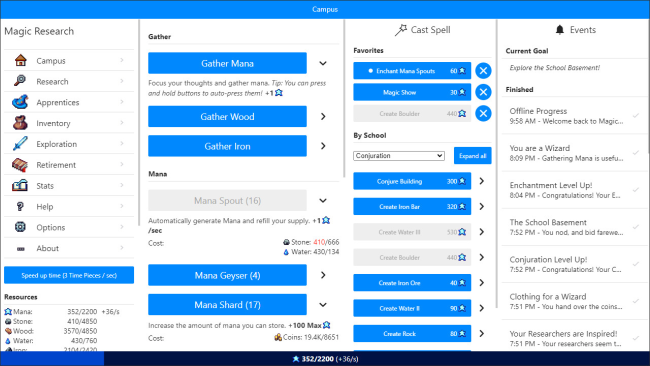
Most of your time goes into producing resources, assigning apprentices and researchers, unlocking disciplines, and deciding which upgrades best support your current goals. More than one hundred spells serve practical and experimental purposes, letting you improve production, overcome obstacles, and open avenues that are not immediately obvious. Research branches continually introduce new systems, so the game evolves from a straightforward management loop into a layered puzzle of synergies, automation, and long-term planning. Advancement eventually asks you to retire a run, sacrificing present momentum for permanent bonuses that make the next academy stronger and faster to develop.
What separates Magic Research from many idle games is its sense of discovery: mechanics arrive gradually, and hidden storylines can permanently reshape the rules of later runs. The hand-drawn presentation and playful magical theme keep the number-heavy progression from feeling sterile, while its frequent unlocks provide satisfying milestones across dozens of hours. Fans of games such as Realm Grinder, Melvor Idle, or NGU Idle will recognize the reset-driven structure, though the school-management framing gives it a distinct identity. It suits newcomers who enjoy relaxed, menu-driven progression, while genre veterans will get the most from optimizing spell combinations, uncovering secrets, and chasing increasingly efficient tournament preparations.
Installation
- Click the green button below to be redirected to UploadHaven.
- Wait 15 seconds, then hit “Free Download.” (Free downloads may be slower — upgrade to UploadHaven Pro for faster speeds.)
- Once downloaded, right-click the .zip file and choose “Extract to Magic Research.” (You’ll need 7-Zip for this.)
- Open the extracted folder and run the game as administrator.
- Enjoy! 🎮 If you see missing DLL errors, check the <strong>_Redist</strong> folder inside and install what’s needed.
System Requirements
- Requires a 64-bit processor and operating system
- OS: Windows 7 (SP1+) or higher
- Processor: Intel Core i3 or better
- Memory: 4 GB RAM
- Graphics: N/A
- Storage: 300 MB available space
- Sound Card: N/A
Setup Guide & Troubleshooting
How do I fix missing DLL errors for Magic Research (v1.14.1)?
After extracting Magic Research (v1.14.1), navigate to the _Redist or _CommonRedist folder inside the game directory and install DirectX, Vcredist, and any other dependencies included.
What should I do if the downloaded file is corrupted?
The full archive is 362.88 MB — make sure your download completed fully before extracting. Use 7-Zip to extract the files. If you still see a "file corrupted" error, re-download and try again.
Why should I run the game as administrator?
Right-click the game executable and select "Run as Administrator" to avoid save file issues and permission errors. This is especially important on the first launch.
How do I update my GPU drivers for this game?
Magic Research (v1.14.1) requires a N/A or equivalent. Update your NVIDIA or AMD drivers to the latest version for the best performance.
The game won't launch — what should I try?
Try running in compatibility mode, install the latest DirectX runtime, or install the All-in-One VC Redist Package.
My antivirus is blocking the game — is it safe?
Antivirus false positives are common with pre-installed games. Temporarily pause your antivirus during extraction to prevent it from quarantining game files. You can re-enable it after the extraction completes.