
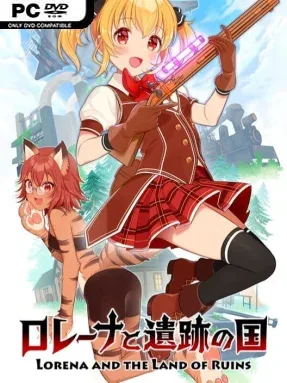
Game Overview
A bright fantasy expedition hides a tough arcade shooter beneath its colorful ruins, sending Lorena across forgotten landscapes in pursuit of a cure for her seriously ill sister. Her search for valuable relics brings her into contact with Xeera, an oddball researcher obsessed with restoring a legendary dragon-like artifact from the ancient past. The story gives the adventure a personal stake, while the world’s submerged wrecks, buried settlements, and abandoned temples supply a constant sense of discovery. Its tone balances earnest treasure-hunting drama with the energetic pace of an old-school action game.
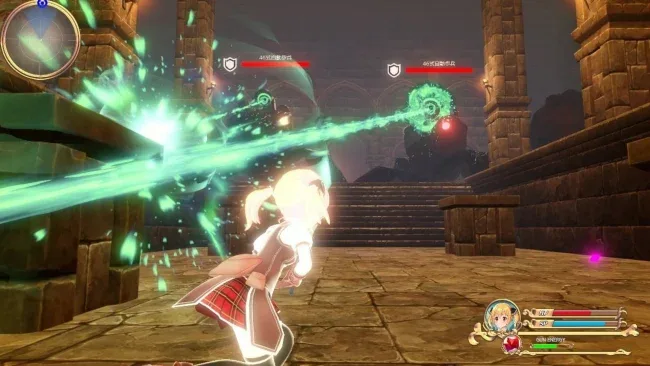
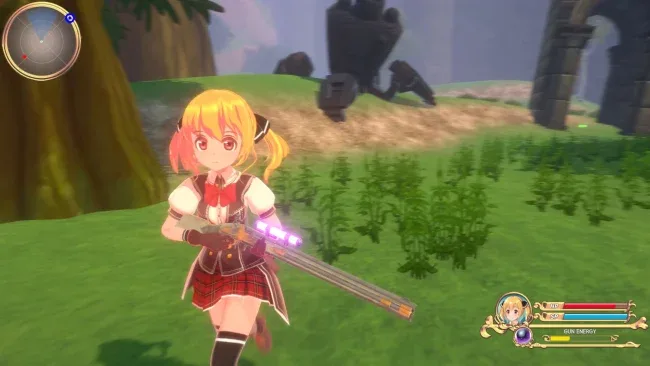
Lorena fights through each third-person stage with a mix of firearms, explosives, agile jumps, and close-range martial arts. Six weapon categories support different approaches to crowded encounters, while accurate headshots and well-timed knockbacks reward players looking to push their scores higher. Progress means learning enemy patterns, weaving around projectiles, surviving dense combat arenas, and dealing with environmental hazards or dungeon-style mechanisms. Four difficulty settings make the campaign approachable for casual players but leave room for veterans who want stricter enemy pressure, and both controller and remappable keyboard-and-mouse controls are supported.
The strongest appeal comes from its deliberately arcade-minded design: combat is about movement, target priority, and replaying stages more cleanly rather than hiding behind slow cover-shooter conventions. Ruin exploration provides visual variety between battles, and the emphasis on large enemy swarms gives some encounters the feel of a character-action score chase. Unlockable costumes and hairstyles add a welcome cosmetic incentive for players who enjoy personalizing their heroine, even if they do not alter combat. Fans of budget-friendly Japanese action games, third-person shooters, and light platforming will find a focused, cheerful adventure here, especially if they enjoy chasing better runs on harder difficulties.
Screenshots
Installation
- Select the <strong>Download</strong> button at the top of this page to open UploadHaven.
- On UploadHaven, wait for any countdown, then select <strong>Free Download</strong>. Optional: UploadHaven Pro for faster downloads.
- When complete, extract the archive to a <strong>Lorena and the Land of Ruins</strong> folder using 7-Zip.
- Open the extracted folder and start the game normally.
- For errors, check <strong>Setup Guide & Troubleshooting</strong> below. Keep your security software enabled.
System Requirements
- Processor: Core i5-4590 or better
- Memory: 8 GB RAM
- Graphics: Geforce GTX 970 or better
- Storage: 5 GB available space
Setup Guide & Troubleshooting
How do I fix missing DLL errors for Lorena and the Land of Ruins (v1.50)?
After extracting Lorena and the Land of Ruins (v1.50), navigate to the _Redist or _CommonRedist folder inside the game directory and install DirectX, Vcredist, and any other dependencies included.
What should I do if the downloaded file is corrupted?
The full archive is 1.56 GB — make sure your download completed fully before extracting. Use 7-Zip to extract the files. If you still see a "file corrupted" error, re-download and try again.
Why should I run the game as administrator?
Right-click the game executable and select "Run as Administrator" to avoid save file issues and permission errors. This is especially important on the first launch.
How do I update my GPU drivers for this game?
Lorena and the Land of Ruins (v1.50) requires a Geforce GTX 970 or better or equivalent. Update your NVIDIA or AMD drivers to the latest version for the best performance.
The game won't launch — what should I try?
Try running in compatibility mode, install the latest DirectX runtime, or install the All-in-One VC Redist Package.
My antivirus is blocking the game — is it safe?
Antivirus false positives are common with pre-installed games. Temporarily pause your antivirus during extraction to prevent it from quarantining game files. You can re-enable it after the extraction completes.