
Game Overview
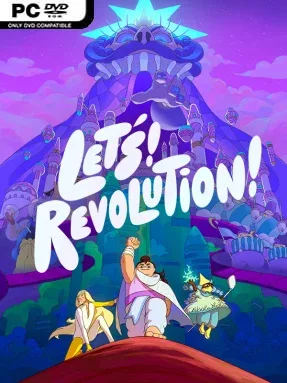
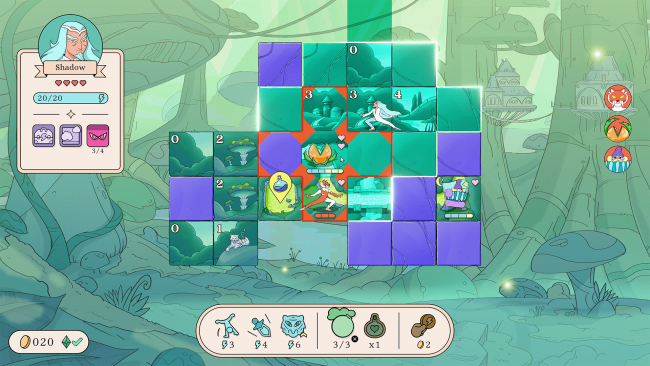
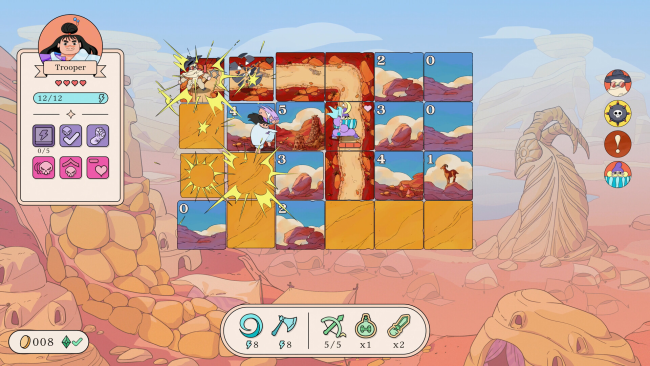
A revolution takes the form of a clever, tense puzzle hunt across the storybook kingdom of Beebom. Let’s! Revolution! turns Minesweeper’s familiar numbered clues into a roguelite pursuit, where every flipped tile can reveal safe ground, useful loot, a dangerous enemy, or another lead on the corrupt King. Its bright hand-drawn art and playful animation keep the mood buoyant, but the pressure is real: careless deduction can leave a hero cornered by royal enforcers. The result feels like a compact strategy adventure built around reading a board as carefully as a battlefield.
Each run sends you through procedurally arranged districts, uncovering tiles to determine where threats and objectives lie while tracking the King’s movements. Enemy actions unfold in turns, so positioning, route planning, and knowing when to fight or slip away matter as much as solving the numerical puzzle. Combat is driven by class skills and a large pool of items, allowing builds based on brute-force attacks, traps, mobility, information gathering, healing, and evasive tricks. The Charger gains momentum by pushing into unknown spaces, while the Shadow disrupts opponents with stealthy tools, and the Oracle bends the rules with extra clues and teleportation; the remaining heroes further encourage repeated runs with different tactical priorities.
What makes the concept work is that Minesweeper logic is not merely a minigame pasted onto combat—it determines how confidently you can move through every encounter. A board can become a puzzle of enemy ranges, blocked paths, hidden hazards, and tempting treasure, making even small decisions satisfying. BUCK’s expressive visual style gives Beebom a distinctive personality, and Antfood’s sound work supports its whimsical yet uneasy atmosphere without overwhelming the strategy. Fans of Into the Breach, Slay the Spire-style run-building, or tactical puzzle games should find plenty to enjoy, while newcomers can approach it through its clear rules and gradually escalating complexity.
Installation
- Click the green button below to be redirected to UploadHaven.
- Wait 15 seconds, then hit “Free Download.” (Free downloads may be slower — upgrade to UploadHaven Pro for faster speeds.)
- Once downloaded, right-click the .zip file and choose “Extract to Let's! Revolution!.” (You’ll need 7-Zip for this.)
- Open the extracted folder and run the game as administrator.
- Enjoy! 🎮 If you see missing DLL errors, check the <strong>_Redist</strong> folder inside and install what’s needed.
System Requirements
- Requires a 64-bit processor and operating system
- OS: Windows XP or better
- Processor: Intel CPU 2.3 Ghz or better
- Memory: 8 GB RAM
- Graphics: Intel HD Graphics 4000 or better (2GB or more of VRAM)
- DirectX: Version 10
- Storage: 4 GB available space
Setup Guide & Troubleshooting
How do I fix missing DLL errors for Let’s! Revolution! (v1.2.20)?
After extracting Let’s! Revolution! (v1.2.20), navigate to the _Redist or _CommonRedist folder inside the game directory and install DirectX, Vcredist, and any other dependencies included.
What should I do if the downloaded file is corrupted?
The full archive is 455.38 MB — make sure your download completed fully before extracting. Use 7-Zip to extract the files. If you still see a "file corrupted" error, re-download and try again.
Why should I run the game as administrator?
Right-click the game executable and select "Run as Administrator" to avoid save file issues and permission errors. This is especially important on the first launch.
How do I update my GPU drivers for this game?
Let’s! Revolution! (v1.2.20) requires a Intel HD Graphics 4000 or better (2GB or more of VRAM) or equivalent. Update your NVIDIA or AMD drivers to the latest version for the best performance.
The game won't launch — what should I try?
This game requires Version 10. Try running in compatibility mode, install the latest DirectX runtime, or install the All-in-One VC Redist Package.
My antivirus is blocking the game — is it safe?
Antivirus false positives are common with pre-installed games. Temporarily pause your antivirus during extraction to prevent it from quarantining game files. You can re-enable it after the extraction completes.