
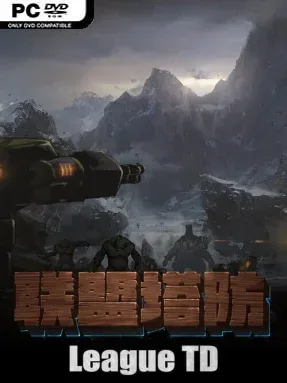
Game Overview
A relentless enemy advance turns every lane into a test of planning, timing, and resource management. League TD is an indie tower-defense game built around earning new defensive units through battle, then refining them into specialized tools for increasingly stubborn waves. Its mood is focused rather than flashy: success comes from reading enemy behavior, covering weaknesses in your line, and resisting the temptation to spend every material the moment it appears. The premise is familiar, but its emphasis on tower customization gives each defense layout more personality than a simple “build the strongest turret” routine.
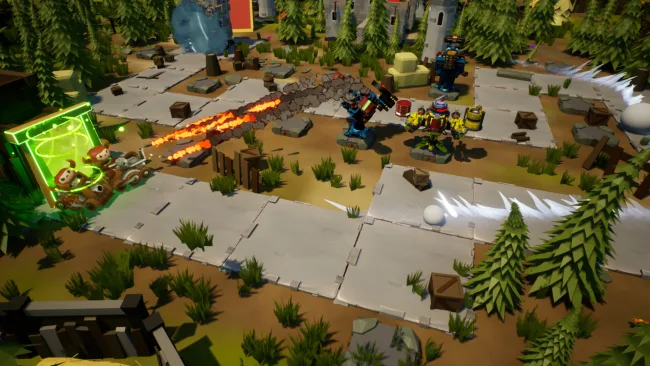
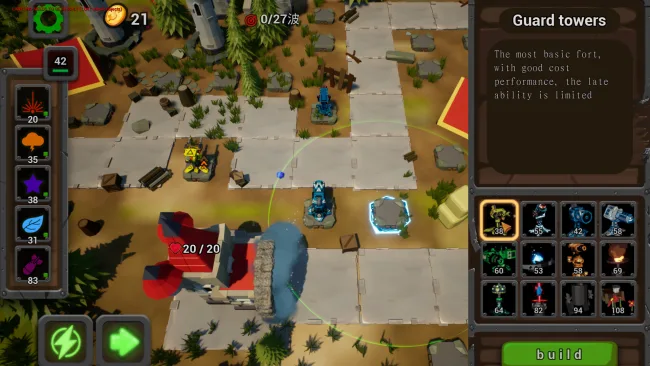
Matches revolve around placing towers with distinct firing styles, collecting materials, and deciding which parts of the defense deserve investment. Every tower type can reach level 10, improving fundamentals such as damage output, firing rate, and attack radius, while higher levels also reveal functional attachments. Those accessories are more than minor stat boosts, as their upgrades can unlock altered abilities and new battlefield roles for a familiar tower. Enemy varieties complicate the usual wave-clearing formula with their own protective traits and countermeasures, so a formation that crushes one assault can struggle badly against the next unless players adapt their mix of damage, coverage, and utility.
League TD stands out through the amount of tuning packed into its tower progression system. With numerous accessories available per tower, players can experiment with builds that prioritize raw firepower, faster attacks, extended reach, or skill-driven effects, making repeat runs an opportunity to test different synergies. The visual and structural appeal lies less in narrative spectacle than in watching a carefully assembled defense become a machine tailored to a specific threat. Fans of classic lane-defense games such as Bloons TD or Kingdom Rush who want more control over individual tower development should find plenty to enjoy, while newcomers can learn the basics quickly before tackling the deeper upgrade combinations.
Screenshots
Installation
- Select the <strong>Download</strong> button at the top of this page to open UploadHaven.
- On UploadHaven, wait for any countdown, then select <strong>Free Download</strong>. Optional: UploadHaven Pro for faster downloads.
- When complete, extract the archive to a <strong>League TD</strong> folder using 7-Zip.
- Open the extracted folder and start the game normally.
- For errors, check <strong>Setup Guide & Troubleshooting</strong> below. Keep your security software enabled.
System Requirements
- Requires a 64-bit processor and operating system
- OS: win7/win10
- Processor: intel core i5-6400 or AMD FX 8320
- Memory: 8 GB RAM
- Graphics: NVIDIA GTX 960 or amd radeon r9 280
- DirectX: Version 11
- Storage: 6 GB available space
Setup Guide & Troubleshooting
How do I fix missing DLL errors for League TD?
After extracting League TD, navigate to the _Redist or _CommonRedist folder inside the game directory and install DirectX, Vcredist, and any other dependencies included.
What should I do if the downloaded file is corrupted?
The full archive is 4.86 GB — make sure your download completed fully before extracting. Use 7-Zip to extract the files. If you still see a "file corrupted" error, re-download and try again.
Why should I run the game as administrator?
Right-click the game executable and select "Run as Administrator" to avoid save file issues and permission errors. This is especially important on the first launch.
How do I update my GPU drivers for this game?
League TD requires a NVIDIA GTX 960 or amd radeon r9 280 or equivalent. Update your NVIDIA or AMD drivers to the latest version for the best performance.
The game won't launch — what should I try?
This game requires Version 11. Try running in compatibility mode, install the latest DirectX runtime, or install the All-in-One VC Redist Package.
My antivirus is blocking the game — is it safe?
Antivirus false positives are common with pre-installed games. Temporarily pause your antivirus during extraction to prevent it from quarantining game files. You can re-enable it after the extraction completes.