
Game Overview
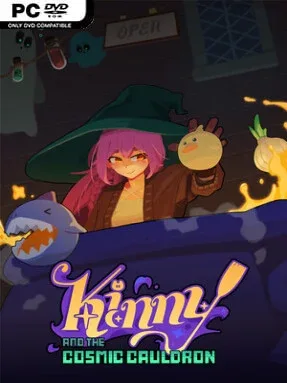
A bubbling pot becomes the center of a surprisingly tense interstellar kitchen in Kinny and the Cosmic Cauldron. You play the only witch chef employed by Stewpendous Spoons, a spacefaring restaurant that serves demanding alien customers with very particular tastes. Every order turns cooking into a high-pressure score chase, where bizarre ingredients collide inside a legendary cauldron and either produce a spectacular stew or a disastrous mess. The tone is whimsical and colorful, but the threat of becoming kitchen stock yourself gives its cartoon chaos a sharp edge.
Runs revolve around dropping a changing set of 20 ingredients into the cauldron, then watching their physical interactions, combinations, and reactions determine how many points your meal earns. Success depends on reaching each patron’s target quickly enough, while learning how individual components behave when they bounce, merge, or trigger effects alongside one another. Between cooking sessions, you shape a stronger deck of ingredients, selecting additions that support reliable combos instead of hoping random collisions save the day. Rewards include expanded cauldron capacity and Cosmic Relics, which add persistent advantages and encourage different approaches to building a winning stew.
Its strongest idea is the fusion of roguelike deck-building with a messy, physics-driven cooking pot: planning matters, but every recipe also demands quick adaptation when the ingredients start behaving unpredictably. Hand-drawn pixel art gives the restaurant and its cosmic backdrops a playful personality, while animated foodstuffs make each cauldron full of action easy to read. Players who enjoy the synergy hunting of Slay the Spire or Balatro but want something less card-table focused should find plenty to experiment with here. Kinny and the Cosmic Cauldron suits newcomers willing to learn through failed runs, while genre veterans can chase increasingly potent relic-and-ingredient combinations.
Installation
- Click the green button below to be redirected to UploadHaven.
- Wait 15 seconds, then hit “Free Download.” (Free downloads may be slower — upgrade to UploadHaven Pro for faster speeds.)
- Once downloaded, right-click the .zip file and choose “Extract to Kinny and the Cosmic Cauldron.” (You’ll need 7-Zip for this.)
- Open the extracted folder and run the game as administrator.
- Enjoy! 🎮 If you see missing DLL errors, check the <strong>_Redist</strong> folder inside and install what’s needed.
System Requirements
- OS: Windows 10
- Processor: x64 architecture with SSE2 instruction set support
- Memory: 8 GB RAM
- Graphics: GPU with DirectX 10, 11, or 12 support
- DirectX: Version 11
- Storage: 2 GB available space
Setup Guide & Troubleshooting
How do I fix missing DLL errors for Kinny and the Cosmic Cauldron (v2026.07.31)?
After extracting Kinny and the Cosmic Cauldron (v2026.07.31), navigate to the _Redist or _CommonRedist folder inside the game directory and install DirectX, Vcredist, and any other dependencies included.
What should I do if the downloaded file is corrupted?
The full archive is 458.61 MB — make sure your download completed fully before extracting. Use 7-Zip to extract the files. If you still see a "file corrupted" error, re-download and try again.
Why should I run the game as administrator?
Right-click the game executable and select "Run as Administrator" to avoid save file issues and permission errors. This is especially important on the first launch.
How do I update my GPU drivers for this game?
Kinny and the Cosmic Cauldron (v2026.07.31) requires a GPU with DirectX 10, 11, or 12 support or equivalent. Update your NVIDIA or AMD drivers to the latest version for the best performance.
The game won't launch — what should I try?
This game requires Version 11. Try running in compatibility mode, install the latest DirectX runtime, or install the All-in-One VC Redist Package.
My antivirus is blocking the game — is it safe?
Antivirus false positives are common with pre-installed games. Temporarily pause your antivirus during extraction to prevent it from quarantining game files. You can re-enable it after the extraction completes.