
Game Overview
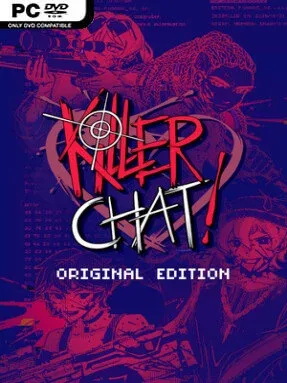
A darkly comic dating simulator turns a writer’s questionable research habits into a six-month nightmare of flirting, lying, and trying not to become evidence. After attracting the attention of an online community for murderers, you enter its chat server under the assumption that you are one of them, despite having no real criminal credentials. The tone balances morbid subject matter with absurd internet humor, awkward romance, and the constant tension of knowing that a badly chosen message may have lethal consequences. Beneath the jokes, the premise creates a surprisingly effective pressure cooker: every relationship begins with a dangerous deception.
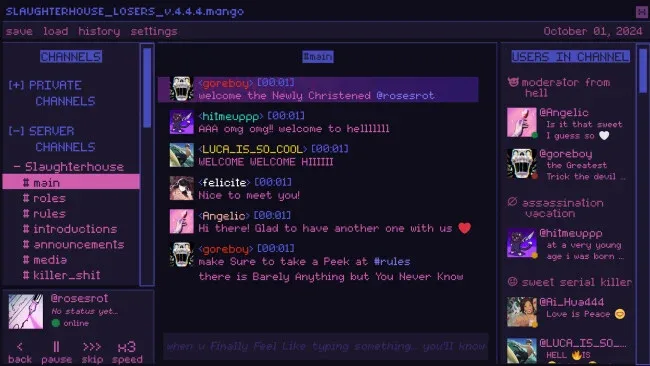
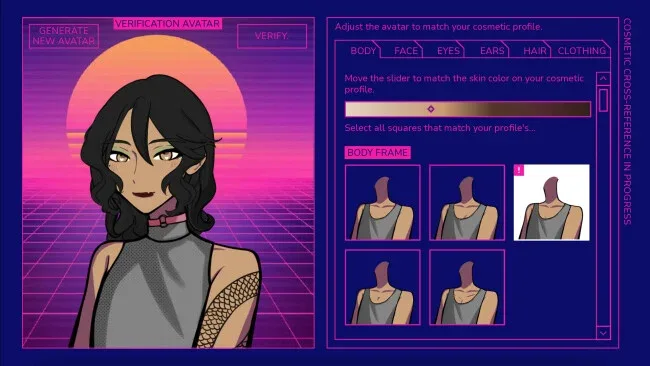
Most of the action unfolds through an interactive chat interface where conversations, profile details, calls, voice notes, and friend requests shape your place in the group. You build a customizable protagonist, choosing their appearance, identity, personality, online persona, and invented killer “specialty,” then decide how boldly to bluff or how carefully to play along. Four romanceable killers, representing different genders and murderous archetypes, respond to your choices across branching routes. Dialogue decisions steer affection, suspicion, and survival, leading toward eight endings that range from uneasy romance to distinctly grim outcomes. A single path takes roughly two to three hours, while seeing every major route turns it into a longer visual-novel commitment.
What separates it from standard dating sims is its use of contemporary messaging culture as both its main storytelling device and its source of comedy. Rather than simply selecting flirt options in a fantasy setting, you are managing an entire fabricated identity among people who may notice every inconsistency. Illustrated scenes, character voice work, sound effects, and an original score give the compact presentation more personality than its chat-window format initially suggests. Fans of choice-heavy visual novels, black comedy, and games such as Hatoful Boyfriend or The Arcana will likely appreciate its strange mix of romance and danger. It is also approachable for newcomers, provided they are comfortable with stories involving murder, death, and references to abuse.
Screenshots
Installation
- Click the green button below to be redirected to UploadHaven.
- Wait 15 seconds, then hit “Free Download.” (Free downloads may be slower — upgrade to UploadHaven Pro for faster speeds.)
- Once downloaded, right-click the .zip file and choose “Extract to Killer Chat! - Original Edition.” (You’ll need 7-Zip for this.)
- Open the extracted folder and run the game as administrator.
- Enjoy! 🎮 If you see missing DLL errors, check the <strong>_Redist</strong> folder inside and install what’s needed.
System Requirements
- OS: Windows 10 or higher
- Processor: 64-bit Intel-compatible
- Memory: 300 MB RAM
- Graphics: OpenGL 3.0
- Storage: 300 MB available space
Setup Guide & Troubleshooting
How do I fix missing DLL errors for Killer Chat! – Original Edition (Incl. Overkill DLC)?
After extracting Killer Chat! – Original Edition (Incl. Overkill DLC), navigate to the _Redist or _CommonRedist folder inside the game directory and install DirectX, Vcredist, and any other dependencies included.
What should I do if the downloaded file is corrupted?
The full archive is 2.63 GB — make sure your download completed fully before extracting. Use 7-Zip to extract the files. If you still see a "file corrupted" error, re-download and try again.
Why should I run the game as administrator?
Right-click the game executable and select "Run as Administrator" to avoid save file issues and permission errors. This is especially important on the first launch.
How do I update my GPU drivers for this game?
Killer Chat! – Original Edition (Incl. Overkill DLC) requires a OpenGL 3.0 or equivalent. Update your NVIDIA or AMD drivers to the latest version for the best performance.
The game won't launch — what should I try?
Try running in compatibility mode, install the latest DirectX runtime, or install the All-in-One VC Redist Package.
My antivirus is blocking the game — is it safe?
Antivirus false positives are common with pre-installed games. Temporarily pause your antivirus during extraction to prevent it from quarantining game files. You can re-enable it after the extraction completes.