
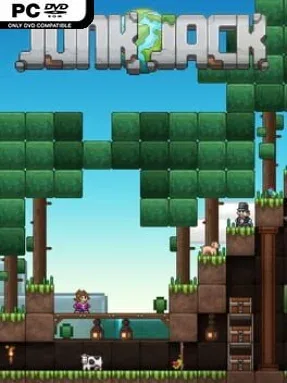
Game Overview
Junk Jack turns a simple patch of alien dirt into a personal workshop, farm, museum, and monster-proof home. Its colorful 2D sandbox structure sits comfortably beside Terraria, but the mood is more relaxed and domestic, with as much attention paid to decorating and collecting as to fighting. Players hop between procedurally generated planets, each offering unfamiliar resources, biomes, ruins, creatures, and underground dangers. The result is an open-ended adventure that rewards curiosity without demanding a single fixed path.
Most of your time goes into mining terrain, gathering materials, and turning them into increasingly useful tools, furniture, equipment, and building pieces. Combat is straightforward real-time action against hostile wildlife and dungeon threats, while stronger gear makes deeper exploration safer and broadens the range of places you can harvest. Between expeditions, you can establish a base, cultivate unusual crops and flowers, fish, cook meals, raise animals, and tame creatures into companions. Multiplayer lets friends share the workload or simply collaborate on elaborate homes, gardens, and collection rooms, making the sandbox loop feel social rather than solitary.
What separates Junk Jack from harsher survival-crafting games is its affection for small-scale projects: arranging furniture, displaying rare loot, breeding animals, and filling a world with the results of your travels all matter as much as reaching the next dangerous planet. Its pixel-art presentation is bright and readable, while the huge spread of crafting ingredients and collectible objects gives dedicated players plenty of long-term goals. Procedural generation keeps new worlds from feeling entirely predictable, even if the familiar mine-craft-fight-upgrade rhythm remains the main draw. Fans of Terraria, Starbound, and low-pressure building sandboxes should feel at home, while newcomers get an approachable crafting adventure that allows them to progress at their own pace.
Installation
- Click the green button below to be redirected to UploadHaven.
- Wait 15 seconds, then hit “Free Download.” (Free downloads may be slower — upgrade to UploadHaven Pro for faster speeds.)
- Once downloaded, right-click the .zip file and choose “Extract to Junk Jack.” (You’ll need 7-Zip for this.)
- Open the extracted folder and run the game as administrator.
- Enjoy! 🎮 If you see missing DLL errors, check the <strong>_Redist</strong> folder inside and install what’s needed.
System Requirements
- OS: Windows 8
- Processor: Intel x86 CPU
- Memory: 1 GB RAM
- Graphics: Opengl 2.1+ GPU (256MB VRAM)
- Storage: 300 MB available space
- Additional Notes: Requires Visual Studio 2015 Redistributables which may require some specific updates from Windows Update to be installed before
Setup Guide & Troubleshooting
How do I fix missing DLL errors for Junk Jack (v3.2)?
After extracting Junk Jack (v3.2), navigate to the _Redist or _CommonRedist folder inside the game directory and install DirectX, Vcredist, and any other dependencies included.
What should I do if the downloaded file is corrupted?
The full archive is 141.44 MB — make sure your download completed fully before extracting. Use 7-Zip to extract the files. If you still see a "file corrupted" error, re-download and try again.
Why should I run the game as administrator?
Right-click the game executable and select "Run as Administrator" to avoid save file issues and permission errors. This is especially important on the first launch.
How do I update my GPU drivers for this game?
Junk Jack (v3.2) requires a Opengl 2.1+ GPU (256MB VRAM) or equivalent. Update your NVIDIA or AMD drivers to the latest version for the best performance.
The game won't launch — what should I try?
Try running in compatibility mode, install the latest DirectX runtime, or install the All-in-One VC Redist Package.
My antivirus is blocking the game — is it safe?
Antivirus false positives are common with pre-installed games. Temporarily pause your antivirus during extraction to prevent it from quarantining game files. You can re-enable it after the extraction completes.