
iVIBRATE Ultimate Edition Cover Art

iVIBRATE Ultimate Edition

INDIE 143.75 MB

Game Overview

A standard controller becomes a surprisingly flexible haptic device in this niche utility built around vibration rather than traditional game objectives. iVIBRATE Ultimate Edition lets players tailor rumble effects for gamepads and supported steering wheels, making it more of an interactive desktop toy than a conventional indie game. The mood is playful, private, and unabashedly specialized, with the focus placed entirely on creating the right tactile rhythm. Its appeal depends less on graphics or narrative and more on how much control you want over hardware feedback.

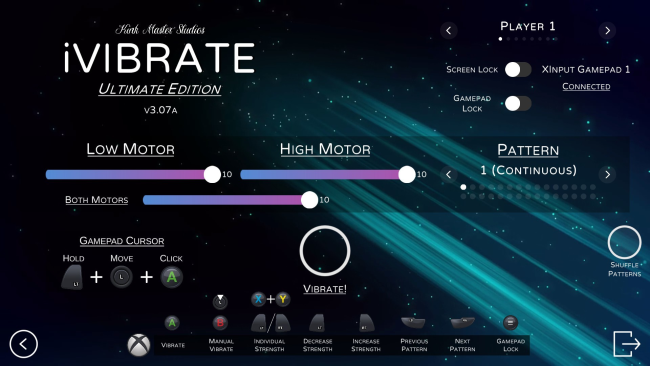
Users choose from a wide selection of preset vibration routines, including continuous, randomized, offset, and user-designed sequences. Separate controls for each controller motor make it possible to emphasize heavy low-frequency rumble, lighter high-frequency pulses, or uneven alternating patterns that feel markedly different from standard in-game feedback. Manual activation can be assigned to a held button instead of a simple on/off switch, while gamepad navigation and an on-screen virtual cursor mean the program can be operated without constantly reaching for a mouse. Steering-wheel compatibility broadens the supported hardware, and visual background options add a small degree of cosmetic personalization.

What separates iVIBRATE Ultimate Edition from a basic controller test application is its unusually granular approach to motor behavior and pattern construction. The custom and randomized modes give it some replay value for users who enjoy experimenting, even though there is no campaign, competitive mode, or broader gameplay loop to speak of. Its presentation is functional rather than lavish, but the interface serves the purpose of quickly adjusting intensity, timing, and motor balance. Anyone seeking an inventive use for a rumble-capable controller or wheel finds a more capable tool here than the vibration settings buried in most games, while players looking for a traditional indie adventure should look elsewhere.

Installation

  1. Click the green button below to be redirected to UploadHaven.
  2. Wait 15 seconds, then hit “Free Download.” (Free downloads may be slower — upgrade to UploadHaven Pro for faster speeds.)
  3. Once downloaded, right-click the .zip file and choose “Extract to iVIBRATE Ultimate Edition.” (You’ll need 7-Zip for this.)
  4. Open the extracted folder and run the game as administrator.
  5. Enjoy! 🎮 If you see missing DLL errors, check the <strong>_Redist</strong> folder inside and install what’s needed.

System Requirements

  • OS: Windows 10
  • Processor: Intel Core i3
  • Memory: 1 GB RAM
  • Graphics: GTX 1050
  • Storage: 125 MB available space
  • Sound Card: N/A
  • Additional Notes: Please download iVIBRATE Ultimate Edition Demo first to test your gamepad and operating system compatibility. (More than likely, iVIBRATE will work on requirements less than this)

Setup Guide & Troubleshooting

How do I fix missing DLL errors for iVIBRATE Ultimate Edition?

After extracting iVIBRATE Ultimate Edition, navigate to the _Redist or _CommonRedist folder inside the game directory and install DirectX, Vcredist, and any other dependencies included.

What should I do if the downloaded file is corrupted?

The full archive is 143.75 MB — make sure your download completed fully before extracting. Use 7-Zip to extract the files. If you still see a "file corrupted" error, re-download and try again.

Why should I run the game as administrator?

Right-click the game executable and select "Run as Administrator" to avoid save file issues and permission errors. This is especially important on the first launch.

How do I update my GPU drivers for this game?

iVIBRATE Ultimate Edition requires a GTX 1050 or equivalent. Update your NVIDIA or AMD drivers to the latest version for the best performance.

The game won't launch — what should I try?

Try running in compatibility mode, install the latest DirectX runtime, or install the All-in-One VC Redist Package.

My antivirus is blocking the game — is it safe?

Antivirus false positives are common with pre-installed games. Temporarily pause your antivirus during extraction to prevent it from quarantining game files. You can re-enable it after the extraction completes.

Need more help? Browse our FAQ & Troubleshooting Guide for solutions to common issues.
Looking for something else? Explore all games on Steam Unlocked