
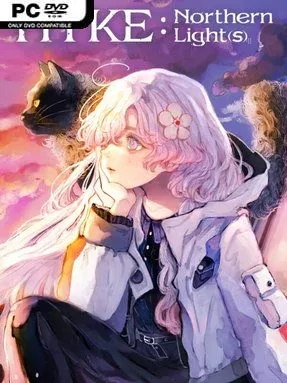
Game Overview
Magic-scarred wilderness and quiet campfire evenings give this pixel-art RPG its appealing contrast. HYKE:Northern Light(s) follows Hyke, a white-haired young witch searching for the mother whose actions helped devastate a world already fractured by war between humans and witches. Her trail leads into the Forbidden Areas, dangerous regions sealed off from ordinary travel and watched over by powerful witches known as the Meteos. The result is a story-driven adventure that balances melancholy, mystery, and an intentionally cozy appreciation for the small moments between battles.
Action unfolds from a top-down 2D perspective, with players pushing through magical hostile zones, fighting enemies, and adapting to each area’s dangers. Hyke is not the only playable fighter: the adventure offers seven characters with their own abilities and combat approaches, encouraging players to change tactics rather than rely on a single solution. Progression revolves around preparing for expeditions, overcoming each stage, and making use of the equipment gathered along the way. Camps act as essential recovery spaces where the party rests, manages gear, and cooks meals that provide useful bonuses before returning to the field.
Its strongest idea is the rhythm between pressure and comfort. Many action RPGs treat downtime as a menu screen, while HYKE:Northern Light(s) makes camping part of the fantasy, letting players arrange their site and enjoy music and food before another risky outing. Detailed pixel environments and a cast of distinct witches give the world a brighter, more characterful identity than its ruined-world premise initially suggests. Players who enjoy the compact action of top-down adventures, the party variety of character-switching RPGs, and the soothing preparation loops found in cozy games should find plenty to like here; it is especially well suited to newcomers who want action without losing a sense of warmth and routine.
Installation
- Click the green button below to be redirected to UploadHaven.
- Wait 15 seconds, then hit “Free Download.” (Free downloads may be slower — upgrade to UploadHaven Pro for faster speeds.)
- Once downloaded, right-click the .zip file and choose “Extract to Hyke:Northern Light(s).” (You’ll need 7-Zip for this.)
- Open the extracted folder and run the game as administrator.
- Enjoy! 🎮 If you see missing DLL errors, check the <strong>_Redist</strong> folder inside and install what’s needed.
System Requirements
- Requires a 64-bit processor and operating system
- OS: Windows 10/11
- Processor: Intel Core i5-7400 3.00GHz
- Memory: 4 GB RAM
- Graphics: NVIDIA GeForce GTX 960 (2GB)
- DirectX: Version 11
- Storage: 3 GB available space
- Additional Notes: ウィンドウサイズ 1280×720
Setup Guide & Troubleshooting
How do I fix missing DLL errors for HYKE:Northern Light(s) (v1.0.1)?
After extracting HYKE:Northern Light(s) (v1.0.1), navigate to the _Redist or _CommonRedist folder inside the game directory and install DirectX, Vcredist, and any other dependencies included.
What should I do if the downloaded file is corrupted?
The full archive is 1.80 GB — make sure your download completed fully before extracting. Use 7-Zip to extract the files. If you still see a "file corrupted" error, re-download and try again.
Why should I run the game as administrator?
Right-click the game executable and select "Run as Administrator" to avoid save file issues and permission errors. This is especially important on the first launch.
How do I update my GPU drivers for this game?
HYKE:Northern Light(s) (v1.0.1) requires a NVIDIA GeForce GTX 960 (2GB) or equivalent. Update your NVIDIA or AMD drivers to the latest version for the best performance.
The game won't launch — what should I try?
This game requires Version 11. Try running in compatibility mode, install the latest DirectX runtime, or install the All-in-One VC Redist Package.
My antivirus is blocking the game — is it safe?
Antivirus false positives are common with pre-installed games. Temporarily pause your antivirus during extraction to prevent it from quarantining game files. You can re-enable it after the extraction completes.