
Game Overview
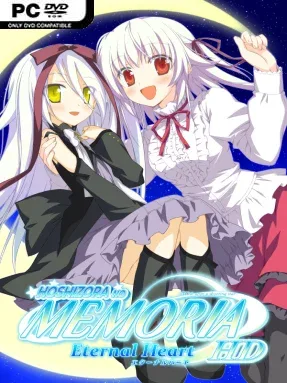
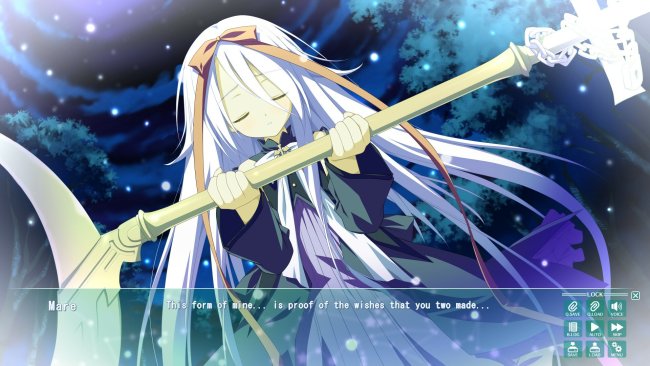
Beneath a sky full of stars, romance takes center stage in a gentle visual novel built for players who want to spend more time with familiar characters rather than start an entirely new adventure. Hoshizora no Memoria -Eternal Heart- HD serves as a sequel-style fandisc to Hoshizora no Memoria -Wish upon a shooting star-, continuing the emotional aftermath of its most important routes. The mood is warm, sentimental, and unabashedly affectionate, balancing quiet everyday moments with the lingering supernatural and emotional threads that define the original story. Its focus falls especially on Mare and Yume, giving their relationships room to breathe after the main narrative’s climactic events.
Reading is the primary activity here: players follow fully voiced Japanese dialogue, enjoy character interactions, and move through a collection of post-story episodes rather than a single long branching campaign. The central loop is deliberately relaxed, built around dialogue, romantic payoffs, comedy, and reflective scenes that reward familiarity with the original cast and their histories. HD artwork gives the character sprites and event CGs a cleaner presentation, while the included gallery lets players revisit unlocked illustrations. There is little mechanical challenge in the conventional sense—no combat, resource management, or demanding puzzles—so the appeal rests on its writing, performances, and the comfort of returning to beloved routes.
What makes Eternal Heart worthwhile is its purpose: it treats endings not as a stopping point, but as an opportunity to show what happiness looks like after the confession, crisis, or supernatural mystery has passed. Alongside the substantial Mare and Yume follow-ups, shorter stories provide extra time with the other heroines, making the package feel like a farewell album for the wider cast. The starry aesthetic, expressive anime art, and intimate pacing place it close to romance-focused visual novels such as CLANNAD’s lighter after-story material or other character-driven fandiscs. Veterans of the original will get the most from it, while newcomers should begin with the main Hoshizora no Memoria first, since these episodes assume investment in its routes and freely continue their outcomes.
Installation
- Click the green button below to be redirected to UploadHaven.
- Wait 15 seconds, then hit “Free Download.” (Free downloads may be slower — upgrade to UploadHaven Pro for faster speeds.)
- Once downloaded, right-click the .zip file and choose “Extract to Hoshizora no Memoria -Eternal Heart- HD.” (You’ll need 7-Zip for this.)
- Open the extracted folder and run the game as administrator.
- Enjoy! 🎮 If you see missing DLL errors, check the <strong>_Redist</strong> folder inside and install what’s needed.
System Requirements
- OS: Windows 7, 8, 8.1, 10
- Processor: Intel Core2Duo and above
- Memory: 1 GB RAM
- Graphics: DirectX compatible card with 64 MB VRAM
- DirectX: Version 9.0c
- Storage: 6 GB available space
- Additional Notes: 1920 x 1080 and above display recommended
Setup Guide & Troubleshooting
How do I fix missing DLL errors for Hoshizora no Memoria -Eternal Heart- HD?
After extracting Hoshizora no Memoria -Eternal Heart- HD, navigate to the _Redist or _CommonRedist folder inside the game directory and install DirectX, Vcredist, and any other dependencies included.
What should I do if the downloaded file is corrupted?
The full archive is 10.08 GB — make sure your download completed fully before extracting. Use 7-Zip to extract the files. If you still see a "file corrupted" error, re-download and try again.
Why should I run the game as administrator?
Right-click the game executable and select "Run as Administrator" to avoid save file issues and permission errors. This is especially important on the first launch.
How do I update my GPU drivers for this game?
Hoshizora no Memoria -Eternal Heart- HD requires a DirectX compatible card with 64 MB VRAM or equivalent. Update your NVIDIA or AMD drivers to the latest version for the best performance.
The game won't launch — what should I try?
This game requires Version 9.0c. Try running in compatibility mode, install the latest DirectX runtime, or install the All-in-One VC Redist Package.
My antivirus is blocking the game — is it safe?
Antivirus false positives are common with pre-installed games. Temporarily pause your antivirus during extraction to prevent it from quarantining game files. You can re-enable it after the extraction completes.