

Game Overview
A murder investigation unfolds not through cinematic set pieces, but across a cluttered police desktop where every report, photograph, call log, and sealed document can change the case. Ravenport is a wet, worn-down port city viewed through a convincing CRT-style police operating system, complete with scanlines, weather reports, and an ever-ticking clock. The tone is methodical and tense, asking players to think like detectives rather than follow highlighted objectives. A bad conclusion carries real weight: charge the wrong suspect and Internal Affairs turns its attention toward you.
Each case begins with incomplete information and a handful of people worth questioning, then leaves you to build the chain of proof. Investigations involve reading deeply nested files, linking leads on a physical evidence board, checking timestamps against phone records, scanning photos with UV light, and completing hands-on forensic tasks such as fingerprint matching, cipher work, and chromatograph calibration. Interrogations are the centerpiece, allowing players to type their own questions instead of selecting from a dialogue wheel; suspects respond conversationally, evade accusations, contradict prior claims, and react when incriminating evidence lands on the table. Pressure matters, since unsupported aggression can end an interview, while the right document can expose a lie and unlock new avenues.
Its strongest idea is treating the detective’s computer as the entire game world rather than a menu between scenes. Written deductions and arrest decisions demand genuine attention, while alternate culprit configurations give solved cases reason to be reopened and reconsidered. Salary management, patrol dispatches, commissary interactions, and smaller side activities help the precinct feel active beyond the main investigation, and English and Arabic support includes proper right-to-left presentation. Players who enjoy the observational detail of Return of the Obra Dinn, the evidence handling of Her Story, or classic police procedurals should find a demanding, refreshingly unscripted mystery here; newcomers can learn its systems, but patient note-takers get the most from it.
Screenshots
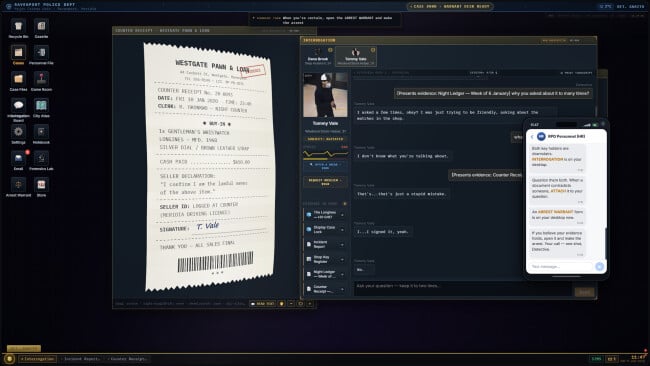
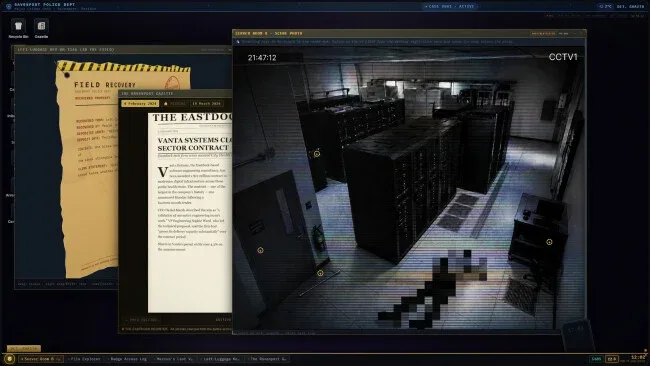
Installation
- Click the green button below to be redirected to UploadHaven.
- Wait 15 seconds, then hit “Free Download.” (Free downloads may be slower — upgrade to UploadHaven Pro for faster speeds.)
- Once downloaded, right-click the .zip file and choose “Extract to Homicide Desk.” (You’ll need 7-Zip for this.)
- Open the extracted folder and run the game as administrator.
- Enjoy! 🎮 If you see missing DLL errors, check the <strong>_Redist</strong> folder inside and install what’s needed.
System Requirements
- OS: Windows 10 (64-bit)
- Processor: Dual-core 2.0 GHz (Intel Core i3 / AMD equivalent, 2015 or newer)
- Memory: 4096 MB RAM
- Graphics: Integrated graphics with WebGL / DirectX 11 support (Intel HD 4000 or better)
- DirectX: Version 11
- Network: Broadband Internet connection
- Storage: 13000 MB MB available space
- Sound Card: Any DirectX-compatible sound device
Setup Guide & Troubleshooting
How do I fix missing DLL errors for Homicide Desk (v1.4.0)?
After extracting Homicide Desk (v1.4.0), navigate to the _Redist or _CommonRedist folder inside the game directory and install DirectX, Vcredist, and any other dependencies included.
What should I do if the downloaded file is corrupted?
The full archive is 10.92 GB — make sure your download completed fully before extracting. Use 7-Zip to extract the files. If you still see a "file corrupted" error, re-download and try again.
Why should I run the game as administrator?
Right-click the game executable and select "Run as Administrator" to avoid save file issues and permission errors. This is especially important on the first launch.
How do I update my GPU drivers for this game?
Homicide Desk (v1.4.0) requires a Integrated graphics with WebGL / DirectX 11 support (Intel HD 4000 or better) or equivalent. Update your NVIDIA or AMD drivers to the latest version for the best performance.
The game won't launch — what should I try?
This game requires Version 11. Try running in compatibility mode, install the latest DirectX runtime, or install the All-in-One VC Redist Package.
My antivirus is blocking the game — is it safe?
Antivirus false positives are common with pre-installed games. Temporarily pause your antivirus during extraction to prevent it from quarantining game files. You can re-enable it after the extraction completes.