

Game Overview
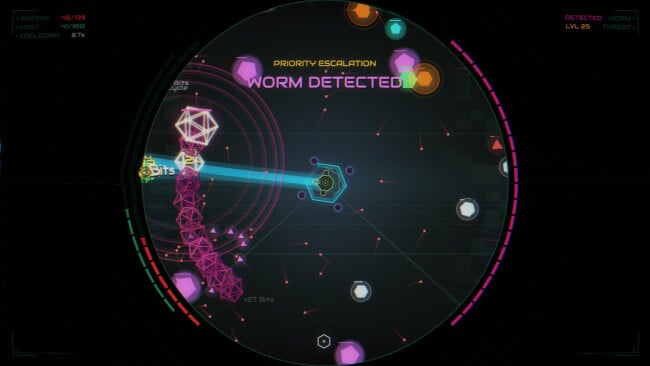
A cheerful digital penguin stands between PeteOS and a steadily escalating virus outbreak in this compact incremental clicker. The premise is simple—purge hostile code, strengthen the system, and push farther into increasingly demanding runs—but the progression gives it more bite than a basic idle distraction. Its bright, clean computer-interface theme keeps the mood light even as numbers, enemies, and decisions begin to pile up. Hex Core suits players who enjoy watching a modest setup evolve into an efficient virus-crushing machine without demanding dozens of hours before it shows its best ideas.
Combat revolves around taking on virus encounters, earning resources, and deciding how aggressively to invest those gains before launching the next attempt. A huge upgrade grid, containing more than 900 nodes, expands offensive options and unlocks additional systems, so advancement is not merely about raising damage values. Research through Kernel Ops rewards completed objectives with useful materials, while new weapons and pathways gradually change how a run feels. Campaign offers the main structured route, Blitz favors quicker action, and Fork provides another way to approach its layered progression; controller support and accessibility options also make the click-heavy format easier to tailor.
What separates it from many minimalist clickers is the emphasis on deliberate resets: raising the difficulty increases the risk but also improves the payoff, giving each fresh run a meaningful strategic purpose. The scale of the skill tree encourages experimentation, yet the game remains intentionally short and readable rather than becoming an endless spreadsheet of prestige currencies. Its visual charm and approachable systems make it friendly to incremental newcomers, while optimization-minded veterans can chase faster clears and more efficient upgrade routes. Players who like the reset-and-rebuild satisfaction of games such as Cookie Clicker or idle RPGs, but want a more directed set of combat runs and objectives, find a focused little time sink here.
Screenshots

Installation
- Select the <strong>Download</strong> button at the top of this page to open UploadHaven.
- On UploadHaven, wait for any countdown, then select <strong>Free Download</strong>. Optional: UploadHaven Pro for faster downloads.
- When complete, extract the archive to a <strong>Hex Core</strong> folder using 7-Zip.
- Open the extracted folder and start the game normally.
- For errors, check <strong>Setup Guide & Troubleshooting</strong> below. Keep your security software enabled.
System Requirements
- OS *: Windows 7 64bit
- Processor: 2 GHz
- Memory: 1 GB RAM
- Graphics: OpenGL 2.1+ with shader support
- Storage: 100 MB available space
Setup Guide & Troubleshooting
How do I fix missing DLL errors for Hex Core (v1.260904)?
After extracting Hex Core (v1.260904), navigate to the _Redist or _CommonRedist folder inside the game directory and install DirectX, Vcredist, and any other dependencies included.
What should I do if the downloaded file is corrupted?
The full archive is 88.53 MB — make sure your download completed fully before extracting. Use 7-Zip to extract the files. If you still see a "file corrupted" error, re-download and try again.
Do I need to run the game as administrator?
Usually, no. Start the game normally from the extracted folder. If you see a permissions or save error, check that the folder is writable and follow the game's documented fix. Only grant administrator access when a trusted game's specific setup requires it.
How do I update my GPU drivers for this game?
Hex Core (v1.260904) requires a OpenGL 2.1+ with shader support or equivalent. Update your NVIDIA or AMD drivers to the latest version for the best performance.
The game won't launch — what should I try?
Check that extraction completed and your PC meets the system requirements. Note any error message before choosing a fix. If it identifies a missing runtime, install the required DirectX components or Microsoft Visual C++ Redistributable from Microsoft.
My antivirus is blocking the game — is it safe?
A warning needs to be investigated; the download source alone cannot confirm that a file is safe. Keep your security software enabled and review the detection details. Do not run or restore a flagged file unless you have verified that it is a false positive. If you are unsure, leave it quarantined.