
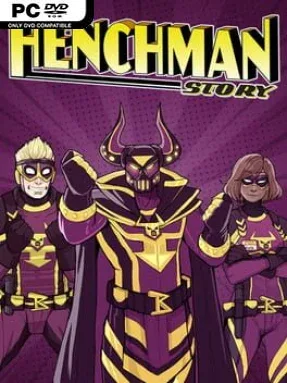
Game Overview
Life at the bottom of a supervillain’s organization is equal parts humiliating, dangerous, and weirdly relatable. Henchman Story casts you as Stan, a low-ranking employee of the theatrical Lord Bedlam, whose benefits package barely compensates for the regular beatings delivered by flashy superheroes. Its comic-book city is full of capes, ridiculous schemes, office politics, and people trying to survive in a world where collateral damage is apparently a career hazard. The mood stays sharply comedic, but the story understands that a disposable henchman can still have real ambitions, friendships, and reasons to question who deserves loyalty.
Play unfolds as a choice-driven narrative adventure built around conversations, branching decisions, and the consequences of deciding when to obey, lie, stand up for yourself, or play both sides. Stan meets fellow minions, celebrated heroes, rival villains, and potential romantic interests, with each relationship able to shift according to your responses. Rather than relying on action-heavy combat, the game makes dialogue and judgment its central challenges: a careless remark can damage a bond, alter a character’s future, or send the plot down a different route. Multiple story paths lead to eleven possible endings, including outcomes where Stan remains an expendable lackey and others where he earns a much more influential position.
What stands out is the way it treats superhero satire as workplace comedy rather than simply mocking capes and clichés from a distance. The colorful art, exaggerated personalities, and fully voiced performances give the cast an animated, approachable energy, while the branching structure encourages another run to see how different alliances and romances develop. Fans of visual novels and narrative games such as The Wolf Among Us or choice-focused Telltale adventures should appreciate its character-first storytelling, though its lighter scope and lack of combat make it best approached for the writing rather than mechanical depth. Henchman Story suits newcomers to interactive fiction as well as veterans looking for a funny, compact tale where being the least important person in the room can still change everything.
Installation
- Click the green button below to be redirected to UploadHaven.
- Wait 15 seconds, then hit “Free Download.” (Free downloads may be slower — upgrade to UploadHaven Pro for faster speeds.)
- Once downloaded, right-click the .zip file and choose “Extract to Henchman Story.” (You’ll need 7-Zip for this.)
- Open the extracted folder and run the game as administrator.
- Enjoy! 🎮 If you see missing DLL errors, check the <strong>_Redist</strong> folder inside and install what’s needed.
System Requirements
- OS: Windows 7+
- Processor: 1.5 Ghz Dual-Core CPU
- Memory: 512 MB RAM
- Graphics: DirectX or OpenGL compatible card
- Storage: 2 GB available space
Setup Guide & Troubleshooting
How do I fix missing DLL errors for Henchman Story?
After extracting Henchman Story, navigate to the _Redist or _CommonRedist folder inside the game directory and install DirectX, Vcredist, and any other dependencies included.
What should I do if the downloaded file is corrupted?
The full archive is 1.26 GB — make sure your download completed fully before extracting. Use 7-Zip to extract the files. If you still see a "file corrupted" error, re-download and try again.
Why should I run the game as administrator?
Right-click the game executable and select "Run as Administrator" to avoid save file issues and permission errors. This is especially important on the first launch.
How do I update my GPU drivers for this game?
Henchman Story requires a DirectX or OpenGL compatible card or equivalent. Update your NVIDIA or AMD drivers to the latest version for the best performance.
The game won't launch — what should I try?
Try running in compatibility mode, install the latest DirectX runtime, or install the All-in-One VC Redist Package.
My antivirus is blocking the game — is it safe?
Antivirus false positives are common with pre-installed games. Temporarily pause your antivirus during extraction to prevent it from quarantining game files. You can re-enable it after the extraction completes.