

Game Overview
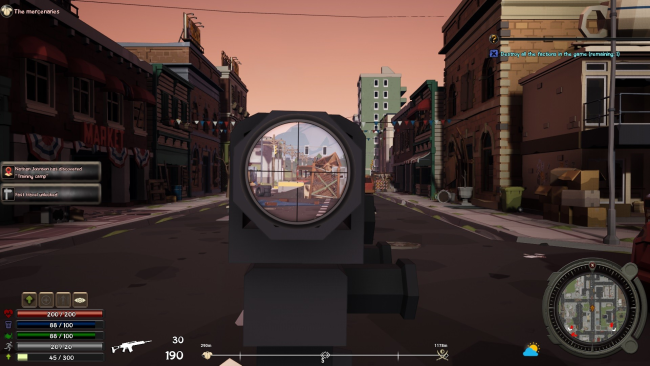
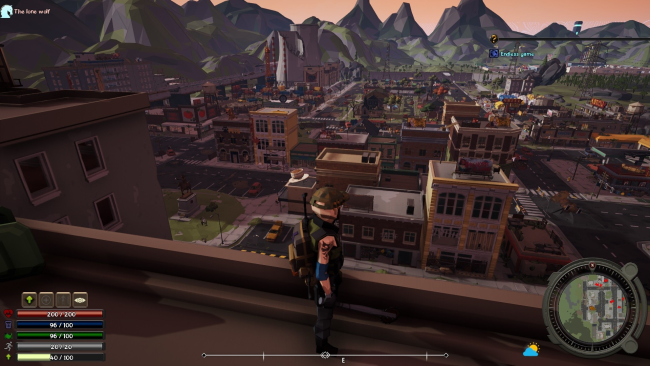
A bankrupt future’s answer to amusement parks is a customizable augmented-reality apocalypse where every visit can become a different zombie survival story. Set in the 24th century, Heavenworld frames its undead RPG action as a high-tech entertainment simulation, but the tone leans toward tense resource management rather than carefree spectacle. Hunger, injuries, infection, hostile survivors, and the ever-present zombie threat turn even a routine scavenging run into a calculated risk. Its biggest promise is freedom: players are not simply following a fixed campaign, but shaping the kind of apocalypse they want to endure.
Survival revolves around developing a character through skills covering combat, construction, crafting, negotiation, and general wilderness know-how, then applying those abilities to a persistent camp and its inhabitants. You gather supplies, manage food and health, maintain vehicles, build defenses and useful structures, and keep the infection from overwhelming either your hero or recruited companions. Quests, faction relationships, trading, and the option to form a faction of your own give the world a broader social layer beyond killing zombies. A large set of scenario options lets players alter difficulty, mission types, survival rules, enemy and allied factions, zombie behavior, available skills, and even the role of the game master, while saved presets make it easy to return to preferred rulesets.
What separates Heavenworld from more straightforward undead RPGs is its emphasis on authoring the experience before and during play. The story editor and tools for creating companions and occupations aim to make individual runs feel less scripted, closer to a sandbox campaign than a single linear adventure. Camp upkeep and interpersonal decision-making should appeal to players who enjoy the systemic pressure of Project Zomboid alongside faction-building RPGs, though its dense customization is likely more rewarding for patient genre veterans than players seeking instant action. For anyone who wants zombies, settlement management, and replayable scenario design in one package, Heavenworld offers a notably flexible survival framework.
Installation
- Click the green button below to be redirected to UploadHaven.
- Wait 15 seconds, then hit “Free Download.” (Free downloads may be slower — upgrade to UploadHaven Pro for faster speeds.)
- Once downloaded, right-click the .zip file and choose “Extract to Heavenworld.” (You’ll need 7-Zip for this.)
- Open the extracted folder and run the game as administrator.
- Enjoy! 🎮 If you see missing DLL errors, check the <strong>_Redist</strong> folder inside and install what’s needed.
System Requirements
- Requires a 64-bit processor and operating system
- OS: Windows 7/8/10 (64-bit)
- Processor: Core i5 (3Ghz)
- Memory: 4 GB RAM
- Graphics: 2 GB RAM card (DirectX 11)
- DirectX: Version 11
- Storage: 5 GB available space
Setup Guide & Troubleshooting
How do I fix missing DLL errors for Heavenworld (v2.60)?
After extracting Heavenworld (v2.60), navigate to the _Redist or _CommonRedist folder inside the game directory and install DirectX, Vcredist, and any other dependencies included.
What should I do if the downloaded file is corrupted?
The full archive is 1.71 GB — make sure your download completed fully before extracting. Use 7-Zip to extract the files. If you still see a "file corrupted" error, re-download and try again.
Why should I run the game as administrator?
Right-click the game executable and select "Run as Administrator" to avoid save file issues and permission errors. This is especially important on the first launch.
How do I update my GPU drivers for this game?
Heavenworld (v2.60) requires a 2 GB RAM card (DirectX 11) or equivalent. Update your NVIDIA or AMD drivers to the latest version for the best performance.
The game won't launch — what should I try?
This game requires Version 11. Try running in compatibility mode, install the latest DirectX runtime, or install the All-in-One VC Redist Package.
My antivirus is blocking the game — is it safe?
Antivirus false positives are common with pre-installed games. Temporarily pause your antivirus during extraction to prevent it from quarantining game files. You can re-enable it after the extraction completes.