
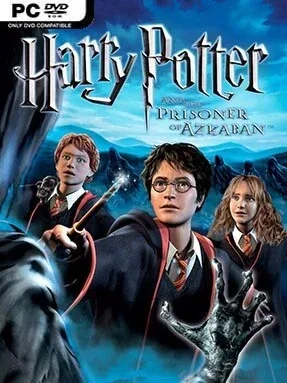
Game Overview
Hogwarts feels more dangerous in Harry Potter and the Prisoner of Azkaban, a third-person action-adventure that follows Harry’s turbulent third year at school. Dementors patrol the grounds, Sirius Black’s escape hangs over the story, and familiar classrooms give way to shadowy corridors, snowy courtyards, and secretive areas around the castle. The tone stays accessible and storybook-like rather than truly grim, but it captures the series’ shift toward higher stakes. Fans get a compact retelling of the novel’s major events while spending far more time casting spells and poking around Hogwarts than watching cutscenes.
Control rotates between Harry, Ron, and Hermione, with each member of the trio bringing specific talents to environmental puzzles and combat encounters. Spellcasting drives most of the action: players stun hostile creatures, manipulate objects, light dark paths, and solve obstacles that require the right character in the right place. Exploration rewards attention with collectables, hidden passages, and optional activities, while platforming sections ask for careful movement across ledges, towers, and hazardous outdoor spaces. Encounters are simple by modern standards, but juggling positioning, spell timing, and character abilities keeps the adventure moving at a brisk pace.
Its greatest strength is the chance to play the whole trio rather than treating Ron and Hermione as background companions. The game turns Hogwarts into an interactive puzzle box, making even routine school locations feel worth revisiting when a newly learned spell opens another route. Visuals and controls show their age, and the camera can occasionally make jumps or combat less precise than intended, yet the charm of the setting carries it through. Anyone who enjoys older licensed adventures, especially players who grew up with the early Harry Potter games or like the accessible exploration of classic platformers, finds plenty to enjoy here.
Installation
- Click the green button below to be redirected to UploadHaven.
- Wait 15 seconds, then hit “Free Download.” (Free downloads may be slower — upgrade to UploadHaven Pro for faster speeds.)
- Once downloaded, right-click the .zip file and choose “Extract to Harry Potter and The Prisoner of Azkaban.” (You’ll need 7-Zip for this.)
- Open the extracted folder and run the game as administrator.
- Enjoy! 🎮 If you see missing DLL errors, check the <strong>_Redist</strong> folder inside and install what’s needed.
System Requirements
- OS: Windows XP or newer
- Processor: Intel Pentium III / AMD Duron 2.0GHz
- Memory: 256 MB of RAM
- Graphics: AMD Rage 128 Pro or NVIDIA GeForce 2 MX 100/200 32MB
- DirectX: Version 9.0
- Storage: 500 MB
Setup Guide & Troubleshooting
How do I fix missing DLL errors for Harry Potter and The Prisoner of Azkaban?
After extracting Harry Potter and The Prisoner of Azkaban, navigate to the _Redist or _CommonRedist folder inside the game directory and install DirectX, Vcredist, and any other dependencies included.
What should I do if the downloaded file is corrupted?
The full archive is 499.76 MB — make sure your download completed fully before extracting. Use 7-Zip to extract the files. If you still see a "file corrupted" error, re-download and try again.
Why should I run the game as administrator?
Right-click the game executable and select "Run as Administrator" to avoid save file issues and permission errors. This is especially important on the first launch.
How do I update my GPU drivers for this game?
Harry Potter and The Prisoner of Azkaban requires a AMD Rage 128 Pro or NVIDIA GeForce 2 MX 100/200 32MB or equivalent. Update your NVIDIA or AMD drivers to the latest version for the best performance.
The game won't launch — what should I try?
This game requires Version 9.0. Try running in compatibility mode, install the latest DirectX runtime, or install the All-in-One VC Redist Package.
My antivirus is blocking the game — is it safe?
Antivirus false positives are common with pre-installed games. Temporarily pause your antivirus during extraction to prevent it from quarantining game files. You can re-enable it after the extraction completes.