
Game Overview
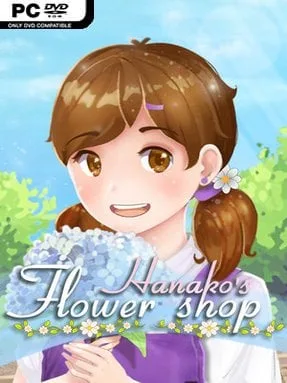
A small neighborhood florist becomes the setting for a gentle but emotionally weighty coming-of-age story. Hanako takes responsibility for her grandfather’s respected shop while struggling with grief, self-doubt, and the intimidating standard he leaves behind. The result is an anime-styled visual novel that trades action for attentive conversation, quiet reflection, and the satisfaction of helping people articulate feelings they cannot easily say aloud. Its mood stays warm and hopeful, though its treatment of bereavement and personal loss gives many encounters real emotional texture.
Most of your time is spent speaking with customers, learning what is happening in their lives, and interpreting their needs before assembling an appropriate bouquet. Flowers carry symbolic associations, so picking blooms is more than a cosmetic activity: a poorly judged arrangement can miss the point, while the right combination offers reassurance, apology, affection, or closure. Choices shape Hanako’s connections with the town and influence how individual storylines develop, encouraging players to pay attention to dialogue rather than simply chase an obvious correct answer. The management side supports the narrative rather than overwhelming it, keeping the focus on customer requests, flower meanings, and the personal stakes behind each sale.
What makes Hanako’s Flower Shop appealing is its use of floral symbolism as a storytelling tool, turning bouquet creation into a form of character-driven puzzle solving. Hand-drawn backgrounds, expressive character art, and small animations give the town a cozy visual identity that suits the intimate scale of its stories. Fans of reflective visual novels such as Coffee Talk or VA-11 Hall-A, especially those who enjoy relationship choices without demanding mechanical complexity, should find plenty to appreciate here. It also works well for newcomers to the genre, provided they are comfortable with themes involving death, mourning, and the difficult process of finding confidence after loss.
Installation
- Click the green button below to be redirected to UploadHaven.
- Wait 15 seconds, then hit “Free Download.” (Free downloads may be slower — upgrade to UploadHaven Pro for faster speeds.)
- Once downloaded, right-click the .zip file and choose “Extract to Hanako's Flower Shop.” (You’ll need 7-Zip for this.)
- Open the extracted folder and run the game as administrator.
- Enjoy! 🎮 If you see missing DLL errors, check the <strong>_Redist</strong> folder inside and install what’s needed.
System Requirements
- OS *: Windows 7
- Processor: CPU 1.3GHz
- Memory: 2 GB RAM
- DirectX: Version 9.0c
- Storage: 1 GB available space
Setup Guide & Troubleshooting
How do I fix missing DLL errors for Hanako’s Flower Shop (v1.0)?
After extracting Hanako’s Flower Shop (v1.0), navigate to the _Redist or _CommonRedist folder inside the game directory and install DirectX, Vcredist, and any other dependencies included.
What should I do if the downloaded file is corrupted?
The full archive is 3.50 GB — make sure your download completed fully before extracting. Use 7-Zip to extract the files. If you still see a "file corrupted" error, re-download and try again.
Why should I run the game as administrator?
Right-click the game executable and select "Run as Administrator" to avoid save file issues and permission errors. This is especially important on the first launch.
How do I update my GPU drivers for this game?
Update your NVIDIA or AMD drivers to the latest version for the best performance and compatibility.
The game won't launch — what should I try?
This game requires Version 9.0c. Try running in compatibility mode, install the latest DirectX runtime, or install the All-in-One VC Redist Package.
My antivirus is blocking the game — is it safe?
Antivirus false positives are common with pre-installed games. Temporarily pause your antivirus during extraction to prevent it from quarantining game files. You can re-enable it after the extraction completes.