
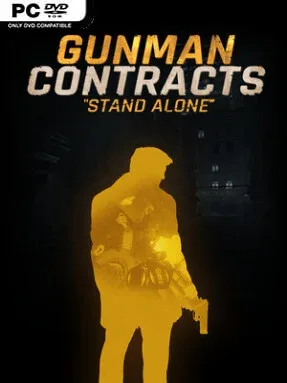
Game Overview
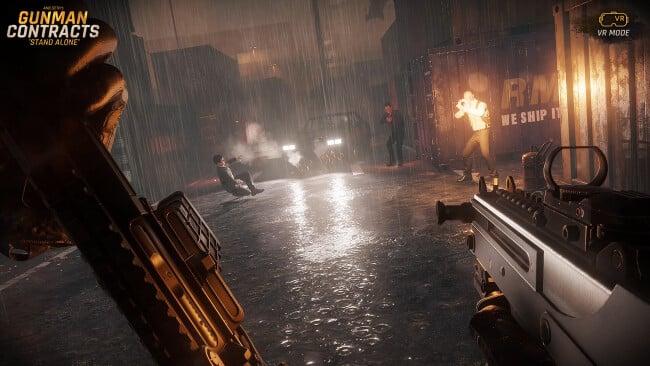
A hard-edged contract shooter puts you behind the visor of a feared operative who cleans up crimes conventional justice cannot touch. Set across criminal strongholds on the outskirts of a city, the campaign follows the Gunman’s pursuit of the Collectors, an organization tied to disappearances and murder. Its mood is closer to a lean revenge thriller than a sprawling military epic: grimy warehouses, compromised restaurants, and lethal close-quarters encounters supply the backdrop. Built for both VR and standard screens, it aims to make every cleared room feel like a tightly staged action sequence.
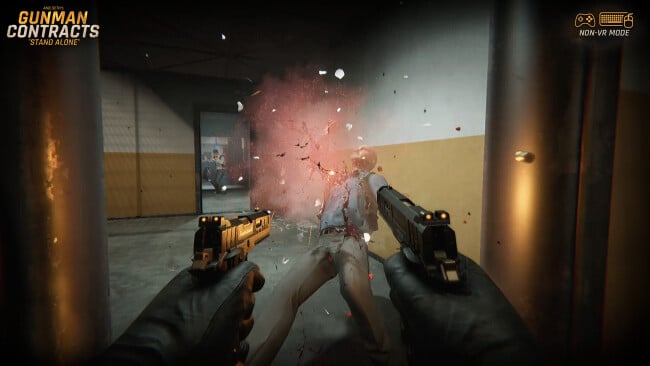
Missions revolve around choosing a loadout, pushing through hostile territory, and surviving fast, punishing firefights against armed enemies. The arsenal includes more than 18 unlockable weapons, along with attachments, knives, and a compound bow, while the workbench allows cosmetic changes and alternate weapon sounds. Between contracts, the Hive serves as a practical home base with a firing range, timed shooting drills, pop-up targets, and holographic combat practice. Takedown mode lets players customize enemy numbers and types for compact combat scenarios, while Last Stand mixes escalating waves with bomb-disarm objectives; all major activities track scores through separate VR and non-VR leaderboards.
What separates Gunman Contracts – Stand Alone from many VR shooters is its deliberate focus on authored, cinematic encounters rather than sandbox chaos or loot grinding. The developer’s earlier Half-Life: Alyx mod work shows in the emphasis on weapon handling, environmental tension, and replaying missions for cleaner runs, higher scores, and different equipment choices. Early Access begins with three connected story operations and several challenge maps, with further campaign contracts planned through updates, so players should expect an incomplete but substantial foundation rather than a finished long-form campaign. Fans of John Wick-style gunplay, Superhot VR’s score-chasing precision, or tactical shooters that reward aim and aggression should find plenty to enjoy, though newcomers may want to spend time training before tackling the harsher modes.
Screenshots
Installation
- Click the green button below to be redirected to UploadHaven.
- Wait 15 seconds, then hit “Free Download.” (Free downloads may be slower — upgrade to UploadHaven Pro for faster speeds.)
- Once downloaded, right-click the .zip file and choose “Extract to Gunman Contracts - Stand Alone.” (You’ll need 7-Zip for this.)
- Open the extracted folder and run the game as administrator.
- Enjoy! 🎮 If you see missing DLL errors, check the <strong>_Redist</strong> folder inside and install what’s needed.
System Requirements
- Requires a 64-bit processor and operating system
- OS: Windows 10 (64bit)
- Processor: Non-VR: Intel Core i5-7500 or better
- Memory: 12 GB RAM
- Graphics: Non-VR: GTX 1070 or better
- Storage: 20 GB available space
- VR Support: OpenXR: Standing / Sitting
- Additional Notes: Tests on various systems are still in progress. These Specs are for Non-VR.
Setup Guide & Troubleshooting
How do I fix missing DLL errors for Gunman Contracts – Stand Alone?
After extracting Gunman Contracts – Stand Alone, navigate to the _Redist or _CommonRedist folder inside the game directory and install DirectX, Vcredist, and any other dependencies included.
What should I do if the downloaded file is corrupted?
The full archive is 9.61 GB — make sure your download completed fully before extracting. Use 7-Zip to extract the files. If you still see a "file corrupted" error, re-download and try again.
Why should I run the game as administrator?
Right-click the game executable and select "Run as Administrator" to avoid save file issues and permission errors. This is especially important on the first launch.
How do I update my GPU drivers for this game?
Gunman Contracts – Stand Alone requires a Non-VR: GTX 1070 or better or equivalent. Update your NVIDIA or AMD drivers to the latest version for the best performance.
The game won't launch — what should I try?
Try running in compatibility mode, install the latest DirectX runtime, or install the All-in-One VC Redist Package.
My antivirus is blocking the game — is it safe?
Antivirus false positives are common with pre-installed games. Temporarily pause your antivirus during extraction to prevent it from quarantining game files. You can re-enable it after the extraction completes.