
Game Overview
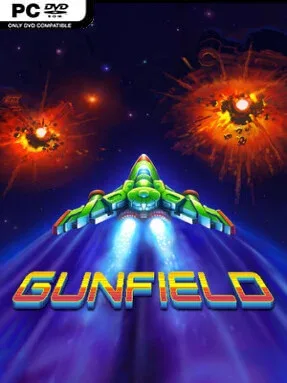
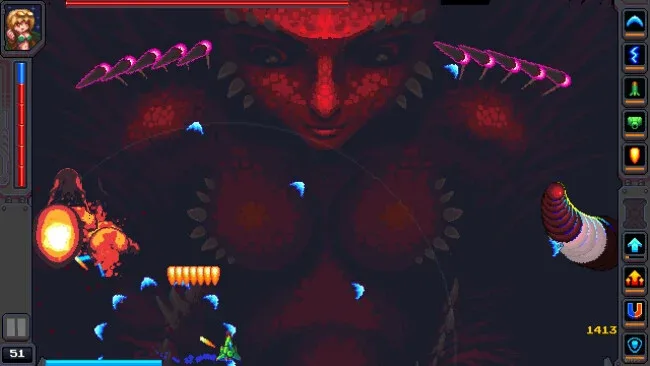
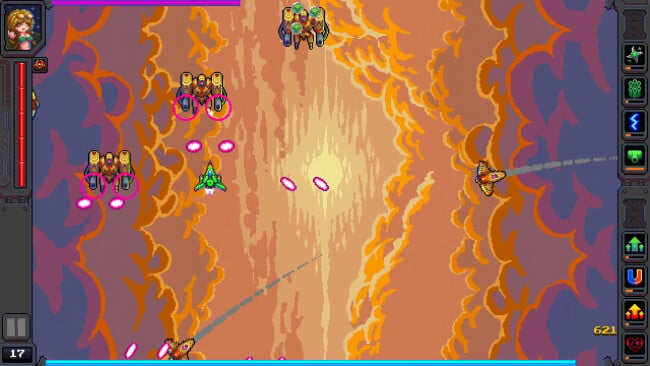
Alien fleets fill the screen, bosses loom large, and survival depends on building a ship that can keep firing through the chaos. GUNFIELD is a fast vertical-scrolling shooter with roguelite build-making at its core, pairing arcade-style space combat with the escalating upgrade choices associated with Vampire Survivors. Its pixel-art planets and hostile space lanes give each run an energetic, old-school sci-fi feel, while the constant pressure of incoming enemies keeps the tone intense rather than leisurely. The result is a compact score-chasing shooter where smart loadout decisions matter as much as quick reflexes.
Players pilot a spacecraft through waves of alien vessels, weaving around fire, clearing swarms, and confronting oversized boss encounters. Weapons and abilities become the center of each run, with different offensive tools combining into specialized builds that may favor broad crowd control, concentrated damage, defensive survival, or aggressive close-range firepower. Progression includes unlocking and improving equipment, while additional ships and pilots introduce traits that alter how a build performs and encourage experimentation. Controls support keyboard and mouse, controllers, and touchscreen input, making the action accessible whether players prefer twin-stick-like precision or a simpler arcade setup.
What separates GUNFIELD from a straightforward shmup is its emphasis on adapting a build as the fight develops rather than relying solely on a fixed ship loadout. Fans of Tyrian-style scrolling shooters should recognize the appeal of escalating weapons and screen-clearing firepower, while roguelite players get the satisfaction of finding combinations that turn a vulnerable craft into a destructive machine. Pixelated environments and varied ship options provide useful visual and strategic variety without distracting from the central loop of shooting, dodging, and upgrading. It suits newcomers who want immediately readable arcade action, but veterans chasing efficient builds and reliable boss strategies are likely to get the most from repeated runs.
Screenshots
Installation
- Click the green button below to be redirected to UploadHaven.
- Wait 15 seconds, then hit “Free Download.” (Free downloads may be slower — upgrade to UploadHaven Pro for faster speeds.)
- Once downloaded, right-click the .zip file and choose “Extract to GUNFIELD.” (You’ll need 7-Zip for this.)
- Open the extracted folder and run the game as administrator.
- Enjoy! 🎮 If you see missing DLL errors, check the <strong>_Redist</strong> folder inside and install what’s needed.
System Requirements
- OS *: Windows 7
- Processor: Dual Core 2.4 Ghz
- Memory: 1 GB RAM
- DirectX: Version 9.0
- Storage: 200 MB available space
- Sound Card: DirectX® Compatible
Setup Guide & Troubleshooting
How do I fix missing DLL errors for GUNFIELD (v1.1.2.2)?
After extracting GUNFIELD (v1.1.2.2), navigate to the _Redist or _CommonRedist folder inside the game directory and install DirectX, Vcredist, and any other dependencies included.
What should I do if the downloaded file is corrupted?
The full archive is 254.39 MB — make sure your download completed fully before extracting. Use 7-Zip to extract the files. If you still see a "file corrupted" error, re-download and try again.
Why should I run the game as administrator?
Right-click the game executable and select "Run as Administrator" to avoid save file issues and permission errors. This is especially important on the first launch.
How do I update my GPU drivers for this game?
Update your NVIDIA or AMD drivers to the latest version for the best performance and compatibility.
The game won't launch — what should I try?
This game requires Version 9.0. Try running in compatibility mode, install the latest DirectX runtime, or install the All-in-One VC Redist Package.
My antivirus is blocking the game — is it safe?
Antivirus false positives are common with pre-installed games. Temporarily pause your antivirus during extraction to prevent it from quarantining game files. You can re-enable it after the extraction completes.