
Game Overview
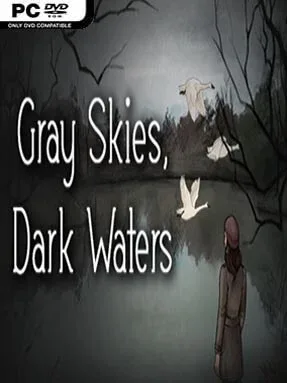
A missing mother turns the quiet shoreline town of Avett’s Landing into a place where every familiar face might be hiding something. Gray Skies, Dark Waters is a compact, choice-driven narrative adventure that follows seventeen-year-old Lina Garrett as she searches for answers amid family fractures, local rumors, and the unsettling pull of old Chesapeake folklore. Its mood is melancholy rather than overtly frightening, balancing supernatural uncertainty with a grounded portrait of grief, isolation, and the complicated ties that keep families together.
Lina spends the story speaking with townspeople, examining clues, revisiting memories, and choosing how much trust or suspicion to place in the people around her. Decisions continuously shape relationships and steer the Garrett family toward different outcomes, so the mystery is less about finding one definitive solution than deciding what Lina believes and how she responds. The journey runs roughly two to three hours, making it an approachable evening-length experience instead of a sprawling adventure. Full voice acting and an original score carry much of the emotional weight, while the focus remains firmly on dialogue, atmosphere, and consequences rather than puzzles or action sequences.
Its hand-painted visual style, reminiscent of illustrated storybooks, gives Avett’s Landing a deceptively gentle appearance that suits the game’s uneasy blend of childhood memory and adult pain. The folklore angle adds intrigue without reducing the story to a conventional ghost tale, leaving room for interpretation as Lina pieces together a version of events that feels true to her. A commentary mode with developer and subject-matter interviews also adds worthwhile context for players interested in the themes and production. Fans of Life is Strange, To the Moon, or The Path who value intimate writing, multiple endings, and emotionally difficult choices over mechanical challenge are likely to find this a memorable short-form drama.
Installation
- Click the green button below to be redirected to UploadHaven.
- Wait 15 seconds, then hit “Free Download.” (Free downloads may be slower — upgrade to UploadHaven Pro for faster speeds.)
- Once downloaded, right-click the .zip file and choose “Extract to Gray Skies, Dark Waters.” (You’ll need 7-Zip for this.)
- Open the extracted folder and run the game as administrator.
- Enjoy! 🎮 If you see missing DLL errors, check the <strong>_Redist</strong> folder inside and install what’s needed.
System Requirements
- OS: Windows Vista or newer
- Processor: 1.4 GHz
- Memory: 4 GB RAM
- Graphics: 512MB of VRAM
- Storage: 3720 MB available space
Setup Guide & Troubleshooting
How do I fix missing DLL errors for Gray Skies, Dark Waters (v2017.06.13)?
After extracting Gray Skies, Dark Waters (v2017.06.13), navigate to the _Redist or _CommonRedist folder inside the game directory and install DirectX, Vcredist, and any other dependencies included.
What should I do if the downloaded file is corrupted?
The full archive is 2.44 GB — make sure your download completed fully before extracting. Use 7-Zip to extract the files. If you still see a "file corrupted" error, re-download and try again.
Why should I run the game as administrator?
Right-click the game executable and select "Run as Administrator" to avoid save file issues and permission errors. This is especially important on the first launch.
How do I update my GPU drivers for this game?
Gray Skies, Dark Waters (v2017.06.13) requires a 512MB of VRAM or equivalent. Update your NVIDIA or AMD drivers to the latest version for the best performance.
The game won't launch — what should I try?
Try running in compatibility mode, install the latest DirectX runtime, or install the All-in-One VC Redist Package.
My antivirus is blocking the game — is it safe?
Antivirus false positives are common with pre-installed games. Temporarily pause your antivirus during extraction to prevent it from quarantining game files. You can re-enable it after the extraction completes.