
Graveyard Architect Cover Art

Graveyard Architect

INDIE 1.27 GB v1.1.0

Game Overview

A peaceful cemetery becomes a nightly death trap in this indie management-survival hybrid, where every headstone, grave, and decorative choice can determine whether you see another sunrise. Graveyard Architect splits its action between careful daytime planning and chaotic nighttime defense, turning a seemingly solemn construction job into a fight against the very residents under your care. The mood shifts sharply from methodical and slightly macabre to tense and hostile as neglected graves begin producing angry undead. It is a compact premise with real pressure: build a respectable resting place, or deal with the consequences after dark.

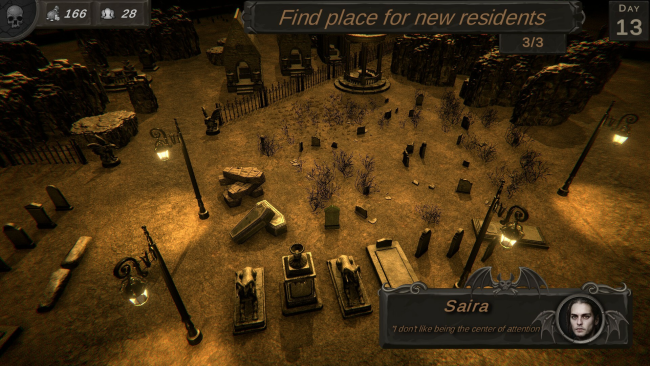
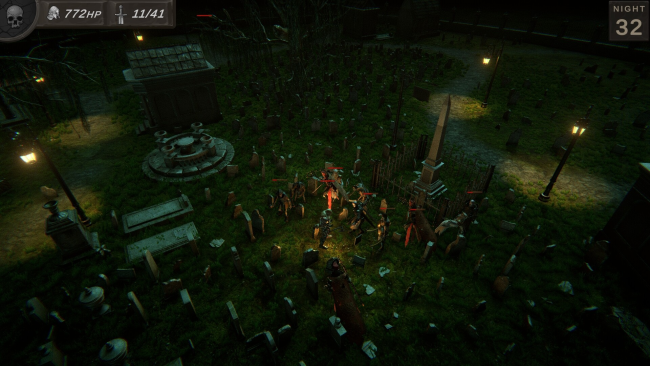
During the day, you accept burial orders, place the delivered bodies correctly, organize the grounds, and improve the cemetery with decorations. Layout matters beyond appearances, since obstacles and carefully arranged paths can slow down dead residents when they rise, giving you more control over the nighttime assault. Poor upkeep, excessive clutter, and insufficient decoration fuel unrest, so the building phase acts as preparation rather than a separate cosmetic mode. When darkness arrives, the focus turns to survival combat as you defend yourself, prevent the undead from escaping the grounds, and hold out until morning.

Its strongest idea is the direct link between management mistakes and enemy behavior: the monsters are not random invaders, but the result of your own bad cemetery planning. That makes each day a balancing act between fulfilling orders efficiently, beautifying the grounds, and designing a defensible maze for a possible rebellion. The visual concept and structure should appeal to players who enjoy the reactive planning of graveyard-management games but want more immediate danger than a pure builder provides. Fans of light strategy, defensive layouts, and simple undead survival will find the premise appealing, while players seeking a deep simulation or a large-scale combat system may find its focused day-and-night loop more modest.

Installation

  1. Click the green button below to be redirected to UploadHaven.
  2. Wait 15 seconds, then hit “Free Download.” (Free downloads may be slower — upgrade to UploadHaven Pro for faster speeds.)
  3. Once downloaded, right-click the .zip file and choose “Extract to Graveyard Architect.” (You’ll need 7-Zip for this.)
  4. Open the extracted folder and run the game as administrator.
  5. Enjoy! 🎮 If you see missing DLL errors, check the <strong>_Redist</strong> folder inside and install what’s needed.

System Requirements

  • OS: Windows 32bit
  • Processor: Intel Core i3 4130 or AMD equivalent
  • Memory: 4 GB RAM
  • Graphics: GTX 750 Ti or Radeon RX 560X
  • Storage: 4 GB available space

Setup Guide & Troubleshooting

How do I fix missing DLL errors for Graveyard Architect (v1.1.0)?

After extracting Graveyard Architect (v1.1.0), navigate to the _Redist or _CommonRedist folder inside the game directory and install DirectX, Vcredist, and any other dependencies included.

What should I do if the downloaded file is corrupted?

The full archive is 1.27 GB — make sure your download completed fully before extracting. Use 7-Zip to extract the files. If you still see a "file corrupted" error, re-download and try again.

Why should I run the game as administrator?

Right-click the game executable and select "Run as Administrator" to avoid save file issues and permission errors. This is especially important on the first launch.

How do I update my GPU drivers for this game?

Graveyard Architect (v1.1.0) requires a GTX 750 Ti or Radeon RX 560X or equivalent. Update your NVIDIA or AMD drivers to the latest version for the best performance.

The game won't launch — what should I try?

Try running in compatibility mode, install the latest DirectX runtime, or install the All-in-One VC Redist Package.

My antivirus is blocking the game — is it safe?

Antivirus false positives are common with pre-installed games. Temporarily pause your antivirus during extraction to prevent it from quarantining game files. You can re-enable it after the extraction completes.

Need more help? Browse our FAQ & Troubleshooting Guide for solutions to common issues.
Looking for something else? Explore all games on Steam Unlocked