
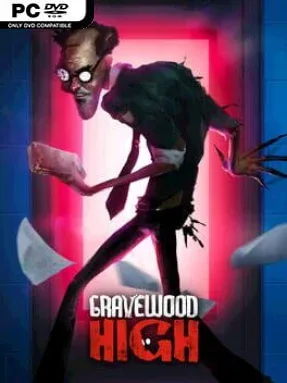
Game Overview
A seemingly ordinary school becomes a hostile puzzle box where missing students, indifferent adults, and one monstrous authority figure hide a much larger secret. Gravewood High is a first-person stealth-horror adventure built around the fear of being hunted in cramped hallways, classrooms, and strange spaces that no longer obey normal rules. Its tone balances cartoonish, exaggerated visuals with genuine pressure, as every creak, broken object, and wrong turn can bring the Teacher closer. Rather than simply surviving a haunted building, you are trying to understand why the school changes and find a way out before it closes around you.
Most of the action revolves around searching rooms for useful items, solving environmental obstacles, opening routes, and keeping out of the Teacher’s reach. The school rearranges itself after you are caught, so memorizing a safe path is never enough; each attempt asks you to quickly read a fresh layout and improvise. You can break parts of the environment, use hiding places, and turn the building’s hazards against its owner, but passive stealth only delays the problem. Progress comes from locating objects connected to the Teacher and sabotaging them, while his growing arsenal of abilities makes later encounters less predictable and more demanding.
The shifting structure gives the game a roguelite edge without abandoning its central mystery, ensuring repeated escapes feel different rather than rehearsed. Destructible interiors are especially useful because a chase can turn into an opportunity: smash through an obstruction, create a diversion, or lure the Teacher toward a trap. Story segments reach beyond the school’s present-day nightmare, touching distinct historical eras including 1980s America and the Civil War, which gives the mystery more scope than a standard mascot-horror setup. Players who enjoy Hello Neighbor’s reactive pursuer, the escalating tension of Five Nights at Freddy’s, or escape-room exploration with a mischievous streak should find plenty to like, although newcomers should expect failure and experimentation to be part of the design.
Installation
- Click the green button below to be redirected to UploadHaven.
- Wait 15 seconds, then hit “Free Download.” (Free downloads may be slower — upgrade to UploadHaven Pro for faster speeds.)
- Once downloaded, right-click the .zip file and choose “Extract to Gravewood High.” (You’ll need 7-Zip for this.)
- Open the extracted folder and run the game as administrator.
- Enjoy! 🎮 If you see missing DLL errors, check the <strong>_Redist</strong> folder inside and install what’s needed.
System Requirements
- Requires a 64-bit processor and operating system
- OS: Windows 8.1, Windows 10 (64-bit versions)
- Processor: 2.5 GHz CPU, 4 cores
- Memory: 8 GB RAM
- Graphics: GeForce 950, AMD Radeon 530
- DirectX: Version 10
- Storage: 2 GB available space
Setup Guide & Troubleshooting
How do I fix missing DLL errors for Gravewood High (v2023.05.03)?
After extracting Gravewood High (v2023.05.03), navigate to the _Redist or _CommonRedist folder inside the game directory and install DirectX, Vcredist, and any other dependencies included.
What should I do if the downloaded file is corrupted?
The full archive is 9.21 GB — make sure your download completed fully before extracting. Use 7-Zip to extract the files. If you still see a "file corrupted" error, re-download and try again.
Why should I run the game as administrator?
Right-click the game executable and select "Run as Administrator" to avoid save file issues and permission errors. This is especially important on the first launch.
How do I update my GPU drivers for this game?
Gravewood High (v2023.05.03) requires a GeForce 950, AMD Radeon 530 or equivalent. Update your NVIDIA or AMD drivers to the latest version for the best performance.
The game won't launch — what should I try?
This game requires Version 10. Try running in compatibility mode, install the latest DirectX runtime, or install the All-in-One VC Redist Package.
My antivirus is blocking the game — is it safe?
Antivirus false positives are common with pre-installed games. Temporarily pause your antivirus during extraction to prevent it from quarantining game files. You can re-enable it after the extraction completes.