
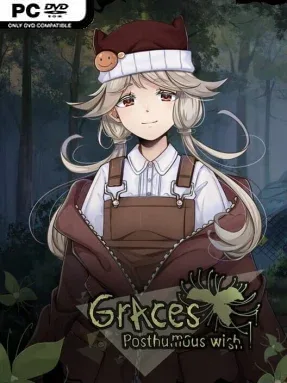
Game Overview
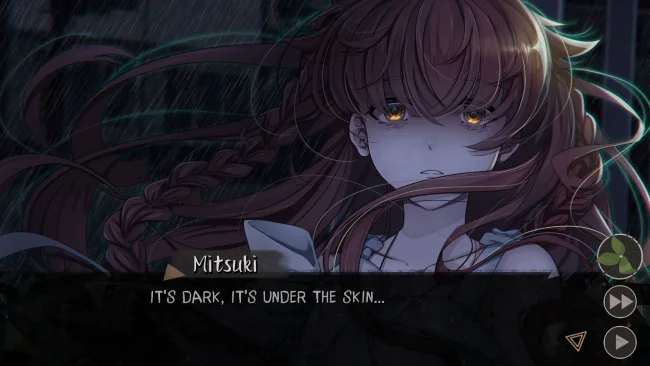
A streak of impossible bad luck follows high-schooler Aki until it starts to feel less like coincidence and more like something hungry. When her classmate Mitsuki claims a curse is behind the disasters, Aki finally sees a possible explanation—only for Mitsuki to die before revealing how to stop it. Rumours point toward another girl, a grotesque plant begins swallowing the town, and Aki turns to a forbidden rite in hopes of speaking with the dead. Graces: Posthumous Wish delivers an intimate supernatural mystery with the uneasy mood of urban legends traded between students after class.
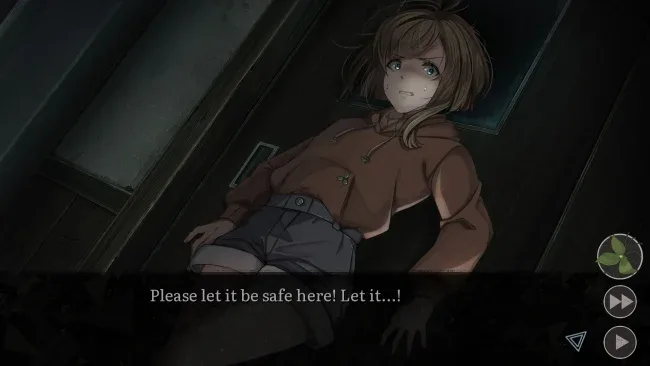
Play unfolds as a choice-driven visual novel focused on reading, investigating relationships, and deciding how far Aki is willing to go for answers. Dialogue decisions steer the story through branching scenes, uncover different sides of Mitsuki’s death, and determine whether Aki saves, sacrifices, or misunderstands the people around her. The main routes offer four substantial conclusions, while a further dozen shorter endings lean hard into bleak school-horror outcomes. At roughly nine to eleven hours for a standard playthrough, it is built for readers who want to revisit key decisions and pursue its many alternate fates.
Its strongest asset is the way ordinary teenage anxieties—friendships, gossip, isolation, and resentment—feed directly into the occult premise. The spreading vegetation gives the setting a distinctive visual menace, while around 90 illustrated CG scenes ensure major revelations and emotional turns land with more impact than text alone. Rather than relying on action or conventional puzzles, the tension comes from uncertainty: who can be trusted, what the ritual truly costs, and whether a “good” ending is even possible. Fans of compact Japanese-style horror visual novels, especially players who enjoy the branching tragedies of Higurashi or the character-focused dread of Corpse Party, find plenty to unravel here; newcomers can also jump in easily if they are ready for a text-heavy, unsettling story.
Screenshots
Installation
- Select the <strong>Download</strong> button at the top of this page to open UploadHaven.
- On UploadHaven, wait for any countdown, then select <strong>Free Download</strong>. Optional: UploadHaven Pro for faster downloads.
- When complete, extract the archive to a <strong>Graces: Posthumous Wish</strong> folder using 7-Zip.
- Open the extracted folder and start the game normally.
- For errors, check <strong>Setup Guide & Troubleshooting</strong> below. Keep your security software enabled.
System Requirements
- OS *: Windows 7 or higher
- Processor: 2.6 Ghz Quad Core
- Memory: 2 GB RAM
- Graphics: OpenGL 2.0 or DirectX 9.0c
- Storage: 1 GB available space
Setup Guide & Troubleshooting
How do I fix missing DLL errors for Graces: Posthumous Wish?
After extracting Graces: Posthumous Wish, navigate to the _Redist or _CommonRedist folder inside the game directory and install DirectX, Vcredist, and any other dependencies included.
What should I do if the downloaded file is corrupted?
The full archive is 1.29 GB — make sure your download completed fully before extracting. Use 7-Zip to extract the files. If you still see a "file corrupted" error, re-download and try again.
Why should I run the game as administrator?
Right-click the game executable and select "Run as Administrator" to avoid save file issues and permission errors. This is especially important on the first launch.
How do I update my GPU drivers for this game?
Graces: Posthumous Wish requires a OpenGL 2.0 or DirectX 9.0c or equivalent. Update your NVIDIA or AMD drivers to the latest version for the best performance.
The game won't launch — what should I try?
Try running in compatibility mode, install the latest DirectX runtime, or install the All-in-One VC Redist Package.
My antivirus is blocking the game — is it safe?
Antivirus false positives are common with pre-installed games. Temporarily pause your antivirus during extraction to prevent it from quarantining game files. You can re-enable it after the extraction completes.