

Game Overview
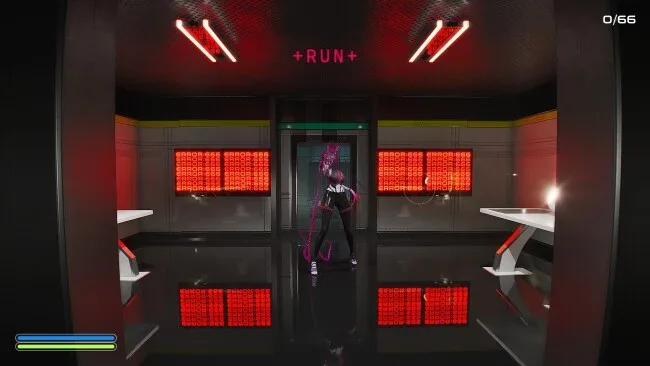
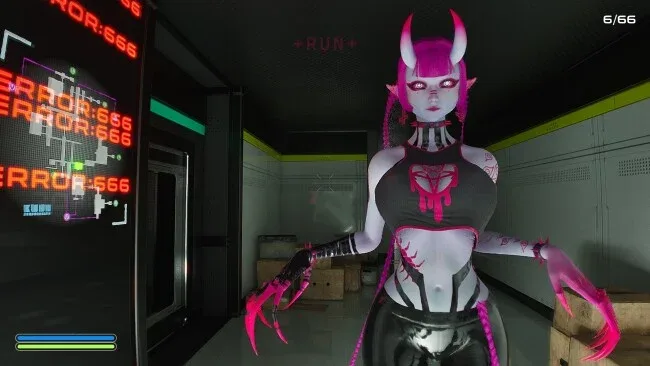
A collapsing research facility becomes the setting for a tense first-person escape game built around a simple but nasty problem: recover stolen divine DNA before the building detonates, while an unkillable experiment prowls the halls. Golden apples hold the valuable samples, and getting them into the extraction vents is the only route to meeting your quota. The threat is Roku, a childlike but terrifying creature whose moods swing between playful curiosity and sudden violence. Its tone lands somewhere between absurdist sci-fi horror and a desperate game of keep-away, with every improvised distraction carrying the risk of becoming your last mistake.
Most runs revolve around searching rooms for apples, hauling them through dangerous corridors, and throwing them into vents while monitoring Roku’s movements. Nearly every loose object can become a tool: food may occupy her, toys can attract her attention, and random debris can create noise or physically interrupt her path. Direct confrontation is not an option, nor can raw speed reliably save you, so survival depends on reading her reactions and buying precious seconds through physics-driven improvisation. Item locations shift between attempts, forcing players to adapt their route rather than memorize a single perfect run, while difficulty settings adjust the pressure for learners and experienced horror fans alike.
Its strongest idea is making the monster’s attention a resource to manage instead of treating it as a standard enemy to evade or defeat. Roku feels less like a predictable patrol-based pursuer and more like an unstable presence that responds to what happens around her, turning thrown objects and environmental clutter into meaningful decisions. Unlockable outfits add a small incentive for repeat escapes, but replayability chiefly comes from changing item layouts and the emergent chaos of each attempt. Fans of the improvised survival tension in games like Alien: Isolation, with a stranger and more comedic physics angle, should find plenty to enjoy; newcomers can start on lower difficulties, while veterans get a compact challenge that rewards quick thinking under pressure.
Screenshots
Installation
- Click the green button below to be redirected to UploadHaven.
- Wait 15 seconds, then hit “Free Download.” (Free downloads may be slower — upgrade to UploadHaven Pro for faster speeds.)
- Once downloaded, right-click the .zip file and choose “Extract to GON: God Of Nothing.” (You’ll need 7-Zip for this.)
- Open the extracted folder and run the game as administrator.
- Enjoy! 🎮 If you see missing DLL errors, check the <strong>_Redist</strong> folder inside and install what’s needed.
System Requirements
- OS: Windows 10 64-bit
- Processor: Intel i5-8400
- Memory: 8 GB RAM
- Graphics: NVIDIA GTX 1060
- Storage: 2 GB available space
- Additional Notes: AMD gpu is known to cause performance issues, but I’m working on the solution!
Setup Guide & Troubleshooting
How do I fix missing DLL errors for GON: God Of Nothing (v1.12)?
After extracting GON: God Of Nothing (v1.12), navigate to the _Redist or _CommonRedist folder inside the game directory and install DirectX, Vcredist, and any other dependencies included.
What should I do if the downloaded file is corrupted?
The full archive is 1.63 GB — make sure your download completed fully before extracting. Use 7-Zip to extract the files. If you still see a "file corrupted" error, re-download and try again.
Why should I run the game as administrator?
Right-click the game executable and select "Run as Administrator" to avoid save file issues and permission errors. This is especially important on the first launch.
How do I update my GPU drivers for this game?
GON: God Of Nothing (v1.12) requires a NVIDIA GTX 1060 or equivalent. Update your NVIDIA or AMD drivers to the latest version for the best performance.
The game won't launch — what should I try?
Try running in compatibility mode, install the latest DirectX runtime, or install the All-in-One VC Redist Package.
My antivirus is blocking the game — is it safe?
Antivirus false positives are common with pre-installed games. Temporarily pause your antivirus during extraction to prevent it from quarantining game files. You can re-enable it after the extraction completes.