
Game Overview
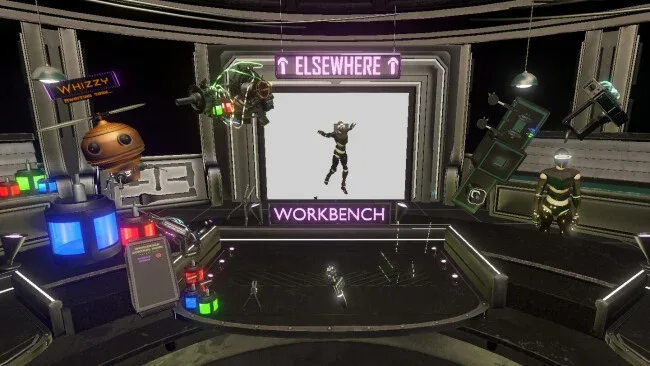
A cluttered futuristic workshop becomes a playground for anyone who enjoys making machines work through trial, error, and a few spectacular mistakes. GizmoLab VR casts you as a new laboratory attendant working alongside Whizzy, a robotic helper with a front-row seat to every odd invention you assemble. Its tone is playful rather than intimidating, but the underlying focus is practical: connect hardware, understand what each part does, and turn a pile of sci-fi components into something functional. Whether you are solving a customer’s problem or simply testing a ridiculous contraption, the appeal comes from physically inhabiting the workbench in VR.
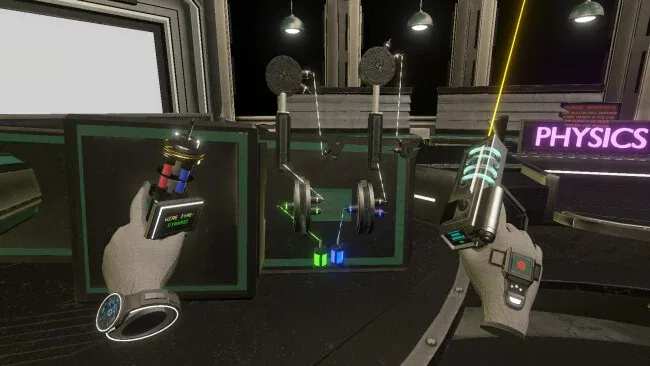
Most of the action revolves around selecting components, placing them around the lab, and joining them into circuits with the Wire Creator Tool. Dynamic wires remain attached while connected objects move, making it possible to build articulated devices and moving mechanisms without constantly rebuilding your setup; static wiring suits cleaner, fixed installations. More than 50 electrical parts provide the raw material for switches, sensors, motors, power systems, and other machinery, with many designed as approachable versions of recognizable engineering hardware. Challenges give your tinkering a purpose, while the open-ended sandbox encourages experimentation beyond the intended solutions. Progress depends less on reflexes than on observation and problem-solving, so failures usually become useful lessons about power flow, placement, and timing.
What separates GizmoLab VR from a typical crafting sandbox is its hands-on circuit-building emphasis. Rather than gathering resources or surviving in a hostile world, you spend your time behaving like an inventor at a tactile, interactive sci-fi workbench. The game makes electrical concepts feel accessible without pretending to be a full professional simulator, giving curious newcomers room to learn while leaving technically minded players plenty of parts to combine. Fans of the construction freedom in Besiege, the engineering experimentation of Scrap Mechanic, or the playful VR interaction of Job Simulator should find its focus appealing, especially if they prefer clever devices over combat.
Screenshots
Installation
- Click the green button below to be redirected to UploadHaven.
- Wait 15 seconds, then hit “Free Download.” (Free downloads may be slower — upgrade to UploadHaven Pro for faster speeds.)
- Once downloaded, right-click the .zip file and choose “Extract to GizmoLab VR.” (You’ll need 7-Zip for this.)
- Open the extracted folder and run the game as administrator.
- Enjoy! 🎮 If you see missing DLL errors, check the <strong>_Redist</strong> folder inside and install what’s needed.
System Requirements
- OS: Windows 10/11
- Processor: Intel i5-4590 or AMD FX 8350
- Memory: 8 GB RAM
- Graphics: NVIDIA GTX 970 or AMD Radeon RX 480
- VR Support: OpenXR Supported VR Headsets (Index, Meta Quest Pro, 2, 3)
Setup Guide & Troubleshooting
How do I fix missing DLL errors for GizmoLab VR?
After extracting GizmoLab VR, navigate to the _Redist or _CommonRedist folder inside the game directory and install DirectX, Vcredist, and any other dependencies included.
What should I do if the downloaded file is corrupted?
The full archive is 634.44 MB — make sure your download completed fully before extracting. Use 7-Zip to extract the files. If you still see a "file corrupted" error, re-download and try again.
Why should I run the game as administrator?
Right-click the game executable and select "Run as Administrator" to avoid save file issues and permission errors. This is especially important on the first launch.
How do I update my GPU drivers for this game?
GizmoLab VR requires a NVIDIA GTX 970 or AMD Radeon RX 480 or equivalent. Update your NVIDIA or AMD drivers to the latest version for the best performance.
The game won't launch — what should I try?
Try running in compatibility mode, install the latest DirectX runtime, or install the All-in-One VC Redist Package.
My antivirus is blocking the game — is it safe?
Antivirus false positives are common with pre-installed games. Temporarily pause your antivirus during extraction to prevent it from quarantining game files. You can re-enable it after the extraction completes.