
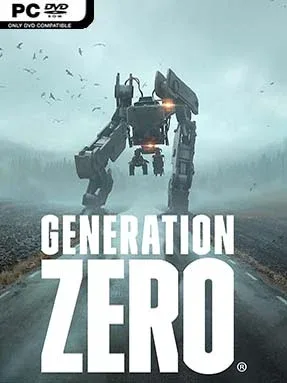
Game Overview
1980s rural Sweden becomes an unnervingly empty battlefield where abandoned homes, dark forests, coastal towns, and military bunkers are patrolled by hostile machines. Generation Zero blends open-world exploration with first-person firefights, asking you to survive long enough to understand why an entire population has vanished. Its tone is lonely and tense rather than relentlessly explosive; the silence between encounters often feels as dangerous as the combat itself. Every distant mechanical screech can signal anything from a scouting drone to a towering hunter moving through the trees.
Survival revolves around searching houses, vehicles, farms, and installations for ammunition, weapons, healing items, schematics, and clues. Fights reward preparation over reckless shooting: machines have armored sections, exposed components, weapons, sensors, and movement systems that can be targeted to disable their advantages. A poorly planned ambush can become a desperate retreat when reinforcements arrive, so players use cover, distractions, explosives, stealth, and terrain to control each engagement. Missions lead across a sizeable Scandinavian map, while character progression unlocks practical skills and crafting options; the full campaign can be tackled alone or with up to four players in cooperative play.
The machine design is the standout feature, with each enemy type behaving less like a disposable target and more like a dangerous mechanical predator with recognizable weaknesses. Persistent enemy damage adds welcome continuity, meaning a damaged machine can remain wounded if you escape and return later, while the escalating threat levels keep familiar regions from becoming completely safe. Sweden’s stylized 1980s setting gives the game a distinct identity, balancing pastoral landscapes and retro details against cold sci-fi menace. Players who enjoy the scavenging and tactical co-op of The Division, the open-ended tension of STALKER, or the robotic enemies of Horizon will find plenty to like, especially if they prefer deliberate gunfights over constant arcade action.
Installation
- Click the green button below to be redirected to UploadHaven.
- Wait 15 seconds, then hit “Free Download.” (Free downloads may be slower — upgrade to UploadHaven Pro for faster speeds.)
- Once downloaded, right-click the .zip file and choose “Extract to Generation Zero.” (You’ll need 7-Zip for this.)
- Open the extracted folder and run the game as administrator.
- Enjoy! 🎮 If you see missing DLL errors, check the <strong>_Redist</strong> folder inside and install what’s needed.
System Requirements
- Requires a 64-bit processor and operating system
- OS: 64bit OS – Windows 7 with Service Pack 1
- Processor: Intel i5 Quad Core
- Memory: 8 GB RAM
- Graphics: nVidia GTX 660 / ATI HD7870 – 2GB VRAM / Intel® Iris™ Pro Graphics 580
- Storage: 35 GB available space
Setup Guide & Troubleshooting
How do I fix missing DLL errors for Generation Zero (v2921874 & ALL DLC)?
After extracting Generation Zero (v2921874 & ALL DLC), navigate to the _Redist or _CommonRedist folder inside the game directory and install DirectX, Vcredist, and any other dependencies included.
What should I do if the downloaded file is corrupted?
The full archive is 46.00 GB — make sure your download completed fully before extracting. Use 7-Zip to extract the files. If you still see a "file corrupted" error, re-download and try again.
Why should I run the game as administrator?
Right-click the game executable and select "Run as Administrator" to avoid save file issues and permission errors. This is especially important on the first launch.
How do I update my GPU drivers for this game?
Generation Zero (v2921874 & ALL DLC) requires a nVidia GTX 660 / ATI HD7870 – 2GB VRAM / Intel® Iris™ Pro Graphics 580 or equivalent. Update your NVIDIA or AMD drivers to the latest version for the best performance.
The game won't launch — what should I try?
Try running in compatibility mode, install the latest DirectX runtime, or install the All-in-One VC Redist Package.
My antivirus is blocking the game — is it safe?
Antivirus false positives are common with pre-installed games. Temporarily pause your antivirus during extraction to prevent it from quarantining game files. You can re-enable it after the extraction completes.