


Futanari di Funghi Cover Art

Futanari di Funghi

159.15 MB v1.0 & Uncensored

Game Overview

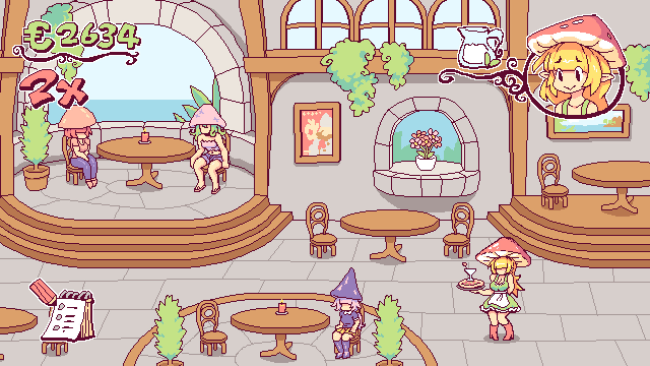
A frantic restaurant shift supplies the framework for a cheeky adult management game built around absurd fantasy ingredients and deliberately over-the-top humor. You play alongside Pipina, a waitress whose magical mushroom-based ability keeps the kitchen stocked with its most important “sauce” when demand gets out of hand. The setting is knowingly silly rather than dark, mixing ristorante bustle, flirtatious dialogue, and explicit adult imagery rendered in colorful pixel art. Its appeal comes from treating an outrageous premise with the brisk pacing of an arcade service game.

Orders arrive quickly, requiring you to prepare and deliver meals before impatient customers lose interest. Successful service chains build combos and push up your score, so the challenge lies in prioritizing dishes, maintaining momentum, and avoiding wasted time during a busy shift. When the restaurant’s special topping runs low, the action shifts into player-directed adult replenishment sequences that function as the game’s resource-management interlude. Light visual-novel scenes connect these moments, adding a small story thread and a bit of personality to Pipina’s workday, while unlocked scenes can be revisited through the gallery.

What separates Futanari di Funghi from a typical adult visual novel is its attempt to make the erotic material part of an actual gameplay loop instead of simply presenting a sequence of scenes. The pixel-art presentation is clean, expressive, and intentionally cartoonish, which suits the comedic tone far better than a serious approach would. Replay value mainly comes from improving scores, maintaining longer serving streaks, and collecting its animation content rather than from deep branching choices or complex restaurant simulation systems. Players who enjoy simple time-management games in the vein of Diner Dash, but want an unapologetically niche adult twist, are the natural audience; anyone looking for a substantial narrative or demanding strategy game should expect a much lighter experience.

Installation

  1. Click the green button below to be redirected to UploadHaven.
  2. Wait 15 seconds, then hit “Free Download.” (Free downloads may be slower — upgrade to UploadHaven Pro for faster speeds.)
  3. Once downloaded, right-click the .zip file and choose “Extract to Futanari di Funghi.” (You’ll need 7-Zip for this.)
  4. Open the extracted folder and run the game as administrator.
  5. Enjoy! 🎮 If you see missing DLL errors, check the <strong>_Redist</strong> folder inside and install what’s needed.

System Requirements

  • OS *: Windows 7+
  • Processor: 1.2ghz
  • Memory: 4 MB RAM
  • Graphics: 512 mb Video Memory
  • Storage: 500 MB available space
  • Sound Card: AMD High Definition

Setup Guide & Troubleshooting

How do I fix missing DLL errors for Futanari di Funghi (v1.0 & Uncensored)?

After extracting Futanari di Funghi (v1.0 & Uncensored), navigate to the _Redist or _CommonRedist folder inside the game directory and install DirectX, Vcredist, and any other dependencies included.

What should I do if the downloaded file is corrupted?

The full archive is 159.15 MB — make sure your download completed fully before extracting. Use 7-Zip to extract the files. If you still see a "file corrupted" error, re-download and try again.

Why should I run the game as administrator?

Right-click the game executable and select "Run as Administrator" to avoid save file issues and permission errors. This is especially important on the first launch.

How do I update my GPU drivers for this game?

Futanari di Funghi (v1.0 & Uncensored) requires a 512 mb Video Memory or equivalent. Update your NVIDIA or AMD drivers to the latest version for the best performance.

The game won't launch — what should I try?

Try running in compatibility mode, install the latest DirectX runtime, or install the All-in-One VC Redist Package.

My antivirus is blocking the game — is it safe?

Antivirus false positives are common with pre-installed games. Temporarily pause your antivirus during extraction to prevent it from quarantining game files. You can re-enable it after the extraction completes.

Need more help? Browse our FAQ & Troubleshooting Guide for solutions to common issues.
Looking for something else? Explore all games on Steam Unlocked