
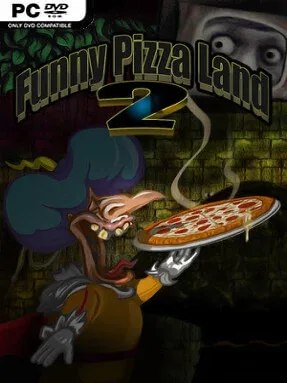
Game Overview
A royal cook’s search for the perfect pizza turns into a strangely sinister comic adventure set in 1632. Pedro, known as the potato pilgrim, works for the king but dreams of inventing a new culinary masterpiece; instead, he finds the disturbing secrets buried beneath PIZZALAND’s obsession with food. The tone balances deadpan absurdity, grotesque imagery, and playful humor, creating an old-school adventure that is as interested in unsettling you as it is in making you laugh. Although it follows the original FunnyPizzaLand, the story stands on its own and takes place centuries before the earlier game.
Pedro navigates a large, nonlinear collection of illustrated locations, examining odd objects, talking to bizarre inhabitants, and combining clues to push the story forward. Interaction uses a traditional verb-based point-and-click interface, so progress depends on choosing the right actions and thinking carefully about each screen rather than relying on reflexes. Puzzles gradually uncover where this warped food kingdom comes from, with several situations built around deliberately eccentric logic and the game’s peculiar sense of comedy. Veteran adventure players can expect a compact few-hour run, while newcomers may spend longer untangling its more demanding solutions.
Hand-drawn Full HD scenes give every street, room, and grotesque character a deliberately crafted storybook look, supported by classical sprite animation and real-time visual effects. Rather than conventional spoken dialogue, characters communicate through unusual mumblings and text, a choice that makes the world feel both charmingly homemade and faintly unnerving. Its willingness to commit to bizarre culinary mythology and dark humor separates it from cleaner, more conventional point-and-click adventures. Fans of surreal independent adventures, especially players who enjoy the puzzle focus of classic LucasArts-style games with a more macabre European edge, are likely to find FunnyPizzaLand 2 memorable; players wanting fast action or straightforward puzzle logic may find its strangeness less appetizing.
Installation
- Click the green button below to be redirected to UploadHaven.
- Wait 15 seconds, then hit “Free Download.” (Free downloads may be slower — upgrade to UploadHaven Pro for faster speeds.)
- Once downloaded, right-click the .zip file and choose “Extract to FunnyPizzaLand 2.” (You’ll need 7-Zip for this.)
- Open the extracted folder and run the game as administrator.
- Enjoy! 🎮 If you see missing DLL errors, check the <strong>_Redist</strong> folder inside and install what’s needed.
System Requirements
- Requires a 64-bit processor and operating system
- OS *: Windows 7 (FULLY patched) 64-bit or higher
- Processor: Dual Core 2.60 GHz
- Memory: 4 GB RAM
- Graphics: Intel HD 3000 or better
- DirectX: Version 11
- Storage: 704 MB available space
- Additional Notes: Requires a 64-bit processor
Setup Guide & Troubleshooting
How do I fix missing DLL errors for FunnyPizzaLand 2 (v1.0)?
After extracting FunnyPizzaLand 2 (v1.0), navigate to the _Redist or _CommonRedist folder inside the game directory and install DirectX, Vcredist, and any other dependencies included.
What should I do if the downloaded file is corrupted?
The full archive is 521.75 MB — make sure your download completed fully before extracting. Use 7-Zip to extract the files. If you still see a "file corrupted" error, re-download and try again.
Why should I run the game as administrator?
Right-click the game executable and select "Run as Administrator" to avoid save file issues and permission errors. This is especially important on the first launch.
How do I update my GPU drivers for this game?
FunnyPizzaLand 2 (v1.0) requires a Intel HD 3000 or better or equivalent. Update your NVIDIA or AMD drivers to the latest version for the best performance.
The game won't launch — what should I try?
This game requires Version 11. Try running in compatibility mode, install the latest DirectX runtime, or install the All-in-One VC Redist Package.
My antivirus is blocking the game — is it safe?
Antivirus false positives are common with pre-installed games. Temporarily pause your antivirus during extraction to prevent it from quarantining game files. You can re-enable it after the extraction completes.