
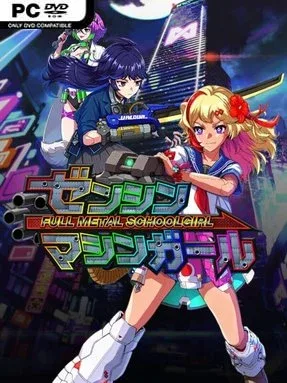
FULL METAL SCHOOLGIRL Cover Art

FULL METAL SCHOOLGIRL

ACTION 5.48 GB v1.05 & ALL DLC

Game Overview

A cybernetic schoolgirl turns Japan’s work-obsessed future into a violently satisfying target range. Set in 2089, FULL METAL SCHOOLGIRL imagines a nation where endless overtime is treated as civic virtue and a monolithic employer dictates everyday life from its towering headquarters. The tone is gleefully rebellious rather than solemn: an armed heroine crashes through corporate offices, reducing an absurdly hostile workplace to scrap with guns, blades, and raw mechanical force. At the summit waits the CEO of Meternal Jobz, but reaching that office means surviving a skyscraper built to grind intruders down.

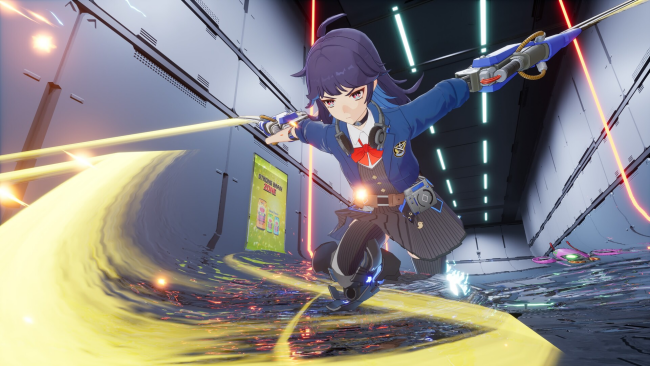
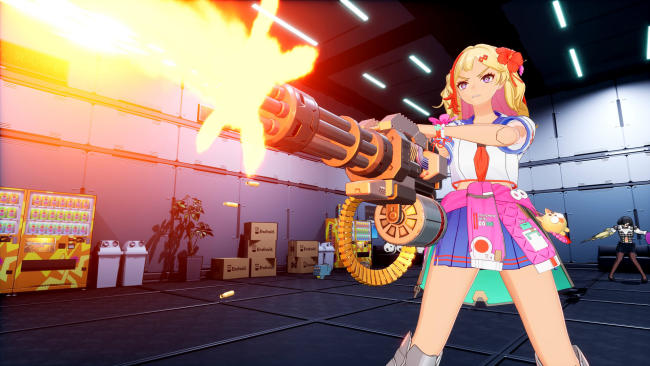
Runs revolve around pushing upward through a 100-floor tower whose layouts shift between attempts. You fight crowds of “Working Dead,” cyborg employees programmed to defend the company until destruction, while navigating security hazards designed to turn each floor into a compact combat gauntlet. Gunfire and swordplay appear to work in tandem, encouraging players to blast openings at range before closing in for aggressive melee finishes. Defeated enemies, found items, and run rewards feed back into upgrades, letting you alter the heroine’s equipment and enhancement programs before tackling the tower again.

Its sharpest idea is the livestream framing: viewers watch the assault, donate money, and become another form of progression as a successful run draws a larger audience. That gives the familiar roguelite loop a fittingly cynical twist, turning corporate rebellion into a spectacle that funds its own escalation. More than 100 foundational customization options promise room to shape builds around preferred weapons and upgrades, while procedural floors keep repeat climbs from feeling identical. FULL METAL SCHOOLGIRL suits players who enjoy the repeat-and-improve structure of action roguelites but want a louder, pulpier anime edge—somewhere between a cyberpunk hack-and-slash and an arcade shooter with a pointed satire of corporate culture.

Installation

  1. Click the green button below to be redirected to UploadHaven.
  2. Wait 15 seconds, then hit “Free Download.” (Free downloads may be slower — upgrade to UploadHaven Pro for faster speeds.)
  3. Once downloaded, right-click the .zip file and choose “Extract to FULL METAL SCHOOLGIRL.” (You’ll need 7-Zip for this.)
  4. Open the extracted folder and run the game as administrator.
  5. Enjoy! 🎮 If you see missing DLL errors, check the <strong>_Redist</strong> folder inside and install what’s needed.

System Requirements

  • Requires a 64-bit processor and operating system
  • OS: Windows 10 64bit / Windows 11 64bit
  • Processor: Intel Core i7 7700K
  • Memory: 16 GB RAM
  • Graphics: NVIDIA GeForce GTX 1060 6GB
  • DirectX: Version 12
  • Storage: 9 GB available space

Setup Guide & Troubleshooting

How do I fix missing DLL errors for FULL METAL SCHOOLGIRL (v1.05 & ALL DLC)?

After extracting FULL METAL SCHOOLGIRL (v1.05 & ALL DLC), navigate to the _Redist or _CommonRedist folder inside the game directory and install DirectX, Vcredist, and any other dependencies included.

What should I do if the downloaded file is corrupted?

The full archive is 5.48 GB — make sure your download completed fully before extracting. Use 7-Zip to extract the files. If you still see a "file corrupted" error, re-download and try again.

Why should I run the game as administrator?

Right-click the game executable and select "Run as Administrator" to avoid save file issues and permission errors. This is especially important on the first launch.

How do I update my GPU drivers for this game?

FULL METAL SCHOOLGIRL (v1.05 & ALL DLC) requires a NVIDIA GeForce GTX 1060 6GB or equivalent. Update your NVIDIA or AMD drivers to the latest version for the best performance.

The game won't launch — what should I try?

This game requires Version 12. Try running in compatibility mode, install the latest DirectX runtime, or install the All-in-One VC Redist Package.

My antivirus is blocking the game — is it safe?

Antivirus false positives are common with pre-installed games. Temporarily pause your antivirus during extraction to prevent it from quarantining game files. You can re-enable it after the extraction completes.

Need more help? Browse our FAQ & Troubleshooting Guide for solutions to common issues.
Looking for something else? Explore all games on Steam Unlocked