
FORTIFY Cover Art

FORTIFY

INDIE 80.63 MB v2024.12.17

Game Overview

Rust base building becomes a low-pressure design problem in FORTIFY, a specialized sandbox tool for players who want to plan smarter before risking materials on a live server. Rather than dropping you into a survival match, it provides a quiet, practical workspace for constructing everything from compact starter shelters to sprawling fortified compounds. The mood is creative and methodical, with the tension of raid defense replaced by the satisfaction of refining layouts, choke points, loot rooms, and roof access. For dedicated Rust builders, it functions like an architectural test bench built around the game’s familiar construction rules.

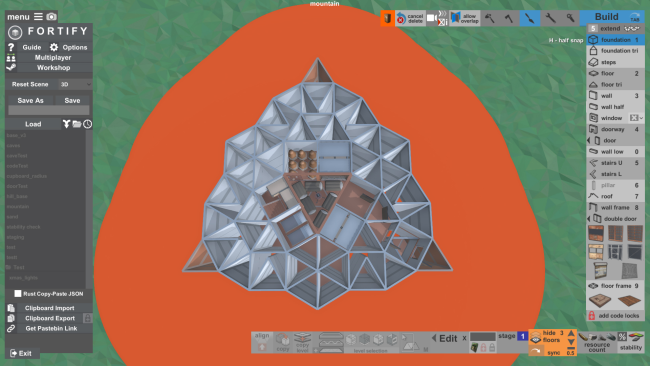
Players place the same structural pieces used in Rust, working within the current Building 4.0 placement restrictions while experimenting freely without hostile players, upkeep costs, or resource grinding getting in the way. As a design grows, FORTIFY calculates the materials required to build it and the upkeep needed to maintain it, helping turn ambitious blueprints into realistic survival-server plans. A building-blocked area visualization and stability calculations make it easier to catch weak extensions, awkward upgrades, or placements that would fail in-game. Raid testing also plays a major role: C4, rockets, and satchels can be used to damage or destroy sections accurately, allowing players to evaluate how a base holds up before committing to it on a server.

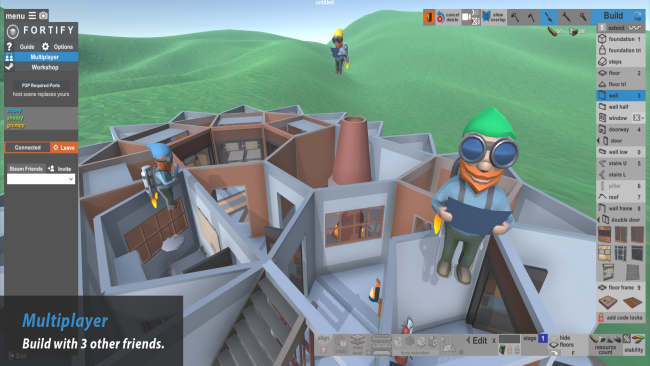
The strongest feature is its connection to the broader Rust building community. Designs can be loaded from a large collection of workshop creations, modified to suit a group’s needs, and exported through the Copy-Paste Oxide plugin format for use on compatible modded servers. Up to four people can build together, while quick sharing links and clipboard exports make it simple to pass a concept to teammates. FORTIFY is less a standalone survival game than a focused companion for Rust’s construction metagame, and it particularly suits players who enjoy tools like creative modes, base planners, and raid simulators. Newcomers can learn building logic without costly mistakes, while experienced clan architects gain a fast way to prototype serious defenses.

Installation

  1. Click the green button below to be redirected to UploadHaven.
  2. Wait 15 seconds, then hit “Free Download.” (Free downloads may be slower — upgrade to UploadHaven Pro for faster speeds.)
  3. Once downloaded, right-click the .zip file and choose “Extract to FORTIFY.” (You’ll need 7-Zip for this.)
  4. Open the extracted folder and run the game as administrator.
  5. Enjoy! 🎮 If you see missing DLL errors, check the <strong>_Redist</strong> folder inside and install what’s needed.

System Requirements

  • OS: Windows 7, 8, 10
  • Processor: SSE2 instruction set support
  • Memory: 2 GB RAM
  • Graphics: Graphics card with DX10 (shader model 4.0) capabilities
  • DirectX: Version 10
  • Storage: 100 MB available space

Setup Guide & Troubleshooting

How do I fix missing DLL errors for FORTIFY (v2024.12.17)?

After extracting FORTIFY (v2024.12.17), navigate to the _Redist or _CommonRedist folder inside the game directory and install DirectX, Vcredist, and any other dependencies included.

What should I do if the downloaded file is corrupted?

The full archive is 80.63 MB — make sure your download completed fully before extracting. Use 7-Zip to extract the files. If you still see a "file corrupted" error, re-download and try again.

Why should I run the game as administrator?

Right-click the game executable and select "Run as Administrator" to avoid save file issues and permission errors. This is especially important on the first launch.

How do I update my GPU drivers for this game?

FORTIFY (v2024.12.17) requires a Graphics card with DX10 (shader model 4.0) capabilities or equivalent. Update your NVIDIA or AMD drivers to the latest version for the best performance.

The game won't launch — what should I try?

This game requires Version 10. Try running in compatibility mode, install the latest DirectX runtime, or install the All-in-One VC Redist Package.

My antivirus is blocking the game — is it safe?

Antivirus false positives are common with pre-installed games. Temporarily pause your antivirus during extraction to prevent it from quarantining game files. You can re-enable it after the extraction completes.

Need more help? Browse our FAQ & Troubleshooting Guide for solutions to common issues.
Looking for something else? Explore all games on Steam Unlocked